
Jura Bingo Cards - Print Free or Customize
Print free Jura bingo cards or modify, limitless cards! Choose from 41,500+ templates or use the bingo card generator. Add numbers, words, photos, or all of them. Play using PDF prints, digital bingo cards, and the digital bingo caller, or combine all formats.
About: This bingo card is perfect for Japanese language learners looking to boost their skills through fun and immersive activities. With a mix of reading, listening, writing, and speaking challenges, it encourages you to explore Japanese media while using the language in real-life contexts. Ideal for study groups, language challenge events, or solo learners seeking fresh motivation.
How To: To download a printable PDF, click the Print button. You can adjust the card count and other print preferences on the Print tab. Grid items and free space content can be added on the Basic tab. Appearance can be highly customized on the relevant tabs, or you can quickly search any preference on the 🔍 tab.
How to play Jura Bingo Cards?
- Paper Players: Print PDF bingo cards and manually scratch the cards.
- Virtual Players: Click on the Play button above, and then click on the 🎫 button.
- Paper Caller: Print PDF calling list & calling slips and manually draw the slips.
- Virtual Caller: Click on the Play button above.
- Mixed Mode: Pick any combination above. For example, caller can be either Offline or Virtual. And players can be Offline or Virtual or a mix of both.
Step-By-Step:
- Start by saving the Jura Bingo PDF by clicking on the "Print" button above.
- Open the PDF and print a hard copy.
- For random calling, you can print another copy of the call list, cut, fold and then pull them randomly at play time.
- Cut the bingo cards at the cut lines if there are greater than 1 bingo cards per page.
- Give one card to each player. For marking, you can use crayons. Crayons are the cheapest.
- Pick one person to be the caller. If you are playing in a small group, the caller can as well play along with their own Bingo card.
- The caller starts the game by randomly picking an item from the call list and calling out it to everyone.
- The players scan their cards to see if they have the announced word. If they do, they cross off that word.
- The first player to finish a horizontal, vertical, or a diagonal line of marked items announces "Bingo!" and wins the play.
- The caller checks that the items crossed off form a proper line as per the Bingo card and call list.
- You can play for multiple patterns or a full card blackout for an extended play.
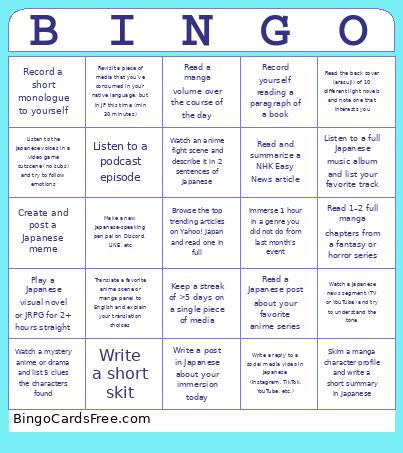 This Jura Bingo Cards Game contains following Words or Phrases: Read a children's book or graded reader, Read and summarize a NHK Easy News article, Analyze the lyrics of a Japanese song, Watch a drama or movie without subs, Listen to a podcast episode, Immerse 1 hour in one of your lowest categories from last month, Immerse 1 hour in a genre you did not do from last month's event, Ask a friend for a place they enjoyed going to recently, then research about it for min 30 minutes (in JP), Fully finish 1 audio/visual content (min 20 mins, YouTube, anime, podcast, etc), Beat your total logged time at the end of the event compared to the same time period last month, Keep a streak of >5 days on a single piece of media, Revisit a piece of media that you've consumed in your native language, but in JP this time (min 30 minutes), Watch one anime episode from any supernatural or romance comedy series, Read a chapter of manga from a slice-of-life series, Read a short manga panel or book page and post a new word/grammar point you learned, Watch a Japanese game trailer or OP (10+ minutes), Watch 1 anime music video (AMV) and write down one of the lines and explain it, Watch an anime fight scene and describe it in 2 sentences of Japanese, Read one NHK Easy article, Read 1–2 full manga chapters from a fantasy or horror series, Read a Japanese post about your favorite anime series, Watch a live-action adaptation of a manga and compare the differences, Watch a mystery anime or drama and list 5 clues the characters found, Read a web novel chapter in Japanese and share the plot, Read a manga volume over the course of the day, Watch a 30-minute documentary on traditional culture of choice (tea ceremonies, sword-smithing, etc.), Play a Japanese visual novel or JRPG for 2+ hours straight, Read a chapter or 10,000+ characters (whichever is longer) from a Japanese light novel, Watch a Japanese movie (anime, drama, documentary), Read a full manga volume (150+ pages) in one sitting, Read a visual/light novel for 5+ hours in one day and list a few cool words you found, Read a chapter of a manga you dropped long ago and see if it's worth picking back up, Watch the first episode of a non-Japanese Asian drama dubbed in Japanese, Read 5 product reviews on Amazon JP and look for repeated words or expressions, Watch a 15+ minute let's play or walkthrough of a Japanese game with commentary, Read the back cover (arasuji) of 10 different light novels and note one that interests you, Browse the top trending articles on Yahoo! Japan and read one in full, Listen to a full Japanese music album and list your favorite track, Read the description and user reviews of a Japanese mobile app or game, Watch a Japanese news segment (TV or YouTube) and try to understand the tone, Scroll through Pixiv rankings and read 5 manga shorts (short comics), Visit a Japanese bookstore's website and read the top 5 titles in any category, Watch a Japanese TV commercial compilation and try to understand product types, Read an entry from Wikipedia JP about a topic you already know in English, Watch a short Japanese documentary on a social issue (housing, aging, education, etc), Skim a Japanese Twitter thread about an anime episode that just aired, Read a news article about a festival or tradition you didn't know existed, Listen to the Japanese voices in a video game cutscene (no subs) and try to follow emotions, Watch a Japanese vending machine or convenience store tour video, Read a full Japanese city/tourism webpage about a random prefecture, Record a short monologue to yourself, Record yourself reading a paragraph of a book, Write a short skit, Describe your day (in Japanese), Pick a debate topic and argue your opinion, Write an essay about your JP learning so far (JP or EN allowed), Talk to a friend who is interested in learning JP and guide them through your method, Hand write (on paper) 1 paragraph about something you're interested in, 1 hour of output in VRC, italki, etc., Email a professional in Japan (e.g., ask about research or school), Make a new Japanese-speaking pen pal on Discord, LINE, etc, Write a reply to a social media video in Japanese (Instagram, TikTok, YouTube, etc.), Skim a manga character profile and write a short summary in Japanese, Write a 5-sentence character rant, journal entry, anime review, or opinion post in Japanese, Record yourself talking about a recent anime/manga for 1+ minute(s) in Japanese, Translate a favorite anime scene or manga panel to English and explain your translation choices, Write a post in Japanese about your immersion today, Create and post a Japanese meme, Hand write a dictionary entry about your day or something you're interested in (2+ paragraphs).