
Kickoff Bingo Cards - Print Free or Customize
Print free Kickoff bingo cards or personalize, limitless prints! Pick from 39,000+ templates or use our bingo card generator. Add numbers, phrases, photos, or mix them all. Play using printed PDF, online bingo cards, and our online bingo caller, or go hybrid.
About: This bingo card is perfect for livening up any workplace event, team meeting, or company social. With a playful mix of “find someone who” icebreakers, everyday office happenings, and a sprinkle of corporate lingo, it encourages colleagues to connect, share laughs, and notice the fun quirks that make office life unique. Great for team-building and breaking the ice!
How To: To save a PDF to print, click the Print button. You can change the number of cards and other print preferences on the Print tab. Grid items and free space text can be added on the Basic tab. Appearance can be totally personalized on the relevant tabs, or you can easily find any setting on the 🔍 tab.
How to play Kickoff Bingo Cards?
- Paper Players: Print PDF bingo cards and manually mark the cards.
- Digital Players: Click on the Play button above, and then click on the 🎫 button.
- Digital Caller: Click on the Play button above.
- Paper Caller: Print PDF calling list & calling slips and manually choose the slips.
- Hybrid Play: Pick any combination above. For example, caller can be either Paper or Digital. And players can be Paper or Digital or a mix of both.
Step-By-Step:
- Start by getting the Kickoff Bingo PDF by clicking on the "Print" button above.
- Open the PDF and print a hard copy.
- For random drawing, you can print another copy of the call list, cut, fold and then pick them randomly at play time.
- Cut the bingo cards at the cut lines if there are greater than 1 bingo cards per page.
- Give one card to each player. For marking, you can use markers. Crayons cost the least.
- Pick one person to be the caller. If you are playing in a small group, the caller may also play along with their own Bingo card.
- The caller begins the play by randomly drawing an item from the call list and calling out it to all players.
- The players look at their cards to see if they have the announced word. If they do, they mark that word.
- The first player to finish a horizontal, vertical, or a diagonal line of marked items yells "Bingo!" and wins the game.
- The caller confirms that the items crossed off form a correct line according to the Bingo card and call list.
- You can play for multiple patterns or a full card blackout for a longer game.
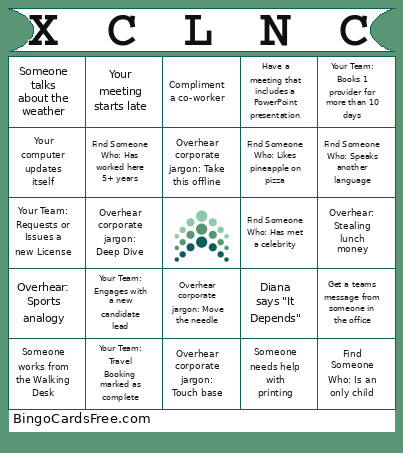 This Kickoff Bingo Cards Game contains following Words or Phrases: Find Someone Who: Prefers Pepsi over Coke, Find Someone Who: Speaks another language, Find Someone Who: Has lived in another country, Find Someone Who: Has a pet that is not dog/cat, Find Someone Who: Has worked here 5+ years, Find Someone Who: Shares your birthday month, Find Someone Who: Has met a celebrity, Find Someone Who: Can whistle, Find Someone Who: Is left handed, Find Someone Who: Is an only child, Find Someone Who: Prefers tea to coffee, Find Someone Who: Likes pineapple on pizza, Find Someone Who: Has served on a jury, Find Someone Who: Works out before work, Find Someone Who: Works out at lunch, Find Someone Who: Brought lunch from home, Find Someone Who: Plays a musical instrument, Find Someone Who: Has gone skydiving, Find Someone Who: Has gone bungee jumping, Your Team: Gets a new acceptance, Your Team: Books 1 provider for more than 10 days, New Pipeline add on your team, Extension booked on your team, New Job created for your team, Your Team: Travel Booking marked as complete, Your Team: Checklist marked as complete, Your Team: Engages with a new candidate lead, Your Team: Obtains a new CV, Your Team: Requests or Issues a new License, Specific People Stuff: (need Ops stuff here too), Leader wears a green jacket/suit coat, Chelsie orders Starbucks, Neil raids snacks/soda, Kirsty bursts into laughter, Brandon has tech issues, Diana says "It Depends", Overhear: Stealing lunch money, Overhear: Sports analogy, Someone talking on mute, Someone wears Caliber polo, Someone works from the Walking Desk, Someone uses the Wellness Room, Go to a Team Lunch, There's free food in the kitchen, Get an email marked "urgent", Get stuck in a "Reply All" chain, Compliment a co-worker, Someone gives you a High Five, Someone talks about the weather, Drink a cup of water, Introduce yourself to someone you haven't met IRL yet, Your computer updates itself, Have a meeting that includes a PowerPoint presentation, Someone complains about office temperature, Get a teams message from someone in the office, Someone needs Hai's help with a conference room, Someone needs help with printing, Your meeting runs late, Your meeting starts late, You're asked to re-authenticate, Overhear corporate jargon: Circle back, Overhear corporate jargon: Take this offline, Overhear corporate jargon: Ping, Overhear corporate jargon: Pivot, Overhear corporate jargon: Ducks in a row, Overhear corporate jargon: Move the needle, Overhear corporate jargon: Pain point, Overhear corporate jargon: Touch base, Overhear corporate jargon: Deep Dive, Overhear corporate jargon: Give you some time back.