
KvS26 Bingo Cards - Print Free or Customize
Print free KvS26 bingo cards or customize, unlimited cards! Choose from 42,200+ templates or use the bingo card generator. Add numbers, phrases, pictures, or mix them all. Play using printed PDF, digital bingo cards, and the digital bingo caller, or mix physical and digital.
About: This bingo card is perfect for basketball fans tuning in to a highly anticipated NBA matchup, especially one featuring rising stars and big playoff history. With a mix of specific plays, historic callbacks, and fun broadcast moments, this card brings extra excitement whether you're watching with friends, at a watch party, or just following along at home. Expect plenty of energetic reactions and classic basketball drama.
How To: To download a printable PDF, click the Print button. You can adjust the number of cards and other printing preferences on the Print tab. Grid items and free space content can be edited on the Basic tab. Appearance can be fully personalized on the relevant tabs, or you can quickly find any preference using the 🔍 tab.
How to play KvS26 Bingo Cards?
- Printed Caller: Print PDF calling list & calling slips and manually draw the slips.
- Online Caller: Click on the Play button above.
- Printed Players: Print PDF bingo cards and manually write on the cards.
- Online Players: Click on the Play button above, and then click on the 🎫 button.
- Combo Play: Choose any combination above. For example, caller can be either Printed or Online. And players can be Printed or Online or a mix of both.
Step-By-Step:
- Start by saving the KvS26 PDF by clicking on the "Print" button above.
- Open the PDF and print it.
- For random calling, you can print another copy of the call list, cut, fold and then draw them randomly at play time.
- Cut the bingo cards at the cut marks if there are greater than 1 bingo cards per page.
- Give one card to each player. For marking, you can use pens. Crayons cost the least.
- Choose one person to be the caller. If you are playing in a small group, the caller can as well play along with their own Bingo card.
- The caller begins the game by randomly pulling an item from the call list and announcing it to everyone.
- The players look at their cards to see if they have the announced word. If they do, they cross off that word.
- The first player to complete a horizontal, vertical, or a diagonal line of marked items shouts "Bingo!" and wins the game.
- The caller verifies that the items marked form a correct line as per the Bingo card and call list.
- You can play for multiple patterns or a full card blackout for a longer game.
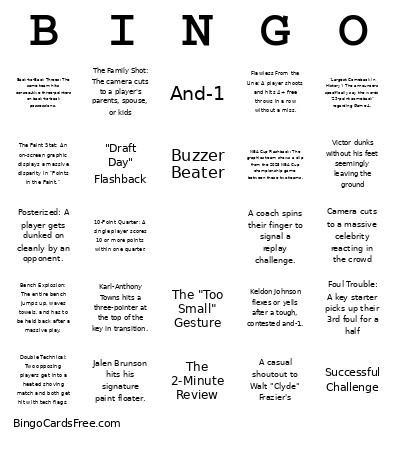 This KvS26 Bingo Cards Game contains following Words or Phrases: Jalen Brunson hits his signature paint floater., Josh Hart grabs a tough offensive rebound against someone much taller., OG Anunoby drains a shot from the corner, Karl-Anthony Towns hits a three-pointer at the top of the key in transition., Jose Alvarado sneaks up from behind someone for a backcourt steal., Mikal Bridges forces a turnover or gets a breakaway layup., Victor Wembanyama records 3+ blocks in a single half., De'Aaron Fox uses a sudden burst of speed to blow past a defender for a layup., Victor dunks without his feet seemingly leaving the ground, Rookie Stephon Castle or Dylan Harper makes a high-IQ play, Devin Vassell hits back-to-back three-pointers., Keldon Johnson flexes or yells after a tough, contested and-1., 1999 Mention: Commentary brings up the 1999 Knicks-Spurs Finals rematch., NBA Cup Flashback: The graphics team shows a clip from the 2025 NBA Cup championship game between these two teams., Camera cuts to a massive celebrity reacting in the crowd, A coach spins their finger to signal a replay challenge., "Largest Comeback in History": The announcers specifically say the words "29-point comeback" regarding Game 4., A casual shoutout to Walt "Clyde" Frazier's, And-1, Airball, 10-0 Run, Buzzer Beater, Technical Foul, Bank Shot, A player loses a sneaker mid-play, Scramble on the Floor, Charge Taken, Rim Rocker: A massive, two-handed breakaway dunk that makes the basket structure shake., Posterized: A player gets dunked on cleanly by an opponent., Inbound Steal: A team turns the ball over immediately on a baseline or sideline inbound pass., The "Too Small" Gesture, The 2-Minute Review, Bench Explosion: The entire bench jumps up, waves towels, and has to be held back after a massive play., Towel Drape: The broadcast cuts to a star player on the bench with a towel draped completely over their head., Foul Trouble: A key starter picks up their 3rd foul for a half, Double Technical: Two opposing players get into a heated shoving match and both get hit with tech flags., Successful Challenge, The Family Shot: The camera cuts to a player's parents, spouse, or kids, "Draft Day" Flashback, The Paint Stat: An on-screen graphic displays a massive disparity in "Points in the Paint.", Local Legend: A former franchise icon is shown, The Mic'd Up Segment: A clip plays during a timeout featuring a coach giving an intense speech to the huddle., Fan in Team Paint: A fan on the jumbotron is caught wearing full face/body paint or an outrageous custom costume., 10-Point Quarter: A single player scores 10 or more points within one quarter., Wemby Triple-Watch: Wembanyama gets a mention for being close to a triple-double., Back-to-Back Threes: The same team hits consecutive three-pointers on back-to-back possessions., Flawless From the Line: A player shoots and hits 4+ free throws in a row without a miss., Double-Double Logged: Any player officially secures a double-double before the 4th quarter starts.