Launch Party Bingo Cards - Print Free or Customize
Print free Launch Party bingo cards or customize,
limitless cards! Choose from 36,300+ designs or use our bingo card generator.
Add numbers, phrases, pictures, or all of them.
Play using PDF prints, virtual bingo cards,
and our virtual bingo caller, or mix physical and digital.
About: This bingo card is perfect for a sports-loving, community-oriented crowd, especially those plugged into women’s and local Bay Area athletics. It’s packed with references to teams, events, and experiences that passionate fans, athletes, and advocates are likely to share. Use it at a watch party, fundraiser, or social mixer to break the ice and highlight shared connections.
How To: To save a PDF to print, click the Print button.
You can alter the number of cards and other
printing preferences on the Print tab.
Grid items and free space text can be added on the Basic tab.
Appearance can be totally customized on the
relevant tabs, or you can easily locate any setting
on the 🔍 tab.
How to play Launch Party Bingo Cards?
Paper Players: Print PDF bingo cards and physically write on the cards.
Digital Players: Click on the Play button above, and then click on the 🎫 button.
Digital Caller: Click on the Play button above.
Paper Caller: Print PDF calling list & calling slips and physically pick the slips.
Hybrid Play: Pick any combination above.
For instance, caller can be either Paper or Digital.
And players can be Paper or Digital or a mix of both.
Step-By-Step:
Start by saving the Launch Party Bingo PDF by clicking on the "Print" button above.
Open the PDF and print a hard copy.
For random drawing, you can print another copy of the call list, cut, fold and then draw them randomly at play time.
Cut the bingo cards at the cut lines if there are more than 1 bingo cards per page.
Distribute one card per player. For marking, you can use crayons. Crayons are the cheapest.
Pick one person to be the caller. If you are playing in a small group, the caller can as well play along with their own Bingo card.
The caller starts the play by randomly picking an item from the call list and calling out it to all players.
The players look at their cards to see if they have the announced word. If they do, they cross off that word.
The first player to finish a horizontal, vertical, or a diagonal line of marked items announces "Bingo!" and wins the play.
The caller checks that the items marked form a correct line as per the Bingo card and call list.
You can play for varied patterns or a full card blackout for a longer play.
This Launch Party Bingo Cards Game contains following Words or Phrases: Has bay fc season tickets, Valkyries season tickets, Has been to a Falcons frisbee game, Has been to a Hysteria watch party, Is already subscribed to our newsletter, Has already donated to our fundraiser, Is a Hysteria co-founder, Plays soccer with Erin or Meadow, You've never met before, Works for a local league or team, Has been to an Oakland Soul game, Is a coach for women or girls, Works for the city of Oakland, Lives in SF, Has played a pro sport, Has been to the Sports Bra in Portland, Knows about The Twelfth Marin, Has been to Rikki's in SF, Was born & raised in Oakland, Has been to a women's world cup, Has been to an Unrivaled game, Has been to a WNBA finals game, Has been to a Bay Breakers game, Can explain the offsides rule in soccer, Has met Violet the raven, Is here with their spouse or kid, Is a business owner, Plays rec or pickup basketball, Has been to a Cal W bball game, Has been to a GS Storm game, Can tell you about the WPBA, Can tell you about LOVB SF, Can tell you about the WPBL, Can tell you about the PWHL, Has watched a live bball game with Audacious, Does NOT know any co-founder personally, Has had Mayra's food at a pop-up or tent, Has read or heard an Audacious poem, Has a sports tattoo.

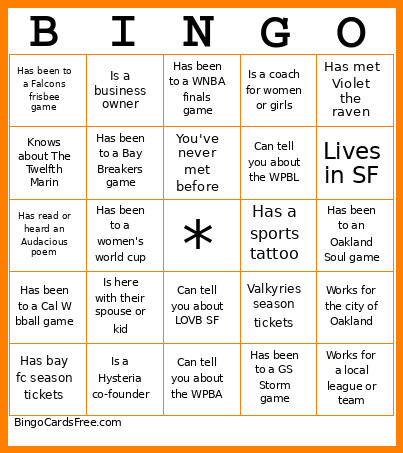 This Launch Party Bingo Cards Game contains following Words or Phrases: Has bay fc season tickets, Valkyries season tickets, Has been to a Falcons frisbee game, Has been to a Hysteria watch party, Is already subscribed to our newsletter, Has already donated to our fundraiser, Is a Hysteria co-founder, Plays soccer with Erin or Meadow, You've never met before, Works for a local league or team, Has been to an Oakland Soul game, Is a coach for women or girls, Works for the city of Oakland, Lives in SF, Has played a pro sport, Has been to the Sports Bra in Portland, Knows about The Twelfth Marin, Has been to Rikki's in SF, Was born & raised in Oakland, Has been to a women's world cup, Has been to an Unrivaled game, Has been to a WNBA finals game, Has been to a Bay Breakers game, Can explain the offsides rule in soccer, Has met Violet the raven, Is here with their spouse or kid, Is a business owner, Plays rec or pickup basketball, Has been to a Cal W bball game, Has been to a GS Storm game, Can tell you about the WPBA, Can tell you about LOVB SF, Can tell you about the WPBL, Can tell you about the PWHL, Has watched a live bball game with Audacious, Does NOT know any co-founder personally, Has had Mayra's food at a pop-up or tent, Has read or heard an Audacious poem, Has a sports tattoo.