
Le mans 24h 2026 Bingo Cards - Print Free or Customize
Print free Le mans 24h 2026 bingo cards or adjust them, unlimited cards! Pick from 41,500+ templates or use the bingo card generator. Add numbers, phrases, photos, or all of them. Play using printable PDF, virtual bingo cards, and the virtual bingo caller, or combine all formats.
About: Get ready for a full-throttle Le Mans viewing experience with this bingo card, perfect for endurance racing fans. It captures all the chaotic, quirky, and unforgettable moments that make the 24 Hours of Le Mans so legendary. Whether you’re hosting a race watch party or want to add some extra excitement to your solo viewing, this card has you covered.
How To: To get a printable PDF, click the Print button. You can adjust the card count and other printing options on the Print tab. Grid items and free space text can be added on the Basic tab. Appearance can be fully personalized on the corresponding tabs, or you can quickly find any preference on the 🔍 tab.
How to play Le mans 24h 2026 Bingo Cards?
- Paper Caller: Print PDF calling list & calling slips and manually draw the slips.
- Paper Players: Print PDF bingo cards and manually write on the cards.
- Virtual Players: Click on the Play button above, and then click on the 🎫 button.
- Virtual Caller: Click on the Play button above.
- Combo Mode: Choose any combination above. For instance, caller can be either Offline or Virtual. And players can be Offline or Virtual or a combination of both.
Step-By-Step:
- Start by saving the Le mans 24h 2026 PDF by clicking on the "Print" button above.
- Open the PDF and print a hard copy.
- For random drawing, you can print another copy of the call list, cut, fold and then pull them randomly at play time.
- Cut the bingo cards at the cut marks if there are more than 1 bingo cards per page.
- Distribute one card per player. For marking, you can use pencils. Crayons are the cheapest.
- Choose one person to be the caller. If you are playing in a small group, the caller may also play along with their own Bingo card.
- The caller initiates the game by randomly pulling an item from the call list and calling out it to all players.
- The players look at their cards to see if they have the announced word. If they do, they mark that word.
- The first player to complete a horizontal, vertical, or a diagonal line of crossed items shouts "Bingo!" and wins the play.
- The caller confirms that the items marked form a correct line as per the Bingo card and call list.
- You can play for varied patterns or a full card blackout for a longer play.
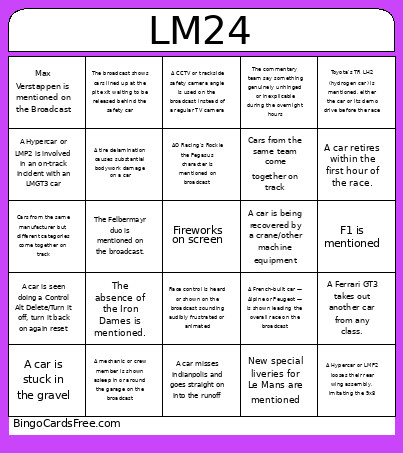 This Le mans 24h 2026 Bingo Cards Game contains following Words or Phrases: Race control is heard or shown on the broadcast sounding audibly frustrated or animated, A car is seen doing a Control Alt Delete/Turn it off, turn it back on again reset, A car misses indianpolis and goes straight on into the runoff, Ford and McLaren's new Hypercar entries are mentioned, The process for how the safety car procedure is explained, A wheel comes off a car, A Hypercar or LMP2 looses their rear wing assembly, imitating the 9x8, A mechanic or crew member is shown asleep in or around the garage on the broadcast, The commentary team say something genuinely unhinged or inexplicable during the overnight hours, A CCTV or trackside safety camera angle is used on the broadcast instead of a regular TV camera, The absence of the Iron Dames is mentioned., AO Racing's Rockie the Pegasus character is mentioned on broadcast, F1 is mentioned, Alpine's exit from the Hypercar category at the end of the year is being discussed, A mechanic putting gaffer tape on a car is being shown., A tire delamination causes substantial bodywork damage on a car, Pit crew members or drivers are shown enjoying a meal, New special liveries for Le Mans are mentioned, Commentators mention the rebranding of the famous Dunlop Bridge, Cars from the same team come together on track, Cars from the same manufacturer but different categories come together on track, A car goes all the way around the Mulsanne roundabout rather than taking the corner, The broadcast shows cars lined up at the pit exit waiting to be released behind the safety car, A Hypercar or LMP2 is involved in an on-track incident with an LMGT3 car, A French-built car — Alpine or Peugeot — is shown leading the overall race on the broadcast, An incident on the street section (Tertre Rouge - Porsche Curves) forces a car to limp back to the pits, A car is stuck in the gravel, A car retires within the first hour of the race., A Ferrari GT3 takes out another car from any class., Toyota's TR LH2 (hydrogen car) is mentioned, either the car or its demo drive before the race, The Toyotas end up 1st and 2nd at some point in the race., Max Verstappen is mentioned on the Broadcast, The commentators take time to explain how the slow zone system works during the race, A car is being recovered by a crane/other machine equipment, The Felbermayr duo is mentioned on the broadcast., A car is shown on the broadcast suffering a mechanical issue during the night hours.