Print free LLM Obs bingo cards or customize,
limitless cards! Pick from 42,200+ designs or use the bingo card generator.
Add numbers, phrases, images, or mix them all.
Play using PDF printouts, virtual bingo cards,
and the virtual bingo caller, or combine all formats.
Similar Bingo Cards: Userresearch, Productdesign, Feedback
About: This bingo card is perfect for user researchers, product managers, or UX designers looking to make their observation sessions more engaging and focused. It encourages direct interaction with users, sharpens your eye for usability issues, and helps teams zero in on real pain points and opportunities for improvement. Use it during interviews, field studies, or user testing to spark lively discussions and capture actionable insights.
How To: To save a PDF to print, click the Print button.
You can change the card count and other
print preferences on the Print tab.
Grid items and free space content can be added on the Basic tab.
Appearance can be totally customized on the
relevant tabs, or you can quickly search any option
on the 🔍 tab.
How to play LLM Obs Bingo Cards?
Printed Caller: Print PDF calling list & calling slips and manually choose the slips.
Virtual Caller: Click on the Play button above.
Printed Players: Print PDF bingo cards and manually scratch the cards.
Virtual Players: Click on the Play button above, and then click on the 🎫 button.
Combo Mode: Choose any combination above.
For example, caller can be either Offline or Virtual.
And players can be Offline or Virtual or a mix of both.
Step-By-Step:
Start by saving the LLM Obs PDF by clicking on the "Print" button above.
Open the PDF and print it.
For random drawing, you can print another copy of the call list, cut, fold and then pull them randomly at play time.
Cut the bingo cards at the cut lines if there are more than 1 bingo cards per page.
Distribute one card per player. For marking, you can use crayons. Crayons are the cheapest.
Choose one person to be the caller. If you are playing in a small group, the caller can also play along with their own Bingo card.
The caller begins the play by randomly drawing an item from the call list and saying it to everyone.
The players check their cards to see if they have the announced word. If they do, they dab that word.
The first player to complete a horizontal, vertical, or a diagonal line of crossed items yells "Bingo!" and wins the play.
The caller validates that the items marked form a proper line according to the Bingo card and call list.
You can play for varied patterns or a full card blackout for a longer play.
This LLM Obs Bingo Cards Game contains following Words or Phrases: Spoke to someone using your product daily, Identified a recurring pain point, Observed someone using a feature live, Learned a workaround someone uses, Asked "what's most frustrating?", Found a feature people ignore, Discovered a "must-have" feature, Logged a usability issue, Learned a user's main goal, Asked "what would you remove?", Heard a complaint twice from different teams, Saw friction in a workflow, Captured a direct user quote, Learned onboarding challenges, Asked "what takes too long?", Found a surprising use case, Identified a manual workaround, Suggested a quick improvement, Learned what success looks like, Asked "what do you wish existed?", Followed a full user journey, Identified a blocker, Validated an assumption, Shared insight with another team, Logged feedback in tracking system.

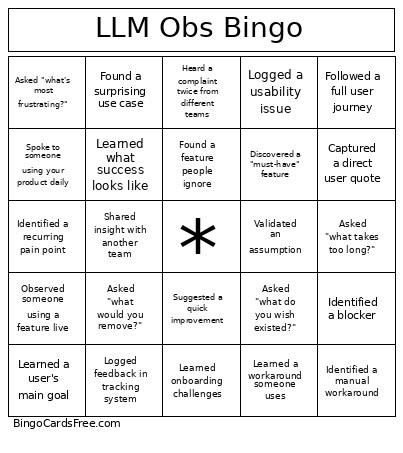 This LLM Obs Bingo Cards Game contains following Words or Phrases: Spoke to someone using your product daily, Identified a recurring pain point, Observed someone using a feature live, Learned a workaround someone uses, Asked "what's most frustrating?", Found a feature people ignore, Discovered a "must-have" feature, Logged a usability issue, Learned a user's main goal, Asked "what would you remove?", Heard a complaint twice from different teams, Saw friction in a workflow, Captured a direct user quote, Learned onboarding challenges, Asked "what takes too long?", Found a surprising use case, Identified a manual workaround, Suggested a quick improvement, Learned what success looks like, Asked "what do you wish existed?", Followed a full user journey, Identified a blocker, Validated an assumption, Shared insight with another team, Logged feedback in tracking system.