Lord of the Flies Bingo Cards - Print Free or Customize
Print free Lord of the Flies bingo cards or modify,
unlimited prints! Select from 42,200+ designs or use our bingo card generator.
Add numbers, words, photos, or any combination.
Play using PDF prints, virtual bingo cards,
and our virtual bingo caller, or combine all formats.
About: This bingo card is perfect for a classroom discussion or book club meeting about "Lord of the Flies." It captures the novel’s major characters, themes, and symbolic moments in a fun and interactive way. Great for students or readers exploring the clash between civility and savagery, this card sparks deeper conversation about human nature and society.
How To: To download a PDF to print, click the Print button.
You can change the card count and other
printing preferences on the Print tab.
Grid items and free space content can be edited on the Basic tab.
Appearance can be exactly customized on the
relevant tabs, or you can easily find any preference
using the 🔍 tab.
How to play Lord of the Flies Bingo Cards?
Virtual Players: Click on the Play button above, and then click on the 🎫 button.
Paper Caller: Print PDF calling list & calling slips and manually draw the slips.
Virtual Caller: Click on the Play button above.
Paper Players: Print PDF bingo cards and manually write on the cards.
Combo Play: Select any combination above.
For instance, caller can be either Offline or Virtual.
And players can be Offline or Virtual or a mix of both.
Step-By-Step:
Start by saving the Lord of the Flies PDF by clicking on the "Print" button above.
Open the PDF and print a hard copy.
For random calling, you can print another copy of the call list, cut, fold and then pull them randomly at play time.
Cut the bingo cards at the cut lines if there are more than 1 bingo cards per page.
Give one card to each player. For marking, you can use crayons. Crayons are the cheapest.
Select one person to be the caller. If you are playing in a small group, the caller can also play along with their own Bingo card.
The caller opens the game by randomly picking an item from the call list and calling out it to all players.
The players check their cards to see if they have the called word. If they do, they cross off that word.
The first player to finish a horizontal, vertical, or a diagonal line of marked items shouts "Bingo!" and wins the play.
The caller validates that the items marked form a proper line as per the Bingo card and call list.
You can play for different patterns or a full card blackout for an extended play.
This Lord of the Flies Bingo Cards Game contains following Words or Phrases: Talks about the 'snake-thing, Works hard on the shelters, Has a hidden place in the forest, Easily intimidated, Believes strongly in rules, Throws stones but won't hit the littlun, Blows the conch first, Claims they saw the beast on the mountain, Helps the littluns get fruit, Hesitates to kill a pig at first, Breaks Piggy's glasses, Likes to wander or explore, Cries a lot and is a littlun, Used to live with his aunt because his parents died, Thinks that "Castle Rock" would make a neat fort, Elected leader by the boys, Represents civilization, represents savagery, a scientific thinker, who killed the pig, nature boy, Twins, The younger boys, Knocks down littluns' sandcastles; feels guilty, violent,impulsive, cruel, Plays the role of the pig in the "dance," gets nearly hurt, Disappears after the first fire, Dead soldier whose body lands on the mountain, Mistaken for the Beast, Symbolizes: Logic, reason, knowledge, The first three to climb the mountain, A littlun who likes to throw sand and make Percival cry, They like to get fruit in the forest, but sometimes it makes them sick, References how his father will come save them, Comes from the sea, Is snake like., Symbolizes the loss of innocence in Chapter 6, Is more distant than the other boys, Democratic leadership, Natural innocence and goodness in society, obsessed with hunting, power hungry, dictator, voice of reason.

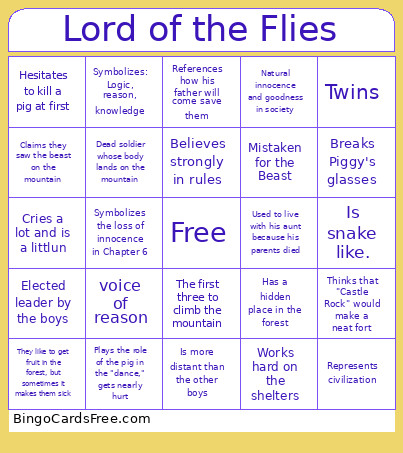 This Lord of the Flies Bingo Cards Game contains following Words or Phrases: Talks about the 'snake-thing, Works hard on the shelters, Has a hidden place in the forest, Easily intimidated, Believes strongly in rules, Throws stones but won't hit the littlun, Blows the conch first, Claims they saw the beast on the mountain, Helps the littluns get fruit, Hesitates to kill a pig at first, Breaks Piggy's glasses, Likes to wander or explore, Cries a lot and is a littlun, Used to live with his aunt because his parents died, Thinks that "Castle Rock" would make a neat fort, Elected leader by the boys, Represents civilization, represents savagery, a scientific thinker, who killed the pig, nature boy, Twins, The younger boys, Knocks down littluns' sandcastles; feels guilty, violent,impulsive, cruel, Plays the role of the pig in the "dance," gets nearly hurt, Disappears after the first fire, Dead soldier whose body lands on the mountain, Mistaken for the Beast, Symbolizes: Logic, reason, knowledge, The first three to climb the mountain, A littlun who likes to throw sand and make Percival cry, They like to get fruit in the forest, but sometimes it makes them sick, References how his father will come save them, Comes from the sea, Is snake like., Symbolizes the loss of innocence in Chapter 6, Is more distant than the other boys, Democratic leadership, Natural innocence and goodness in society, obsessed with hunting, power hungry, dictator, voice of reason.