Print free Lumens123 bingo cards or modify,
unlimited prints! Choose from 33,500+ designs or use the bingo card generator.
Add numbers, phrases, photos, or all of them.
Play using printed PDF, virtual bingo cards,
and the virtual bingo caller, or mix physical and digital.
About: This bingo card is perfect for spicing up team meetings or office gatherings, especially in a healthcare IT or command center environment. Packed with inside jokes, common work frustrations, and quirky team moments, it turns everyday occurrences into a fun, shared game that everyone will relate to and enjoy during those long, unpredictable work sessions.
How To: To get a PDF to print, click the Print button.
You can adjust the card quantity and other
printing settings on the Print tab.
Grid items and free space content can be added on the Basic tab.
Appearance can be highly personalized on the
corresponding tabs, or you can easily search any preference
using the 🔍 tab.
How to play Lumens123 Bingo Cards?
Digital Caller: Click on the Play button above.
Digital Players: Click on the Play button above, and then click on the 🎫 button.
Printed Players: Print PDF bingo cards and manually write on the cards.
Printed Caller: Print PDF calling list & calling slips and manually pick the slips.
Hybrid Mode: Pick any combination above.
For example, caller can be either Printed or Digital.
And players can be Printed or Digital or a mix of both.
Step-By-Step:
Start by saving the Lumens123 PDF by clicking on the "Print" button above.
Open the PDF and print a hard copy.
For random calling, you can print another copy of the call list, cut, fold and then pull them randomly at play time.
Cut the bingo cards at the cut lines if there are more than 1 bingo cards per page.
Give one card to each player. For marking, you can use pencils. Crayons are the cheapest.
Pick one person to be the caller. If you are playing in a small group, the caller may as well play along with their own Bingo card.
The caller initiates the game by randomly pulling an item from the call list and calling out it to all players.
The players scan their cards to see if they have the announced word. If they do, they dab that word.
The first player to complete a horizontal, vertical, or a diagonal line of marked items yells "Bingo!" and wins the game.
The caller validates that the items crossed off form a proper line according to the Bingo card and call list.
You can play for different patterns or a full card blackout for a longer game.
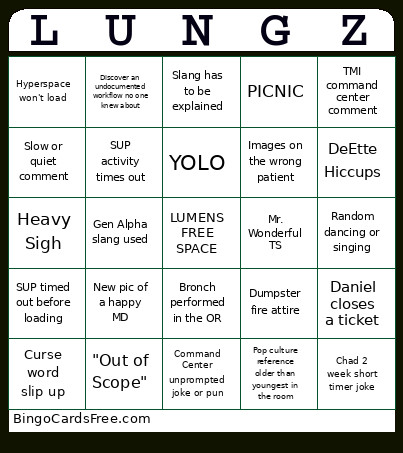
This Lumens123 Bingo Cards Game contains following Words or Phrases: "Can I ask a question?", "Images aren't on AVS", "Knock on wood", "Not my hill to die on", "Out of Scope", "Take that off your plate", "That's not how we did it before", "What's the/your login dept?", Approved!, Austin eats a yellow skittle, Bronch performed in the OR, Can't find Lumens orders, Chad "dad" sneezes, Chad 2 week short timer joke, Chad sheds a tear, Command Center unprompted joke or pun, Curse word slip up, Daniel closes a ticket, DeEtte Hiccups, Discover an undocumented workflow no one knew about, Dumpster fire attire, This is so much easier, Erik debates/gets afternoon coffee, Erik eats a fruit, Erik gives skeptical look, Heavy Sigh, High priority ticket for optimization request, Images moved in Visage, Images not pulling into report, Images on the wrong patient, Is there a ticket for that?, Leeeeeeroy Jenkins!, Masterfile Dyslexia, Meeting after the meeting turns into Group Therapy, Meghan sends screenshot in dark mode, Mr. Wonderful TS, SUP activity times out, SUP crashes, Hyperspace won't load, New pic of a happy MD, Orders go to wrong WQ, PICNIC, Random dancing or singing, Someone gets a Dolan the Colon sticker for 1st time, SUP timed out before loading, The OG Austin, TMI command center comment, Wrong scope type (but IS IT?), YOLO, Gen Alpha slang used, Slang has to be explained, Pop culture reference older than youngest in the room, Slow or quiet comment.

 This Lumens123 Bingo Cards Game contains following Words or Phrases: "Can I ask a question?", "Images aren't on AVS", "Knock on wood", "Not my hill to die on", "Out of Scope", "Take that off your plate", "That's not how we did it before", "What's the/your login dept?", Approved!, Austin eats a yellow skittle, Bronch performed in the OR, Can't find Lumens orders, Chad "dad" sneezes, Chad 2 week short timer joke, Chad sheds a tear, Command Center unprompted joke or pun, Curse word slip up, Daniel closes a ticket, DeEtte Hiccups, Discover an undocumented workflow no one knew about, Dumpster fire attire, This is so much easier, Erik debates/gets afternoon coffee, Erik eats a fruit, Erik gives skeptical look, Heavy Sigh, High priority ticket for optimization request, Images moved in Visage, Images not pulling into report, Images on the wrong patient, Is there a ticket for that?, Leeeeeeroy Jenkins!, Masterfile Dyslexia, Meeting after the meeting turns into Group Therapy, Meghan sends screenshot in dark mode, Mr. Wonderful TS, SUP activity times out, SUP crashes, Hyperspace won't load, New pic of a happy MD, Orders go to wrong WQ, PICNIC, Random dancing or singing, Someone gets a Dolan the Colon sticker for 1st time, SUP timed out before loading, The OG Austin, TMI command center comment, Wrong scope type (but IS IT?), YOLO, Gen Alpha slang used, Slang has to be explained, Pop culture reference older than youngest in the room, Slow or quiet comment.