Print free MakerSpace bingo cards or alter them,
unlimited cards! Choose from 41,500+ templates or use our bingo card generator.
Add numbers, phrases, photos, or all of them.
Play using PDF prints, virtual bingo cards,
and our virtual bingo caller, or mix physical and digital.
About: This bingo card captures the daily rhythms and quirks of working in a busy MakerSpace or creative workspace. With a blend of playful inside jokes, practical reminders, and workplace norms, it’s ideal for staff training sessions, orientation days, or just adding some fun to team meetings. It brings together both the teamwork and camaraderie that make a maker community thrive.
How To: To get a PDF to print, click the Print button.
You can modify the number of cards and other
printing preferences on the Print tab.
Grid items and free space text can be edited on the Basic tab.
Appearance can be entirely customized on the
corresponding tabs, or you can easily search any setting
on the 🔍 tab.
How to play MakerSpace Bingo Cards?
Paper Players: Print PDF bingo cards and manually scratch the cards.
Virtual Caller: Click on the Play button above.
Virtual Players: Click on the Play button above, and then click on the 🎫 button.
Paper Caller: Print PDF calling list & calling slips and manually select the slips.
Combo Play: Choose any combination above.
For example, caller can be either Paper or Virtual.
And players can be Paper or Virtual or a mix of both.
Step-By-Step:
Start by saving the MakerSpace PDF by clicking on the "Print" button above.
Open the PDF and print a hard copy.
For random drawing, you can print another copy of the call list, cut, fold and then pick them randomly at play time.
Cut the bingo cards at the cut marks if there are more than 1 bingo cards per page.
Distribute one card per player. For marking, you can use markers. Crayons are the cheapest.
Choose one person to be the caller. If you are playing in a small group, the caller may also play along with their own Bingo card.
The caller starts the game by randomly picking an item from the call list and calling out it to all players.
The players scan their cards to see if they have the announced word. If they do, they cross off that word.
The first player to complete a horizontal, vertical, or a diagonal line of marked items announces "Bingo!" and wins the game.
The caller confirms that the items crossed off form a correct line according to the Bingo card and call list.
You can play for different patterns or a full card blackout for a longer game.
This MakerSpace Bingo Cards Game contains following Words or Phrases: No Call/No Show, Swap Shifts, Shift Coverage, Tara talks about her new cat, Schedule Changes Made 2 weeks in advance, Slack, #random, Submit timesheets on time!, Sick Time, 15 minute break for every 4 hours worked, 30 minute lunch after 5 hours, Starry reference, MakerSpace Non-Credit Courses, HR Training, Opening Procedures, Closing Procedures, No Earbuds, Phone Calls taken outside!, Helping Students, Personal projects after work, No homework during work!, When a student comes in, talk to them!, Have you signed in?, TEACH not DO, Adobe Illustrator, Student's Clean up After Themselves, Cubby, Closed Toe Shoes, Name Tag, Apron, Sign in/Sign Out, "What is MakerSpace?", "What would you like to make today?", The Ayrlron Method, Name Plates, USB, Welcome back Kelly!, Kelly is embarrassed I put her name on the bingo card, Project Slips, Pick Up Area, Reserving Equipment.

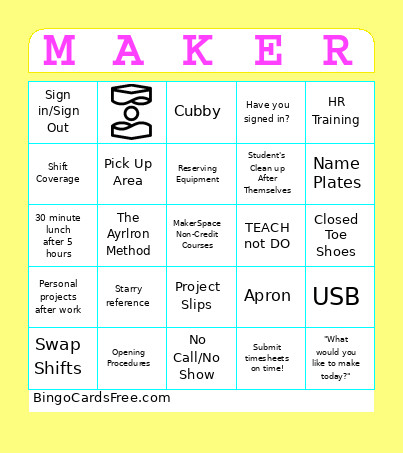 This MakerSpace Bingo Cards Game contains following Words or Phrases: No Call/No Show, Swap Shifts, Shift Coverage, Tara talks about her new cat, Schedule Changes Made 2 weeks in advance, Slack, #random, Submit timesheets on time!, Sick Time, 15 minute break for every 4 hours worked, 30 minute lunch after 5 hours, Starry reference, MakerSpace Non-Credit Courses, HR Training, Opening Procedures, Closing Procedures, No Earbuds, Phone Calls taken outside!, Helping Students, Personal projects after work, No homework during work!, When a student comes in, talk to them!, Have you signed in?, TEACH not DO, Adobe Illustrator, Student's Clean up After Themselves, Cubby, Closed Toe Shoes, Name Tag, Apron, Sign in/Sign Out, "What is MakerSpace?", "What would you like to make today?", The Ayrlron Method, Name Plates, USB, Welcome back Kelly!, Kelly is embarrassed I put her name on the bingo card, Project Slips, Pick Up Area, Reserving Equipment.