
June Jukebox Bingo Cards - Print Free or Customize
Print free June Jukebox bingo cards or alter them, limitless prints! Pick from 35,600+ templates or use our bingo card generator. Add numbers, words, photos, or any combination. Play using PDF printouts, digital bingo cards, and our digital bingo caller, or combine all formats.
About: This bingo card is a lively celebration of iconic pop, rock, and dance hits from multiple decades. Perfect for music lovers at parties, trivia nights, or karaoke events, it brings together crowd-pleasing anthems and singalong favorites that everyone knows. Get ready to reminisce, belt out lyrics, and enjoy a feel-good musical journey with friends.
How To: To download a printable PDF, click the Print button. You can change the card count and other printing options on the Print tab. Grid items and free space content can be added on the Basic tab. Appearance can be fully customized on the relevant tabs, or you can quickly locate any preference on the 🔍 tab.
How to play June Jukebox Bingo Cards?
- Paper Players: Print PDF bingo cards and physically scratch the cards.
- Online Caller: Click on the Play button above.
- Paper Caller: Print PDF calling list & calling slips and physically draw the slips.
- Online Players: Click on the Play button above, and then click on the 🎫 button.
- Combo Mode: Select any combination above. For example, caller can be either Offline or Online. And players can be Offline or Online or a combination of both.
Step-By-Step:
- Start by saving the June Jukebox Bingo PDF by clicking on the "Print" button above.
- Open the PDF and print it.
- For random drawing, you can print another copy of the call list, cut, fold and then draw them randomly at play time.
- Cut the bingo cards at the cut marks if there are more than 1 bingo cards per page.
- Give one card to each player. For marking, you can use crayons. Crayons cost the least.
- Select one person to be the caller. If you are playing in a small group, the caller may also play along with their own Bingo card.
- The caller initiates the game by randomly picking an item from the call list and calling out it to all players.
- The players check their cards to see if they have the called word. If they do, they dab that word.
- The first player to finish a horizontal, vertical, or a diagonal line of marked items announces "Bingo!" and wins the play.
- The caller validates that the items marked form a proper line as per the Bingo card and call list.
- You can play for different patterns or a full card blackout for an extended play.
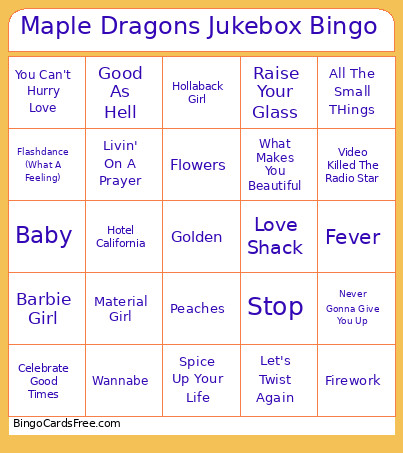 This June Jukebox Bingo Cards Game contains following Words or Phrases: 9 to 5, Africa, Ain't No Mountain High Enough, All The Small THings, All You Need is Love, Angels, Baby, Bad Blood, Barbie Girl, Billie Jean, Blinding Lights, Bohemian Rhapsody, Brown Eyed Girl, California Gurls, Can You Feel The Love Tonight, Celebrate Good Times, Club Can't Handle Me, Come On Eileen, Crazy, Creep, Cruel Summer, Dancing Queen, Dancin' In The Moonlight, Don't Stop Believing, Eye Of The Tiger, Fever, Firework, Flashdance (What A Feeling), Flowers, Fly Me To The Moon, Footloose, Forget You, Funky Town, Girlfriend, Girls Just Wanna Have Fun, Go Your Own Way, Golden, Good As Hell, Good Time, Groove Is In The Heart, Handclap, Happy, Hey There Delilah, Hey Ya!, Hips Don't Lie, Ho Hey, Hollaback Girl, Hot To Go!, Hotel California, I Just Might, I Kissed a Girl, I Love Rock & Roll, I Wanna Dance With Somebody, I Want It That Way, I Will Survive, I'll Be There For You, I'm So Excited, I'm Still Standing, Just The Way You Are, Karma Chameleon, Kokomo, Let's Twist Again, Living On A Prayer, Livin' On A Prayer, Locked Out Of Heaven, Love Shack, Mambo No.5, Material Girl, Mr. Brightside, Mr. Jones, Never Gonna Give You Up, No Scrubs, Old Town Road, One Way Or Another, Party In The USA, Peaches, Pink Pony Club, Poison, Raise Your Glass, Riptide, Rolling In the Deep, Safety Dance, Scar Tissue, Sexyback, Shake It Off, Shape Of You, Shut Up and Dance, Since You've Been Gone, Smells Like Teen Spirit, So Easy (To Fall in Love), Somebody To Love, Spice Up Your Life, Stayin' Alive, Stop, Superstition, Sweet Caroline, Sweet Child of Mine, Sweet Dreams, Take Me Home, Country Roads, Take On Me, Teenage Dirtbag, The Gambler, These Boots Are Made for Walkin', Time Of Our Lives, Twist And Shout, Umbrella, Under Pressure, Uptown Funk, Video Killed The Radio Star, Walking On Sunshine, Wannabe, Waterfalls, What I Got, What Is Love, What Makes You Beautiful, When Doves Cry, Wonderwall, You Can't Hurry Love, You Spin Me Right Round, …Baby One More Time.