
Mario 64 Bingo Cards - Print Free or Customize
Print free Mario 64 bingo cards or adjust them, limitless cards! Choose from 41,500+ designs or use our bingo card generator. Add numbers, words, images, or any combination. Play using printed PDF, online bingo cards, and our online bingo caller, or combine all formats.
About: This bingo card is perfect for Super Mario 64 fans looking to spice up their playthrough with creative and challenging mini-goals. Packed with unique star runs, tricky movement restrictions, and clever use of Mario’s abilities, it brings out friendly competition or solo speedrun fun. Great for game nights, tournaments, or just testing your Mario skills!
How To: To get a printable PDF, click the Print button. You can alter the card count and other print preferences on the Print tab. Grid items and free space content can be changed on the Basic tab. Appearance can be completely customized on the relevant tabs, or you can easily search any option on the 🔍 tab.
How to play Mario 64 Bingo Cards?
- Paper Players: Print PDF bingo cards and manually cross off the cards.
- Paper Caller: Print PDF calling list & calling slips and manually pick the slips.
- Online Players: Click on the Play button above, and then click on the 🎫 button.
- Online Caller: Click on the Play button above.
- Mixed Play: Choose any combination above. For example, caller can be either Paper or Online. And players can be Paper or Online or a combination of both.
Step-By-Step:
- Start by downloading the Mario 64 Bingo PDF by clicking on the "Print" button above.
- Open the PDF and print it.
- For random calling, you can print another copy of the call list, cut, fold and then draw them randomly at play time.
- Cut the bingo cards at the cut marks if there are more than 1 bingo cards per page.
- Give one card to each player. For marking, you can use crayons. Crayons are the cheapest.
- Choose one person to be the caller. If you are playing in a small group, the caller can as well play along with their own Bingo card.
- The caller begins the game by randomly pulling an item from the call list and saying it to everyone.
- The players scan their cards to see if they have the called word. If they do, they mark that word.
- The first player to finish a horizontal, vertical, or a diagonal line of marked items announces "Bingo!" and wins the play.
- The caller validates that the items marked form a correct line according to the Bingo card and call list.
- You can play for varied patterns or a full card blackout for a longer play.
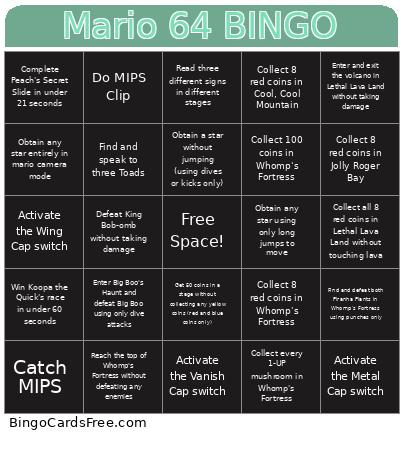 This Mario 64 Bingo Cards Game contains following Words or Phrases: Activate the Metal Cap switch, Activate the Vanish Cap switch, Activate the Wing Cap switch, Beat "Inside the Pyramid" (Shifting Sand Land) without using triple-jumps, Beat "Slip Slidin' Away" star without using forward presses (only steering), Beat any Bowser stage without taking damage, Beat the Big Penguin race, Catch MIPS, Collect 100 coins in Bob-omb Battlefield, Collect 100 coins in Whomp's Fortress, Collect 8 red coins in Bob-omb Battlefield, Collect 8 red coins in Cool, Cool Mountain, Collect 8 red coins in Jolly Roger Bay, Collect 8 red coins in Whomp's Fortress, Collect all 8 red coins in Lethal Lava Land without touching lava, Collect every 1-UP mushroom in Whomp's Fortress, Collect exactly 100 coins in any single level, Complete "Shoot into the Wild Blue" without cannons (Whomp's Fortress), Complete any Bowser stage collecting every red coin, Complete Jolly Roger Bay's sunken ship star without resurfacing, Complete Peach's Secret Slide in under 21 seconds, Complete Whomp's Fortress "Shoot into the Wild Blue" without using cannons, Defeat any Bowser stage collecting exactly 2 red coins (no more, no less), Defeat Bowser without throwing him off stage even once (careful throws only), Defeat King Bob-omb without taking damage, Defeat King Whomp without taking damage, Defeat the Chain Chomp without taking damage, Do MIPS Clip, Enter and exit the volcano in Lethal Lava Land without taking damage, Enter Big Boo's Haunt and defeat Big Boo using only dive attacks, Enter Big Boo's Haunt and collect a star without defeating any boos, Find and defeat both Piranha Plants in Whomp's Fortress using punches only, Find and speak to three Toads, Get 50 coins in a stage without collecting any yellow coins (red and blue coins only), Get a star in Jolly Roger Bay without swimming (cannon allowed), Obtain a star without jumping (using dives or kicks only), Obtain any star entirely in mario camera mode, Obtain any star using only long jumps to move, Reach the floating island in Bob-omb Battlefield without using cannons, Reach the top of Whomp's Fortress without defeating any enemies, Read three different signs in different stages, Visit Every Painting on First Floor, Win Koopa the Quick's race in under 60 seconds.