
Watch Party Bingo Cards - Print Free or Customize
Print free Watch Party bingo cards or customize, limitless prints! Pick from 42,200+ templates or use the bingo card generator. Add numbers, phrases, images, or all of them. Play using printed PDF, online bingo cards, and the online bingo caller, or combine all formats.
About: This bingo card is perfect for fans watching a high-stakes Argentina versus Spain soccer match, blending thrilling on-field action with off-the-pitch fan experiences. With plenty of nods to player highlights, dramatic moments, and audience activities, it brings extra excitement to big game gatherings or watch parties, keeping everyone engaged with each twist and turn.
How To: To get a PDF to print, click the Print button. You can alter the card quantity and other print options on the Print tab. Grid items and free space text can be changed on the Basic tab. Appearance can be highly customized on the relevant tabs, or you can quickly find any preference using the 🔍 tab.
How to play Watch Party Bingo Cards?
- Paper Caller: Print PDF calling list & calling slips and physically draw the slips.
- Online Caller: Click on the Play button above.
- Online Players: Click on the Play button above, and then click on the 🎫 button.
- Paper Players: Print PDF bingo cards and physically scratch the cards.
- Combo Mode: Choose any combination above. For example, caller can be either Offline or Online. And players can be Offline or Online or a combo of both.
Step-By-Step:
- Start by saving the Watch Party PDF by clicking on the "Print" button above.
- Open the PDF and print it.
- For random calling, you can print another copy of the call list, cut, fold and then pull them randomly at play time.
- Cut the bingo cards at the cut lines if there are more than 1 bingo cards per page.
- Distribute one card per player. For marking, you can use pencils. Crayons cost the least.
- Choose one person to be the caller. If you are playing in a small group, the caller may as well play along with their own Bingo card.
- The caller begins the play by randomly picking an item from the call list and calling out it to everyone.
- The players look at their cards to see if they have the called word. If they do, they cross off that word.
- The first player to finish a horizontal, vertical, or a diagonal line of crossed items yells "Bingo!" and wins the play.
- The caller checks that the items marked form a correct line as per the Bingo card and call list.
- You can play for varied patterns or a full card blackout for an extended play.
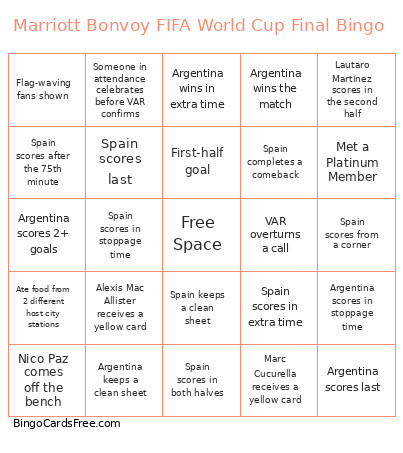 This Watch Party Bingo Cards Game contains following Words or Phrases: A former player is shown in attendance, A goal is ruled offsides, A player comes off the bench and scores, A player gets subbed off before the second half begins, A player scores a hat trick, Álex Baena comes off the bench, Álex Baena records an assist, Alexis Mac Allister creates a big chance, Alexis Mac Allister receives a yellow card, Alexis Mac Allister records an assist, Alexis Mac Allister scores a goal, Argentina completes a comeback, Argentina earns the first corner kick, Argentina keeps a clean sheet, Argentina leads at halftime, Argentina receives the first yellow card, Argentina scores 2+ goals, Argentina scores a penalty, Argentina scores after the 75th minute, Argentina scores before halftime, Argentina scores first, Argentina scores from a corner, Argentina scores from a corner kick, Argentina scores from a free kick, Argentina scores in both halves, Argentina scores in extra time, Argentina scores in stoppage time, Argentina scores in the first 15 minutes, Argentina scores last, Argentina wins a penalty shootout, Argentina wins in extra time, Argentina wins in regulation, Argentina wins on penalties, Argentina wins the match, Argentina's flag is shown, Ate food from 2 different host city stations, Celebrity shown in attendance, Coach shown arguing, Coach shown celebrating, Corner kick leads to a goal, Cristian Romero receives a yellow card, Dani Olmo records an assist, Dani Olmo scores a goal, Dani Olmo scores in the first half, Emiliano Martínez keeps a clean sheet, Emiliano Martínez makes 5+ saves, Emiliano Martínez makes a save, Emiliano Martínez saves a penalty, Enzo Fernández has a shot on target, Enzo Fernández records an assist, Extra time played, Fabián Ruiz records an assist, Fabián Ruiz scores from outside the box, Face-painted fan shown on screen, Ferran Torres comes off the bench, Ferran Torres records an assist, Ferran Torres scores a goal, First-half goal, Flag-waving fans shown, Free-kick goal scored, Gavi receives a yellow card, Gavi records an assist, Gavi scores a goal, Get face-painted, Giuliano Simeone takes a shot on target, Goal scored, Julián Álvarez has 3+ shots, Julián Álvarez records an assist, Lamine Yamal records an assist, Lamine Yamal scores a goal, Lamine Yamal scores the first goal, Lamine Yamal scores with his left foot, Late goal changes the scoreline, Lautaro Martínez records an assist, Lautaro Martínez scores a goal, Lautaro Martínez scores in the second half, Leandro Paredes receives a yellow card, Lionel Messi converts a free kick, Lionel Messi hits the post or crossbar, Lionel Messi records an assist, Lionel Messi scores a goal, Lionel Messi scores from outside the box, Lionel Messi scores the first goal, Lionel Messi scores the winning goal, Lionel Messi takes 3+ shots on target, Lionel Scaloni is shown on camera, Luis de la Fuente is shown on camera, Made a bracelet, Marc Cucurella receives a yellow card, Marc Cucurella records an assist, Marriott Bonvoy Commercial Shown, Met a Platinum Member, Met a Titanium Member, Met an Ambassador Member, Mikel Oyarzabal records an assist, Mikel Oyarzabal scores a goal, Nico Paz comes off the bench, Nico Williams has 3+ shots, Nico Williams records an assist, Nico Williams scores a goal, Nico Williams scores the winning goal, Nicolás González comes off the bench, Nicolás Otamendi commits a foul, Own goal scored, Pau Cubarsí receives a yellow card, Pedri records an assist, Pedri scores a goal, Penalty awarded, Penalty missed, Penalty scored, Penalty shootout, Provided feedback using the touch screens, Red card awarded, Replay shown 3+ times, Rodri receives a yellow card, Rodri records an assist, Rodri wins possession 5+ times, Rodrigo De Paul receives a yellow card, Scored a goal during foosball, Second-half goal, Someone complains in attendance about the referee, Someone in attendance celebrates before VAR confirms, Someone stands in attendance during a scoring chance, Spain completes a comeback, Spain earns the first corner kick, Spain keeps a clean sheet, Spain leads at halftime, Spain receives the first yellow card, Spain scores 2+ goals, Spain scores 3+ goals, Spain scores a penalty, Spain scores after the 75th minute, Spain scores before halftime, Spain scores first, Spain scores from a corner, Spain scores from a free kick, Spain scores in both halves, Spain scores in extra time, Spain scores in stoppage time, Spain scores in the first 15 minutes, Spain scores last, Spain wins in extra time, Spain wins in regulation, Spain wins on penalties, Spain wins the match, Spain's flag is shown, Speak to a Marriott Bonvoy representative, Stoppage-time goal, Stopped by the World Central Kitchen table, Teams are tied after standard match play, Teams are tied at halftime, The commentator mentions "nutmeg", The commentator mentions a previous World Cup, The crowd starts singing "Muchachos", The crowd starts singing/chanting about a player, The group boos a referee's decision, The match goes into extra time, There are 5+ minutes of stoppage time, Thiago Almada records an assist, Three or more goals scored, Three or more yellow cards awarded, Took a photo in the locker room, Took a photo with Marriott Bonvoy Jerseys, Took a photo with the cutouts, Trophy shown on screen, Two or more goals scored, Unai Simón keeps a clean sheet, Unai Simón makes 5+ saves, Unai Simón saves a penalty, Underdog takes the lead, VAR overturns a call, VAR review, Yellow card awarded.