Print free Match Play bingo cards or alter them,
limitless prints! Pick from 41,500+ templates or use our bingo card generator.
Add numbers, words, pictures, or all of them.
Play using printable PDF, virtual bingo cards,
and our virtual bingo caller, or go hybrid.
About: This bingo card is perfect for anyone attending or watching a high-energy robotics competition, especially those involved with FIRST Robotics events. It captures the quirky, competitive moments and rare occurrences that make these matches so much fun to watch. Great for teams, mentors, or volunteers wanting an extra layer of excitement during the event!
How To: To save a printable PDF, click the Print button.
You can change the card quantity and other
printing options on the Print tab.
Grid items and free space text can be added on the Basic tab.
Appearance can be fully customized on the
relevant tabs, or you can quickly search any option
on the 🔍 tab.
How to play Match Play Bingo Cards?
Printed Players: Print PDF bingo cards and physically scratch the cards.
Printed Caller: Print PDF calling list & calling slips and physically select the slips.
Online Caller: Click on the Play button above.
Online Players: Click on the Play button above, and then click on the 🎫 button.
Combo Mode: Pick any combination above.
For example, caller can be either Paper or Online.
And players can be Paper or Online or a combo of both.
Step-By-Step:
Start by downloading the Match Play PDF by clicking on the "Print" button above.
Open the PDF and print it.
For random calling, you can print another copy of the call list, cut, fold and then draw them randomly at play time.
Cut the bingo cards at the cut marks if there are more than 1 bingo cards per page.
Give one card to each player. For marking, you can use pencils. Crayons are the cheapest.
Pick one person to be the caller. If you are playing in a small group, the caller may as well play along with their own Bingo card.
The caller begins the game by randomly pulling an item from the call list and saying it to all players.
The players scan their cards to see if they have the announced word. If they do, they cross off that word.
The first player to complete a horizontal, vertical, or a diagonal line of marked items yells "Bingo!" and wins the play.
The caller confirms that the items crossed off form a proper line as per the Bingo card and call list.
You can play for varied patterns or a full card blackout for an extended play.
This Match Play Bingo Cards Game contains following Words or Phrases: Team wears ref stripped shirts as their uniform, L1 climbs successfully, 6 RP match, Robot Intakes and outtakes witrh same mechanism, Team from Colorado, Defense-only robot, 7RP Match, Team with the same color shirt as the volunteer's shirts, Falls off L3 Climb, No hopper alliance, Triple turret alliance in playoff, Match with two L1 climbs, L2 climb fail, Robot tips over in auto, Rank 1 and rank 75 in same match, all teams on alliance have the same team color, MC says wrong team number during intros, LED alliance, Alliance with two or more animals/animal words in the team names, 80%+ statbotics prediction upset match, two robots playing defense on same alliance, all 6 robots score during autonomous, L3 Climbs successfully, three countries represented in the same match, Robot spins for 10sec straight, both alliances send reps to the question box, Non-square robot, Field fault, Another team with striped pants/overalls, Food in team name, Match with the climb RP, L1 Climb fails, Super wide robot, FTA runs from one alliance station to the other mid match, team makes a shot while climbing, Six robots simultaneously In the center during autonomous, Non-swerve drivetrain, 4 RP each on both alliances, Human Player scores every attempt, More than 40 balls in the hopper, Short Robot, Qualification match is replayed, two climbs on the same tower in a match, Intakes internally, alliance with all teams <1000>10000, prime number team <100.

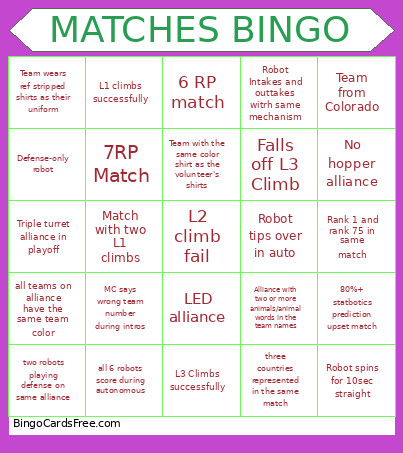 This Match Play Bingo Cards Game contains following Words or Phrases: Team wears ref stripped shirts as their uniform, L1 climbs successfully, 6 RP match, Robot Intakes and outtakes witrh same mechanism, Team from Colorado, Defense-only robot, 7RP Match, Team with the same color shirt as the volunteer's shirts, Falls off L3 Climb, No hopper alliance, Triple turret alliance in playoff, Match with two L1 climbs, L2 climb fail, Robot tips over in auto, Rank 1 and rank 75 in same match, all teams on alliance have the same team color, MC says wrong team number during intros, LED alliance, Alliance with two or more animals/animal words in the team names, 80%+ statbotics prediction upset match, two robots playing defense on same alliance, all 6 robots score during autonomous, L3 Climbs successfully, three countries represented in the same match, Robot spins for 10sec straight, both alliances send reps to the question box, Non-square robot, Field fault, Another team with striped pants/overalls, Food in team name, Match with the climb RP, L1 Climb fails, Super wide robot, FTA runs from one alliance station to the other mid match, team makes a shot while climbing, Six robots simultaneously In the center during autonomous, Non-swerve drivetrain, 4 RP each on both alliances, Human Player scores every attempt, More than 40 balls in the hopper, Short Robot, Qualification match is replayed, two climbs on the same tower in a match, Intakes internally, alliance with all teams <1000>10000, prime number team <100.