Print free May Choir bingo cards or modify,
limitless cards! Pick from 41,500+ templates or use our bingo card generator.
Add numbers, phrases, pictures, or all of them.
Play using PDF prints, digital bingo cards,
and our digital bingo caller, or combine all formats.
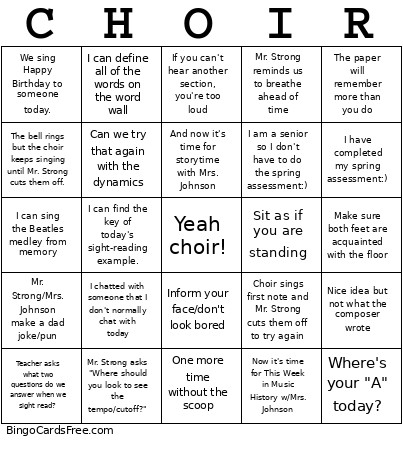
About: This bingo card perfectly captures the lively and familiar moments of a high school choir rehearsal. With inside jokes, classic teacher comments, and musical reminders, it brings out the playful energy and camaraderie found in music rooms everywhere. It’s ideal for choir students or music educators looking to add some fun to rehearsals or choir social events.
How To: To save a printable PDF, click the Print button.
You can change the card count and other
print options on the Print tab.
Grid items and free space content can be added on the Basic tab.
Appearance can be fully personalized on the
corresponding tabs, or you can quickly search any setting
on the 🔍 tab.
How to play May Choir bingo Cards?
Online Caller: Click on the Play button above.
Printed Caller: Print PDF calling list & calling slips and physically choose the slips.
Printed Players: Print PDF bingo cards and physically write on the cards.
Online Players: Click on the Play button above, and then click on the 🎫 button.
Mixed Play: Pick any combination above.
For instance, caller can be either Offline or Online.
And players can be Offline or Online or a combo of both.
Step-By-Step:
Start by getting the May Choir bingo PDF by clicking on the "Print" button above.
Open the PDF and print it.
For random calling, you can print another copy of the call list, cut, fold and then draw them randomly at play time.
Cut the bingo cards at the cut lines if there are greater than 1 bingo cards per page.
Distribute one card per player. For marking, you can use crayons. Crayons are the cheapest.
Pick one person to be the caller. If you are playing in a small group, the caller may also play along with their own Bingo card.
The caller opens the play by randomly drawing an item from the call list and announcing it to everyone.
The players check their cards to see if they have the announced word. If they do, they cross off that word.
The first player to complete a horizontal, vertical, or a diagonal line of crossed items announces "Bingo!" and wins the game.
The caller validates that the items marked form a proper line according to the Bingo card and call list.
You can play for multiple patterns or a full card blackout for an extended game.
This May Choir bingo Cards Game contains following Words or Phrases: The paper will remember more than you do, Make sure both feet are acquainted with the floor, Sit as if you are standing, One more time without the scoop, Can we try that again with the dynamics, And now it's time for storytime with Mrs. Johnson, If you can't hear another section, you're too loud, Inform your face/don't look bored, Nice idea but not what the composer wrote, Mr. Strong/Mrs. Johnson make a dad joke/pun, Where's your "A" today?, Teacher asks what two questions do we answer when we sight read?, Choir sings first note and Mr. Strong cuts them off to try again, Mr. Strong asks "Where should you look to see the tempo/cutoff?", The bell rings but the choir keeps singing until Mr. Strong cuts them off., We sing Happy Birthday to someone today., Now it's time for This Week in Music History w/Mrs. Johnson, Mr. Strong reminds us to breathe ahead of time, I can sing the Beatles medley from memory, I am a senior so I don't have to do the spring assessment:), I have completed my spring assessment:), I can find the key of today's sight-reading example., I chatted with someone that I don't normally chat with today, I can define all of the words on the word wall.

 This May Choir bingo Cards Game contains following Words or Phrases: The paper will remember more than you do, Make sure both feet are acquainted with the floor, Sit as if you are standing, One more time without the scoop, Can we try that again with the dynamics, And now it's time for storytime with Mrs. Johnson, If you can't hear another section, you're too loud, Inform your face/don't look bored, Nice idea but not what the composer wrote, Mr. Strong/Mrs. Johnson make a dad joke/pun, Where's your "A" today?, Teacher asks what two questions do we answer when we sight read?, Choir sings first note and Mr. Strong cuts them off to try again, Mr. Strong asks "Where should you look to see the tempo/cutoff?", The bell rings but the choir keeps singing until Mr. Strong cuts them off., We sing Happy Birthday to someone today., Now it's time for This Week in Music History w/Mrs. Johnson, Mr. Strong reminds us to breathe ahead of time, I can sing the Beatles medley from memory, I am a senior so I don't have to do the spring assessment:), I have completed my spring assessment:), I can find the key of today's sight-reading example., I chatted with someone that I don't normally chat with today, I can define all of the words on the word wall.