Meet the Brothers Bingo Cards - Print Free or Customize
Print free Meet the Brothers bingo cards or alter them,
limitless prints! Select from 42,200+ templates or use our bingo card generator.
Add numbers, words, pictures, or all of them.
Play using PDF prints, online bingo cards,
and our online bingo caller, or mix physical and digital.
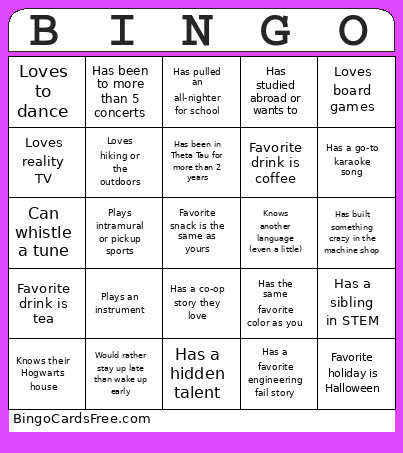
About: This bingo card is perfect for breaking the ice and sparking conversations at a Theta Tau engineering event or similar college gathering. With prompts that blend quirky hobbies, personal favorites, and shared experiences in STEM, it encourages participants to discover common ground and celebrate individuality. It’s ideal for new member mixers or team-building socials.
How To: To download a printable PDF, click the Print button.
You can adjust the number of cards and other
printing options on the Print tab.
Grid items and free space text can be changed on the Basic tab.
Appearance can be completely personalized on the
relevant tabs, or you can easily search any setting
on the 🔍 tab.
How to play Meet the Brothers Bingo Cards?
Printed Caller: Print PDF calling list & calling slips and physically draw the slips.
Printed Players: Print PDF bingo cards and physically cross off the cards.
Digital Caller: Click on the Play button above.
Digital Players: Click on the Play button above, and then click on the 🎫 button.
Mixed Mode: Choose any combination above.
For example, caller can be either Paper or Digital.
And players can be Paper or Digital or a combination of both.
Step-By-Step:
Start by getting the Meet the Brothers PDF by clicking on the "Print" button above.
Open the PDF and print a hard copy.
For random drawing, you can print another copy of the call list, cut, fold and then pick them randomly at play time.
Cut the bingo cards at the cut marks if there are more than 1 bingo cards per page.
Give one card to each player. For marking, you can use markers. Crayons are the cheapest.
Choose one person to be the caller. If you are playing in a small group, the caller may also play along with their own Bingo card.
The caller initiates the play by randomly drawing an item from the call list and calling out it to everyone.
The players check their cards to see if they have the called word. If they do, they dab that word.
The first player to complete a horizontal, vertical, or a diagonal line of marked items shouts "Bingo!" and wins the play.
The caller checks that the items crossed off form a proper line according to the Bingo card and call list.
You can play for multiple patterns or a full card blackout for an extended play.
This Meet the Brothers Bingo Cards Game contains following Words or Phrases: Has the same favorite color as you, Plays an instrument, Has studied abroad or wants to, Has a favorite engineering fail story, Loves to cook, Favorite class is not engineering, Has a sibling in STEM, Is left-handed, Has a hidden talent, Favorite snack is the same as yours, Has pulled an all-nighter for school, Has a co-op story they love, Favorite drink is coffee, Favorite drink is tea, Has run a 5k or other race, Loves Marvel or DC (pick one!), Plays intramural or pickup sports, Has a tattoo or piercing, Knows how to solve a Rubik's cube, Has met someone famous, Has a go-to karaoke song, Loves reality TV, Has a favorite video game, Loves board games, Has been to more than 5 concerts, Loves hiking or the outdoors, Has broken a bone, Knows another language (even a little), Can whistle a tune, Knows their Hogwarts house, Loves to dance, Has been in Theta Tau for more than 2 years, Has been to formal or a retreat, Favorite holiday is Halloween, Favorite holiday is Thanksgiving, Favorite holiday is Christmas, Has built something crazy in the machine shop, Would rather stay up late than wake up early.

 This Meet the Brothers Bingo Cards Game contains following Words or Phrases: Has the same favorite color as you, Plays an instrument, Has studied abroad or wants to, Has a favorite engineering fail story, Loves to cook, Favorite class is not engineering, Has a sibling in STEM, Is left-handed, Has a hidden talent, Favorite snack is the same as yours, Has pulled an all-nighter for school, Has a co-op story they love, Favorite drink is coffee, Favorite drink is tea, Has run a 5k or other race, Loves Marvel or DC (pick one!), Plays intramural or pickup sports, Has a tattoo or piercing, Knows how to solve a Rubik's cube, Has met someone famous, Has a go-to karaoke song, Loves reality TV, Has a favorite video game, Loves board games, Has been to more than 5 concerts, Loves hiking or the outdoors, Has broken a bone, Knows another language (even a little), Can whistle a tune, Knows their Hogwarts house, Loves to dance, Has been in Theta Tau for more than 2 years, Has been to formal or a retreat, Favorite holiday is Halloween, Favorite holiday is Thanksgiving, Favorite holiday is Christmas, Has built something crazy in the machine shop, Would rather stay up late than wake up early.