
MH Bingo for SCP Cards - Print Free or Customize
Print free MH bingo for SCP cards or alter them, unlimited prints! Pick from 42,200+ designs or use the bingo card generator. Add numbers, phrases, images, or mix them all. Play using PDF printouts, virtual bingo cards, and the virtual bingo caller, or mix physical and digital.
About: This bingo card is all about getting to know each other and celebrating everyday moments that connect us. With lots of fun prompts about hobbies, travel, Filipino favorites, and personal quirks, it’s a perfect icebreaker for students, youth groups, or community events. Expect plenty of laughs and surprising discoveries while building a friendly, inclusive atmosphere.
How To: To download a printable PDF, click the Print button. You can adjust the card count and other printing options on the Print tab. Grid items and free space text can be edited on the Basic tab. Appearance can be fully customized on the relevant tabs, or you can easily search any option using the 🔍 tab.
How to play MH Bingo for SCP Cards?
- Online Players: Click on the Play button above, and then click on the 🎫 button.
- Printed Players: Print PDF bingo cards and physically cross off the cards.
- Online Caller: Click on the Play button above.
- Printed Caller: Print PDF calling list & calling slips and physically select the slips.
- Combo Mode: Pick any combination above. For example, caller can be either Paper or Online. And players can be Paper or Online or a mix of both.
Step-By-Step:
- Start by getting the MH Bingo for SCP PDF by clicking on the "Print" button above.
- Open the PDF and print a hard copy.
- For random calling, you can print another copy of the call list, cut, fold and then draw them randomly at play time.
- Cut the bingo cards at the cut lines if there are greater than 1 bingo cards per page.
- Give one card to each player. For marking, you can use crayons. Crayons cost the least.
- Pick one person to be the caller. If you are playing in a small group, the caller can also play along with their own Bingo card.
- The caller begins the game by randomly drawing an item from the call list and announcing it to all players.
- The players check their cards to see if they have the announced word. If they do, they cross off that word.
- The first player to complete a horizontal, vertical, or a diagonal line of marked items yells "Bingo!" and wins the play.
- The caller checks that the items crossed off form a correct line according to the Bingo card and call list.
- You can play for varied patterns or a full card blackout for an extended play.
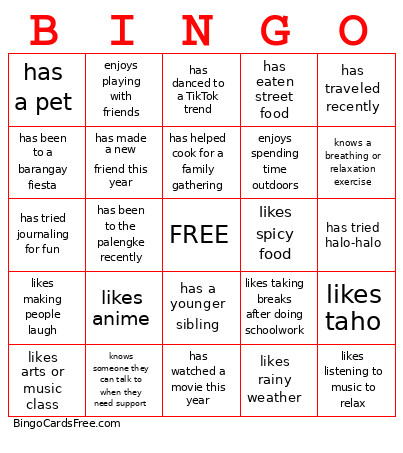 This MH Bingo for SCP Cards Game contains following Words or Phrases: has the same birth month as you, has ridden a jeep this week, has a pet, likes adobo, can speak another dialect, has traveled recently, enjoys drawing or painting, likes reading books or comics, plays a sport, plays a musical instrument, has watched a movie this year, likes karaoke, has been to a barangay fiesta, prefers the beach over the mountains, has tried halo-halo, has climbed a tree before, enjoys cooking or baking, likes spicy food, has a younger sibling, has an older sibling, wears glasses or contact lenses, likes anime, likes K-pop or P-pop, has danced to a TikTok trend, likes science as a subject, likes arts or music class, prefers mornings over evenings, enjoys board games or card games, has flown on an airplane, has gone swimming this year, likes milk tea, likes taho, has eaten street food, has ridden a tricycle this week, has been to the palengke recently, has a favorite local snack, enjoys watching basketball, likes rainy weather, enjoys taking photos, knows how to ride a bike, enjoys puzzles or brain games, has watched a sunrise or sunset at the beach, likes trying new foods, has helped cook for a family gathering, enjoys taking care of plants, has made a new friend this year, is excited to meet new people today, enjoys spending time outdoors, likes listening to music to relax, has a favorite way to cheer themselves up, enjoys helping others, likes making people laugh, has a hobby that helps them feel calm, likes spending time with family, enjoys playing with friends, likes learning new things, has encouraged a friend before, knows a breathing or relaxation exercise, likes taking breaks after doing schoolwork, enjoys reading stories or comics to unwind, likes setting goals for themselves, enjoys celebrating other people's achievements, has tried journaling for fun, knows someone they can talk to when they need support, can name one thing they're grateful for today.