Print free Music bingo cards or adjust them,
unlimited cards! Select from 41,500+ designs or use our bingo card generator.
Add numbers, phrases, pictures, or mix them all.
Play using PDF prints, online bingo cards,
and our online bingo caller, or mix physical and digital.
About: Get ready for a sing-along adventure with this musical bingo card, perfect for kids’ parties, classroom fun, or family game nights. The card features beloved children’s songs and popular movie tunes that everyone knows and loves, creating a playful and nostalgic atmosphere where everyone can join in and sing their hearts out.
How To: To get a PDF to print, click the Print button.
You can adjust the number of cards and other
print settings on the Print tab.
Grid items and free space text can be changed on the Basic tab.
Appearance can be exactly personalized on the
corresponding tabs, or you can quickly search any preference
using the 🔍 tab.
How to play Music Bingo Cards?
Online Players: Click on the Play button above, and then click on the 🎫 button.
Paper Caller: Print PDF calling list & calling slips and manually choose the slips.
Paper Players: Print PDF bingo cards and manually mark the cards.
Online Caller: Click on the Play button above.
Mixed Play: Choose any combination above.
For instance, caller can be either Printed or Online.
And players can be Printed or Online or a combination of both.
Step-By-Step:
Start by saving the Music Bingo PDF by clicking on the "Print" button above.
Open the PDF and print it.
For random calling, you can print another copy of the call list, cut, fold and then draw them randomly at play time.
Cut the bingo cards at the cut marks if there are greater than 1 bingo cards per page.
Distribute one card per player. For marking, you can use pens. Crayons are the cheapest.
Choose one person to be the caller. If you are playing in a small group, the caller may as well play along with their own Bingo card.
The caller opens the game by randomly pulling an item from the call list and calling out it to all players.
The players scan their cards to see if they have the announced word. If they do, they dab that word.
The first player to complete a horizontal, vertical, or a diagonal line of marked items announces "Bingo!" and wins the game.
The caller validates that the items marked form a correct line as per the Bingo card and call list.
You can play for multiple patterns or a full card blackout for an extended game.
This Music Bingo Cards Game contains following Words or Phrases: ABC song next time won't you sing with me, Baby Shark doo doo doo doo, Bingo was his name-o, Can You Feel the Love Tonight Lion King, Circle of Life from The Lion King, Dancing Queen feel that beat from Mamma Mia, Do You Want to Build a Snowman, Five Little Monkeys jumping on the bed, Frosty the Snowman was a jolly happy soul, Itsy Bitsy Spider climbed up the water spout, I'm a Little Teapot short and stout, Jack and Jill went up the hill, Jingle Bells jingle all the way, Let It Go from Frozen, Let's Go Fly a Kite Mary Poppins song, London Bridge is falling down, Mary Had a Little Lamb, Moana How Far I'll Go across the sea, Rain Rain Go Away come again another day, Ring Around the Rosie pocket full of posies, Row Row Row Your Boat gently down the stream, Santa Claus is Coming to Town tonight, Skip to My Lou my darling, The Farmer in the Dell hi-ho the derry-o, This Old Man he played one, Twinkle Twinkle Little Star, Under the Sea from The Little Mermaid, We Don't Talk About Bruno Encanto song, Wheels on the Bus go round and round, Yankee Doodle went to town riding on a pony.

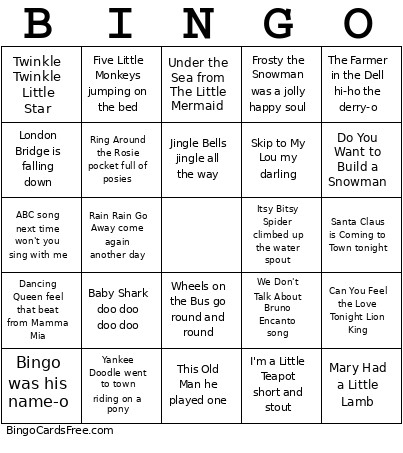 This Music Bingo Cards Game contains following Words or Phrases: ABC song next time won't you sing with me, Baby Shark doo doo doo doo, Bingo was his name-o, Can You Feel the Love Tonight Lion King, Circle of Life from The Lion King, Dancing Queen feel that beat from Mamma Mia, Do You Want to Build a Snowman, Five Little Monkeys jumping on the bed, Frosty the Snowman was a jolly happy soul, Itsy Bitsy Spider climbed up the water spout, I'm a Little Teapot short and stout, Jack and Jill went up the hill, Jingle Bells jingle all the way, Let It Go from Frozen, Let's Go Fly a Kite Mary Poppins song, London Bridge is falling down, Mary Had a Little Lamb, Moana How Far I'll Go across the sea, Rain Rain Go Away come again another day, Ring Around the Rosie pocket full of posies, Row Row Row Your Boat gently down the stream, Santa Claus is Coming to Town tonight, Skip to My Lou my darling, The Farmer in the Dell hi-ho the derry-o, This Old Man he played one, Twinkle Twinkle Little Star, Under the Sea from The Little Mermaid, We Don't Talk About Bruno Encanto song, Wheels on the Bus go round and round, Yankee Doodle went to town riding on a pony.