
Muskowekwan 4 Pillars Saulteaux Bingo Cards - Print Free or Customize
Print free Muskowekwan 4 Pillars Saulteaux bingo cards or modify, unlimited prints! Choose from 42,200+ templates or use our bingo card generator. Add numbers, phrases, photos, or any combination. Play using printable PDF, online bingo cards, and our online bingo caller, or mix physical and digital.
About: This bingo card is a fun and educational way to explore basic Anishinaabemowin (Ojibwe) vocabulary, featuring animals, nature, family, body parts, and common activities. It's perfect for language learners, cultural workshops, or classrooms looking to engage students with Indigenous language in an interactive setting while building confidence with pronunciation and word recognition.
How To: To download a printable PDF, click the Print button. You can change the card quantity and other print preferences on the Print tab. Grid items and free space content can be added on the Basic tab. Appearance can be fully customized on the relevant tabs, or you can easily search any option using the 🔍 tab.
How to play Muskowekwan 4 Pillars Saulteaux Bingo Cards?
- Virtual Players: Click on the Play button above, and then click on the 🎫 button.
- Printed Caller: Print PDF calling list & calling slips and manually choose the slips.
- Printed Players: Print PDF bingo cards and manually write on the cards.
- Virtual Caller: Click on the Play button above.
- Hybrid Mode: Choose any combination above. For instance, caller can be either Paper or Virtual. And players can be Paper or Virtual or a mix of both.
Step-By-Step:
- Start by saving the Muskowekwan 4 Pillars Saulteaux Bingo PDF by clicking on the "Print" button above.
- Open the PDF and print it.
- For random calling, you can print another copy of the call list, cut, fold and then pull them randomly at play time.
- Cut the bingo cards at the cut marks if there are more than 1 bingo cards per page.
- Distribute one card per player. For marking, you can use crayons. Crayons are the cheapest.
- Choose one person to be the caller. If you are playing in a small group, the caller may also play along with their own Bingo card.
- The caller initiates the play by randomly picking an item from the call list and announcing it to everyone.
- The players check their cards to see if they have the called word. If they do, they cross off that word.
- The first player to complete a horizontal, vertical, or a diagonal line of marked items announces "Bingo!" and wins the play.
- The caller confirms that the items crossed off form a proper line as per the Bingo card and call list.
- You can play for different patterns or a full card blackout for a longer play.
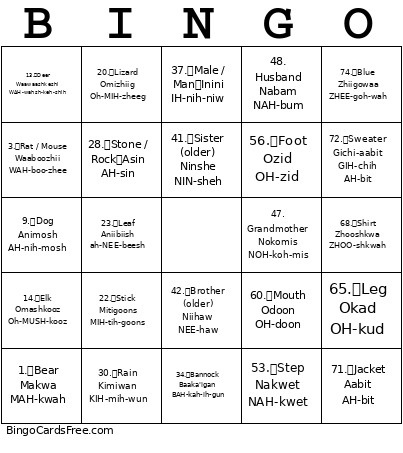 This Muskowekwan 4 Pillars Saulteaux Bingo Cards Game contains following Words or Phrases: 1. Bear Makwa MAH-kwah, 2. Rabbit Waabooz WAH-booze, 3. Rat / Mouse Waaboozhii WAH-boo-zhee, 4. Muskrat Wazhashk WAH-zhushk, 5. Moose Mooz MOOZ, 6. Duck Zhiishiib ZHEE-sheeb, 7. Chicken Baakaan bah-KAHN, 8. Horse Mishtadim MISH-tah-dim, 9. Dog Animosh AH-nih-mosh, 10. Bird Bineshiinh BIH-neh-sheeny, 11. Eagle Migizi MIH-gih-zih, 12. Thunderbird Binesi BEH-neh-see, 13. Deer Waawaashkeshi WAH-wahsh-keh-shih, 14. Elk Omashkooz Oh-MUSH-kooz, 15. Bison / Buffalo Paskwiiwimostim PUS-kwee-wih-moh-stim, -c-, 16. Fly (insect) Ojijaag Oh-JIH-jahg, 17. Fish Giigoonh GEE-goon, 18. Turtle Mikinak MIH-kih-nuk, 19. Frog Omagakii Oh-MAH-guh-kee, 20. Lizard Omizhiig Oh-MIH-zheeg, 21. Tree Mitig MIH-tig, 22. Stick Mitigoons MIH-tih-goons, 23. Leaf Aniibiish ah-NEE-beesh, 24. Grass Mashkosiim MUSH-koh-seem, 25. Sky Ishpiming ISH-pih-ming, 26. Sun Giizis GEE-zis, 27. Moon Dibikigiizis DIH-bih-kih-GEE-zis, 28. Stone / Rock Asin AH-sin, 29. Wind Noodin NOO-din, 30. Rain Kimiwan KIH-mih-wun, -c-, 31. Night Dibikan DIH-bih-kun, 32. Day Giizhigad GEE-zhih-gud, 33. Food Mijim MIH-jim, 34. Bannock Baaka'igan BAH-kah-ih-gun, 35. Soup Nabob NAH-bob, 36. Cooking Jiibaakwe JEE-bah-kweh, 37. Male / Man Inini IH-nih-niw, 38. Female / Woman Ikwe IH-kweh, 39. Girl Ikwezens IH-kweh-zens, 40. Boy Gwiizens GWIH-zens, 41. Sister (older) Ninshe NIN-sheh, 42. Brother (older) Niihaw NEE-haw, 43. Cousin Niijikiwenh NEE-jih-kih-weny, 44. Auntie Nooshenh NOO-sheh-ny, 45. Uncle Zhishe ZHISH-eh, -c-, 46. Grandpa Mishoomis MIH-shoo-mis, 47. Grandmother Nokomis NOH-koh-mis, 48. Husband Nabam NAH-bum, 49. Wife Wikwem WIK-wem, 50. Walk Bimose BIH-moh-seh, 51. Run Bimidaashii BIH-mih-DAH-shee, 52. Skip / Bounce Bapapii BAH-puh-pee, 53. Step Nakwet NAH-kwet, 54. Dance Niimi NEE-mih, 55. Sing Nagamoh NAH-guh-moh, 56. Foot Ozid OH-zid, 57. Hand Ininji IH-nin-jih, 58. Eye Giniizhig Gih-NEE-zhig, 59. Nose Yaawid YAH-wid, 60. Mouth Odoon OH-doon, -c-, 61. Ear Otaawin Oh-TAH-win, 62. Hair Jishib JISH-ib, 63. Head Eshtigwaan Esh-TIH-gwaan, 64. Arm Oninji Oh-NIN-jih, 65. Leg Okad OH-kud, 66. Clothing Biigiig BEE-geeg, 67. Shoe / Moccasin Makizin MAH-kih-zin, 68. Shirt Zhooshkwa ZHOO-shkwah, 69. Pants Miikana MEE-kah-nah, 70. Dress Gichi-biiwaan GIH-chih BEE-wahn, 71. Jacket Aabit AH-bit, 72. Sweater Gichi-aabit GIH-chih AH-bit, 73. Red Miskwaa MIS-kwah, 74. Blue Zhiigowaa ZHEE-goh-wah, 75. Green Miskwaak MIS-kwaa-k.