Print free 4/2 #2 bingo cards or modify,
limitless cards! Pick from 37,300+ designs or use the bingo card generator.
Add numbers, words, pictures, or all of them.
Play using printed PDF, digital bingo cards,
and the digital bingo caller, or mix physical and digital.
About: This bingo card is your ticket to a musical tour of New York City, celebrating legendary songs and artists who’ve captured its spirit. Perfect for music lovers or party guests at a Big Apple-themed event, it sets a lively tone and sparks nostalgia for the city’s vibrant culture through iconic tunes spanning generations and genres.
How To: To get a printable PDF, click the Print button.
You can change the card count and other
printing preferences on the Print tab.
Grid items and free space text can be edited on the Basic tab.
Appearance can be completely customized on the
corresponding tabs, or you can easily locate any setting
using the 🔍 tab.
How to play 4/2 #2 Bingo Cards?
Digital Caller: Click on the Play button above.
Printed Players: Print PDF bingo cards and physically cross off the cards.
Printed Caller: Print PDF calling list & calling slips and physically choose the slips.
Digital Players: Click on the Play button above, and then click on the 🎫 button.
Mixed Mode: Pick any combination above.
For instance, caller can be either Paper or Digital.
And players can be Paper or Digital or a combination of both.
Step-By-Step:
Start by downloading the 4/2 #2 PDF by clicking on the "Print" button above.
Open the PDF and print a hard copy.
For random drawing, you can print another copy of the call list, cut, fold and then pick them randomly at play time.
Cut the bingo cards at the cut lines if there are more than 1 bingo cards per page.
Distribute one card per player. For marking, you can use markers. Crayons cost the least.
Pick one person to be the caller. If you are playing in a small group, the caller can as well play along with their own Bingo card.
The caller begins the play by randomly drawing an item from the call list and announcing it to everyone.
The players check their cards to see if they have the announced word. If they do, they cross off that word.
The first player to complete a horizontal, vertical, or a diagonal line of marked items shouts "Bingo!" and wins the play.
The caller confirms that the items marked form a proper line according to the Bingo card and call list.
You can play for different patterns or a full card blackout for an extended play.
This 4/2 #2 Bingo Cards Game contains following Words or Phrases: Rockaway Beach – Ramones, New York State of Mind – Billy Joel, Shattered – The Rolling Stones, Downtown – Petula Clark, Nights on Broadway – Bee Gees, Jenny From the Block – J. Lo, Ho Hey – The Lumineers, Downtown Train – Tom Waits, Tenth Avenue Freeze Out – Bruce Springsteen, No Sleep Til Brooklyn – Beastie Boys, Theme From New York, New York – Frank Sinatra, 6th Avenue Heartache – The Wallflowers, The Message – Grandmaster Flash, Uptown Girl – Billy Joel, Empire State of Mind – Jay-Z, Alicia Keys, Welcome to New York – Taylor Swift, New York Groove – Hello, On Broadway – The Drifters, New York New York – Grandmaster Flash, You Don't Mess Around with Jim – Jim Croce, Black Jesus + Amen Fashion – Lady Gaga, I Love New York – Madonna, Angel of Harlem – U2, Down & Out in New York City – James Brown, New York, New York – Liza Minnelli, Englishman in New York – Sting, The Only Living Boy in New York – Simon & Garfunkel, Chelsea Morning – Joni Mitchell, Brooklyn's Finest – Jay-Z, Notorious B.I.G..

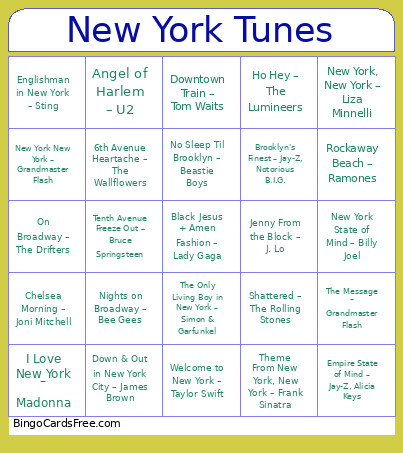 This 4/2 #2 Bingo Cards Game contains following Words or Phrases: Rockaway Beach – Ramones, New York State of Mind – Billy Joel, Shattered – The Rolling Stones, Downtown – Petula Clark, Nights on Broadway – Bee Gees, Jenny From the Block – J. Lo, Ho Hey – The Lumineers, Downtown Train – Tom Waits, Tenth Avenue Freeze Out – Bruce Springsteen, No Sleep Til Brooklyn – Beastie Boys, Theme From New York, New York – Frank Sinatra, 6th Avenue Heartache – The Wallflowers, The Message – Grandmaster Flash, Uptown Girl – Billy Joel, Empire State of Mind – Jay-Z, Alicia Keys, Welcome to New York – Taylor Swift, New York Groove – Hello, On Broadway – The Drifters, New York New York – Grandmaster Flash, You Don't Mess Around with Jim – Jim Croce, Black Jesus + Amen Fashion – Lady Gaga, I Love New York – Madonna, Angel of Harlem – U2, Down & Out in New York City – James Brown, New York, New York – Liza Minnelli, Englishman in New York – Sting, The Only Living Boy in New York – Simon & Garfunkel, Chelsea Morning – Joni Mitchell, Brooklyn's Finest – Jay-Z, Notorious B.I.G..