Print free NIDHC bingo cards or modify,
unlimited cards! Select from 42,200+ templates or use our bingo card generator.
Add numbers, words, pictures, or any combination.
Play using PDF printouts, virtual bingo cards,
and our virtual bingo caller, or combine all formats.
About: Get ready for classic moments from any lively federal team meeting with this bingo card! Perfect for seasoned staff or new colleagues, it captures the quirky phrases, running jokes, and inevitable mishaps that happen when leadership, acronyms, and technology collide. Use it during virtual or in-person briefings to lighten the mood and build camaraderie.
How To: To download a PDF to print, click the Print button.
You can adjust the card quantity and other
printing preferences on the Print tab.
Grid items and free space content can be added on the Basic tab.
Appearance can be fully customized on the
relevant tabs, or you can easily find any option
on the 🔍 tab.
How to play NIDHC Bingo Cards?
Online Caller: Click on the Play button above.
Paper Players: Print PDF bingo cards and physically mark the cards.
Paper Caller: Print PDF calling list & calling slips and physically draw the slips.
Online Players: Click on the Play button above, and then click on the 🎫 button.
Hybrid Mode: Pick any combination above.
For instance, caller can be either Printed or Online.
And players can be Printed or Online or a combo of both.
Step-By-Step:
Start by saving the NIDHC PDF by clicking on the "Print" button above.
Open the PDF and print it.
For random calling, you can print another copy of the call list, cut, fold and then draw them randomly at play time.
Cut the bingo cards at the cut marks if there are more than 1 bingo cards per page.
Give one card to each player. For marking, you can use crayons. Crayons are the cheapest.
Pick one person to be the caller. If you are playing in a small group, the caller may as well play along with their own Bingo card.
The caller starts the play by randomly drawing an item from the call list and saying it to all players.
The players look at their cards to see if they have the announced word. If they do, they cross off that word.
The first player to complete a horizontal, vertical, or a diagonal line of crossed items announces "Bingo!" and wins the play.
The caller confirms that the items crossed off form a correct line as per the Bingo card and call list.
You can play for varied patterns or a full card blackout for a longer play.
This NIDHC Bingo Cards Game contains following Words or Phrases: "Go closer to the mic", Non- standard pronunciation of NIDHC, Julian uses a word no one knows, "…We Met With…", G-Geoff, J-Jeff, Scott says "stuff", Col E describes a thought she had "on her long run", Leadership announces we are hiring yet another new position, Someone goes >10 min over their allotted time, "For those of us here in the room…", Jeff comes in late, Leadership mislabels someone's position title, Someone notes that they updated the slide but "it didn't make it on this version", Someone calls it "TE" instead of "T&E" and then Noelle attacks them, Someone mis-ranks one of the Active Duty personnel, Juan has to fix the AV, Someone tells Jacqui to keep it short, Jeff talks about "purpose over process", Stephanie makes a face at something someone says, Jessica shuts down anything about MCART, Someone gets the P&P directorate name wrong (Planning & Partnership), Online participants have their cameras off, Clark leaves early, T&E gets forgotten in some way, Ramey talks about the snake diagram, Someone calls in sick to the Offsite, There's a new program no one has heard of before, Leadership announces someone's promotion, "The Network", "Legacy CGHE", "Legacy NCDMPH", "Out stations", "Full Operational Capability", "America First" or "America First Global Health Strategy", "Matrixed organization", "The Enterprise", "Official Travel Approval", "How can we leverage our ecosystem partners to…", "This super super matters".

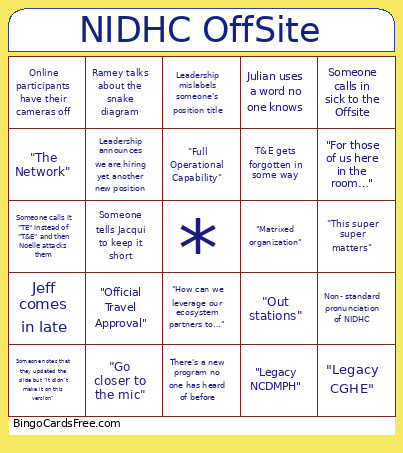 This NIDHC Bingo Cards Game contains following Words or Phrases: "Go closer to the mic", Non- standard pronunciation of NIDHC, Julian uses a word no one knows, "…We Met With…", G-Geoff, J-Jeff, Scott says "stuff", Col E describes a thought she had "on her long run", Leadership announces we are hiring yet another new position, Someone goes >10 min over their allotted time, "For those of us here in the room…", Jeff comes in late, Leadership mislabels someone's position title, Someone notes that they updated the slide but "it didn't make it on this version", Someone calls it "TE" instead of "T&E" and then Noelle attacks them, Someone mis-ranks one of the Active Duty personnel, Juan has to fix the AV, Someone tells Jacqui to keep it short, Jeff talks about "purpose over process", Stephanie makes a face at something someone says, Jessica shuts down anything about MCART, Someone gets the P&P directorate name wrong (Planning & Partnership), Online participants have their cameras off, Clark leaves early, T&E gets forgotten in some way, Ramey talks about the snake diagram, Someone calls in sick to the Offsite, There's a new program no one has heard of before, Leadership announces someone's promotion, "The Network", "Legacy CGHE", "Legacy NCDMPH", "Out stations", "Full Operational Capability", "America First" or "America First Global Health Strategy", "Matrixed organization", "The Enterprise", "Official Travel Approval", "How can we leverage our ecosystem partners to…", "This super super matters".