
NLGER Bingo Cards - Print Free or Customize
Print free NLGER bingo cards or customize, unlimited prints! Select from 38,000+ templates or use our bingo card generator. Add numbers, phrases, photos, or mix them all. Play using printed PDF, digital bingo cards, and our digital bingo caller, or combine all formats.
About: This bingo card is perfect for breaking the ice and sparking conversations at a casual social gathering or party, especially in an international or diverse community. With prompts that celebrate unique backgrounds, quirky interests, and surprising talents, it’s all about discovering fun facts and finding unexpected connections among the group. Ideal for mixed-age groups, reunions, or team-building events, this card brings out everyone’s personality.
How To: To save a printable PDF, click the Print button. You can adjust the number of cards and other print preferences on the Print tab. Grid items and free space content can be changed on the Basic tab. Appearance can be completely personalized on the relevant tabs, or you can quickly locate any option on the 🔍 tab.
How to play NLGER Bingo Cards?
- Digital Caller: Click on the Play button above.
- Printed Caller: Print PDF calling list & calling slips and manually select the slips.
- Digital Players: Click on the Play button above, and then click on the 🎫 button.
- Printed Players: Print PDF bingo cards and manually cross off the cards.
- Mixed Play: Select any combination above. For example, caller can be either Paper or Digital. And players can be Paper or Digital or a combo of both.
Step-By-Step:
- Start by downloading the NLGER PDF by clicking on the "Print" button above.
- Open the PDF and print it.
- For random drawing, you can print another copy of the call list, cut, fold and then pull them randomly at play time.
- Cut the bingo cards at the cut lines if there are more than 1 bingo cards per page.
- Distribute one card per player. For marking, you can use pens. Crayons are the cheapest.
- Select one person to be the caller. If you are playing in a small group, the caller may also play along with their own Bingo card.
- The caller begins the game by randomly drawing an item from the call list and calling out it to all players.
- The players scan their cards to see if they have the called word. If they do, they dab that word.
- The first player to finish a horizontal, vertical, or a diagonal line of crossed items shouts "Bingo!" and wins the game.
- The caller checks that the items marked form a correct line as per the Bingo card and call list.
- You can play for multiple patterns or a full card blackout for an extended game.
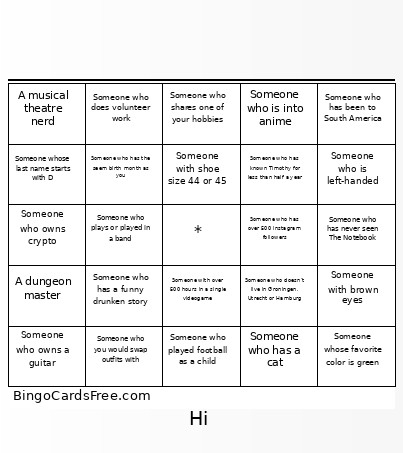 This NLGER Bingo Cards Game contains following Words or Phrases: Someone who has a cat, Someone who lived in more than one country, A vegetarian, Someone who doesn't live in Groningen, Utrecht or Hamburg, Someone who went to high school with Timothy, Someone who has lived with Femke, Someone whose last name starts with D, Someone who works or studies in the medical field, A Dutch person who can speak German, Someone who has been to South America, Someone who knows how to crochet, Someone who played football as a child, Someone who owns a guitar, Someone who read more than 10 books last year, Someone who has a funny drunken story, Someone who has the seem birth month as you, A musical theatre nerd, A dungeon master, Someone with over 500 hours in a single videogame, Someone who owns more than 10 houseplants, Someone who knows Femke for more than 7 years, Someone who is 3 years older or younger than yourself, Someone with shoe size 44 or 45, Someone who had Chappell Roan in their Spotify Wrapped, Someone who shaved all their hair off, Someone who has a funny nickname, Someone who is planning to go to a concert in the next two months, Someone who has never seen The Notebook, Someone who likes pineapple on pizza, Someone with a tattoo, Someone who has broken a bone, Someone who has had pet rats, Someone who is left-handed, Someone whose favorite color is green, Someone with brown eyes, Someone who moved in the last 6 months, Someone who has known Timothy for less than half a year, Someone who has gone camping in the last year, Someone who speaks another language other than English, Dutch or German fluently, Someone who shares one of your hobbies, Someone who plays or played in a band, Someone who you would swap outfits with, Someone who has been to a Michelin star restaurant, Someone who plays the New York Times puzzle, Someone who has two or more siblings, Someone that you don't know but would have a beer with another time, Someone who is into anime, Someone who does volunteer work, Someone who owns crypto, Someone who has over 500 instagram followers.