Print free Nookers bingo cards or personalize,
limitless prints! Choose from 41,500+ designs or use our bingo card generator.
Add numbers, words, photos, or mix them all.
Play using PDF prints, online bingo cards,
and our online bingo caller, or go hybrid.
About: This bingo card perfectly captures the chaos and humor of group chats where someone just cannot type a name correctly. It’s great for friends, coworkers, or online communities who know the pain of autocorrect battles, persistent typos, and the running jokes that spring up around them. Expect lots of laughs and plenty of “you had to be there” moments!
How To: To download a PDF to print, click the Print button.
You can adjust the card count and other
printing preferences on the Print tab.
Grid items and free space content can be edited on the Basic tab.
Appearance can be completely personalized on the
corresponding tabs, or you can quickly search any setting
on the 🔍 tab.
How to play Nookers Bingo Cards?
Digital Players: Click on the Play button above, and then click on the 🎫 button.
Paper Caller: Print PDF calling list & calling slips and physically select the slips.
Digital Caller: Click on the Play button above.
Paper Players: Print PDF bingo cards and physically write on the cards.
Combo Mode: Pick any combination above.
For example, caller can be either Printed or Digital.
And players can be Printed or Digital or a mix of both.
Step-By-Step:
Start by downloading the Nookers PDF by clicking on the "Print" button above.
Open the PDF and print a hard copy.
For random calling, you can print another copy of the call list, cut, fold and then pull them randomly at play time.
Cut the bingo cards at the cut lines if there are more than 1 bingo cards per page.
Give one card to each player. For marking, you can use markers. Crayons are the cheapest.
Pick one person to be the caller. If you are playing in a small group, the caller can also play along with their own Bingo card.
The caller opens the play by randomly pulling an item from the call list and announcing it to everyone.
The players check their cards to see if they have the called word. If they do, they mark that word.
The first player to complete a horizontal, vertical, or a diagonal line of crossed items yells "Bingo!" and wins the play.
The caller verifies that the items crossed off form a proper line according to the Bingo card and call list.
You can play for different patterns or a full card blackout for an extended play.
This Nookers Bingo Cards Game contains following Words or Phrases: Missing two vowels, Adds a silent letter that never belonged, One letter correct, everything else feral, Capitalizes the wrong letter, Alternates caps like it's mocking us, Turns the name into an acronym, Uses a letter that isn't even in the name, Types it correctly once, wrong the next time, Autocorrect to a person who is not here, Autocorrect to food, Autocorrect to a medical term, Autocorrect to something painfully wholesome, Autocorrect to a curse word, Autocorrect makes it longer, Fixes autocorrect… autocorrect fights back, Says "why would it change to THAT", Gives up and recalls the message, "You know who I mean", "My phone hates me", Blames autocorrect, Laugh reacts instead of fixing it, Sends "💀" and moves on, Pretends it was intentional, Says "you knew what I meant", Misspells the same word twice in one message, Misspells two different names in five minutes, Misspells a name in a reply to that person, Typos while apologizing for a typo, Misspells name in a compliment, Misspells an admin, Misspells someone who JUST corrected her, Someone else repeats the typo "by accident", Someone adopts the typo too, Three people correct the typo, Someone makes a nickname from it immediately, Typo becomes a meme, Typo sparks a whole new chat, Typo gets quoted, Typo becomes a reaction emoji, Typo survives longer than the correction, Types "sorry" without fixing the name, Corrects the wrong name, Says the word out loudly (all caps) still misspells, Tags the wrong person entirely, Uses a completely new nickname just to avoid the typo, Rage-types the name in ALL CAPS, Sends TWO more words .. also wrong, Misspells every word in the message, Correction introduces a brand-new typo, Autocorrect replaces word with an emoji, Says "I give up" and posts a pic, Misspells while being smug.

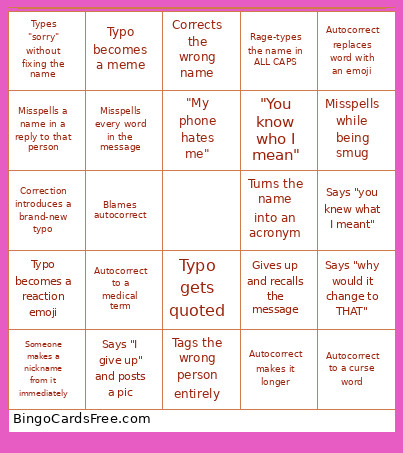 This Nookers Bingo Cards Game contains following Words or Phrases: Missing two vowels, Adds a silent letter that never belonged, One letter correct, everything else feral, Capitalizes the wrong letter, Alternates caps like it's mocking us, Turns the name into an acronym, Uses a letter that isn't even in the name, Types it correctly once, wrong the next time, Autocorrect to a person who is not here, Autocorrect to food, Autocorrect to a medical term, Autocorrect to something painfully wholesome, Autocorrect to a curse word, Autocorrect makes it longer, Fixes autocorrect… autocorrect fights back, Says "why would it change to THAT", Gives up and recalls the message, "You know who I mean", "My phone hates me", Blames autocorrect, Laugh reacts instead of fixing it, Sends "💀" and moves on, Pretends it was intentional, Says "you knew what I meant", Misspells the same word twice in one message, Misspells two different names in five minutes, Misspells a name in a reply to that person, Typos while apologizing for a typo, Misspells name in a compliment, Misspells an admin, Misspells someone who JUST corrected her, Someone else repeats the typo "by accident", Someone adopts the typo too, Three people correct the typo, Someone makes a nickname from it immediately, Typo becomes a meme, Typo sparks a whole new chat, Typo gets quoted, Typo becomes a reaction emoji, Typo survives longer than the correction, Types "sorry" without fixing the name, Corrects the wrong name, Says the word out loudly (all caps) still misspells, Tags the wrong person entirely, Uses a completely new nickname just to avoid the typo, Rage-types the name in ALL CAPS, Sends TWO more words .. also wrong, Misspells every word in the message, Correction introduces a brand-new typo, Autocorrect replaces word with an emoji, Says "I give up" and posts a pic, Misspells while being smug.