Print free OJKZ Muziekbingo cards or personalize,
limitless cards! Select from 41,500+ templates or use the bingo card generator.
Add numbers, words, pictures, or any combination.
Play using printed PDF, virtual bingo cards,
and the virtual bingo caller, or combine all formats.
How To: To get a printable PDF, click the Print button.
You can modify the number of cards and other
printing preferences on the Print tab.
Grid items and free space text can be added on the Basic tab.
Appearance can be totally personalized on the
corresponding tabs, or you can easily find any setting
on the 🔍 tab.
How to play OJKZ Muziekbingo Cards?
Online Caller: Click on the Play button above.
Online Players: Click on the Play button above, and then click on the 🎫 button.
Paper Players: Print PDF bingo cards and physically write on the cards.
Paper Caller: Print PDF calling list & calling slips and physically pick the slips.
Combo Play: Pick any combination above.
For instance, caller can be either Printed or Online.
And players can be Printed or Online or a combination of both.
Step-By-Step:
Start by downloading the OJKZ Muziekbingo PDF by clicking on the "Print" button above.
Open the PDF and print a hard copy.
For random calling, you can print another copy of the call list, cut, fold and then draw them randomly at play time.
Cut the bingo cards at the cut marks if there are more than 1 bingo cards per page.
Give one card to each player. For marking, you can use pens. Crayons are the cheapest.
Pick one person to be the caller. If you are playing in a small group, the caller may also play along with their own Bingo card.
The caller opens the game by randomly picking an item from the call list and saying it to all players.
The players look at their cards to see if they have the announced word. If they do, they cross off that word.
The first player to complete a horizontal, vertical, or a diagonal line of crossed items yells "Bingo!" and wins the play.
The caller verifies that the items marked form a proper line according to the Bingo card and call list.
You can play for different patterns or a full card blackout for a longer play.
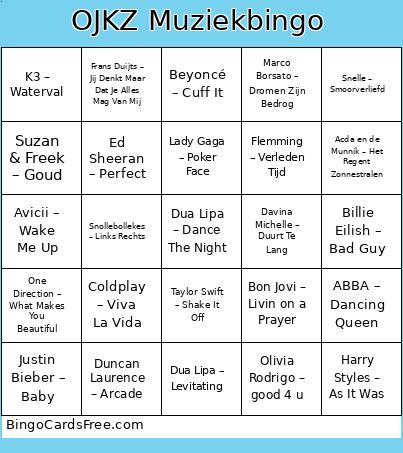
This OJKZ Muziekbingo Cards Game contains following Words or Phrases: Effe Serieus – Baila de Gasolina, Kind van de Duivel – Jebroer, Suzan & Freek – Als Het Avond Is, Antoon – Hallo, Snollebollekes – Links Rechts, Kris Kross Amsterdam, Kraantje Pappie & Tabitha – Moment, K3 – Waterval, Flemming – Automatisch, Guus Meeuwis – Brabant, Frenna & Mula B – Viraal, Davina Michelle – Duurt Te Lang, Pommelien Thijs – Erop of Eronder, Kinderen voor Kinderen – Fitlala, Bizzey, Kraantje Pappie & Chivv – Ja!, Duncan Laurence – Arcade, Froukje – Ik Wil Dansen, Snelle – Reünie, Beyoncé – Single Ladies, ABBA – Dancing Queen, Tino Martin – Zij Weet Het, Harry Styles – As It Was, Olivia Rodrigo – good 4 u, Taylor Swift – Shake It Off, Dua Lipa – Dance The Night, DJ Paul Elstak – Rainbow In The Sky, Queen – Don't Stop Me Now, Kinderen voor Kinderen – Op Een Onbewoond Eiland, Flemming – Verleden Tijd, Suzan & Freek – Goud, Snelle – Smoorverliefd, Antoon – Hotelschool, K3 – Oya Lélé, Maan & Goldband – Stiekem, Acda en de Munnik – Het Regent Zonnestralen, Tabitha – Het Spijt Me Niet, Ronnie Flex – Blijf Bij Mij, Marco Borsato – Dromen Zijn Bedrog, Armin van Buuren – This Is What It Feels Like, Beyoncé – Cuff It, Lil Kleine – Drank & Drugs, One Direction – What Makes You Beautiful, Camila Cabello – Havana, André Hazes Jr. – Leef, Gustaph – Because of You, Dua Lipa – Levitating, Avicii – Wake Me Up, Coldplay – Viva La Vida, Billie Eilish – Bad Guy, Justin Bieber – Baby, Miley Cyrus – Flowers, Lady Gaga – Poker Face, Frans Duijts – Jij Denkt Maar Dat Je Alles Mag Van Mij, Django Wagner – Kali, Europapa – Joost, Robbie Williams – Angels, Bon Jovi – Livin on a Prayer, Ed Sheeran – Perfect, Neil Diamond – Sweet Caroline.

 This OJKZ Muziekbingo Cards Game contains following Words or Phrases: Effe Serieus – Baila de Gasolina, Kind van de Duivel – Jebroer, Suzan & Freek – Als Het Avond Is, Antoon – Hallo, Snollebollekes – Links Rechts, Kris Kross Amsterdam, Kraantje Pappie & Tabitha – Moment, K3 – Waterval, Flemming – Automatisch, Guus Meeuwis – Brabant, Frenna & Mula B – Viraal, Davina Michelle – Duurt Te Lang, Pommelien Thijs – Erop of Eronder, Kinderen voor Kinderen – Fitlala, Bizzey, Kraantje Pappie & Chivv – Ja!, Duncan Laurence – Arcade, Froukje – Ik Wil Dansen, Snelle – Reünie, Beyoncé – Single Ladies, ABBA – Dancing Queen, Tino Martin – Zij Weet Het, Harry Styles – As It Was, Olivia Rodrigo – good 4 u, Taylor Swift – Shake It Off, Dua Lipa – Dance The Night, DJ Paul Elstak – Rainbow In The Sky, Queen – Don't Stop Me Now, Kinderen voor Kinderen – Op Een Onbewoond Eiland, Flemming – Verleden Tijd, Suzan & Freek – Goud, Snelle – Smoorverliefd, Antoon – Hotelschool, K3 – Oya Lélé, Maan & Goldband – Stiekem, Acda en de Munnik – Het Regent Zonnestralen, Tabitha – Het Spijt Me Niet, Ronnie Flex – Blijf Bij Mij, Marco Borsato – Dromen Zijn Bedrog, Armin van Buuren – This Is What It Feels Like, Beyoncé – Cuff It, Lil Kleine – Drank & Drugs, One Direction – What Makes You Beautiful, Camila Cabello – Havana, André Hazes Jr. – Leef, Gustaph – Because of You, Dua Lipa – Levitating, Avicii – Wake Me Up, Coldplay – Viva La Vida, Billie Eilish – Bad Guy, Justin Bieber – Baby, Miley Cyrus – Flowers, Lady Gaga – Poker Face, Frans Duijts – Jij Denkt Maar Dat Je Alles Mag Van Mij, Django Wagner – Kali, Europapa – Joost, Robbie Williams – Angels, Bon Jovi – Livin on a Prayer, Ed Sheeran – Perfect, Neil Diamond – Sweet Caroline.