
PAX Bingo Cards - Print Free or Customize
Print free PAX bingo cards or adjust them, limitless prints! Choose from 41,500+ templates or use our bingo card generator. Add numbers, phrases, photos, or mix them all. Play using PDF printouts, virtual bingo cards, and our virtual bingo caller, or combine all formats.
About: This bingo card captures the everyday quirks, classic responses, and inside jokes of anyone working with PowerSchool or K-12 student information systems. Perfect for data managers, IT staff, registrars, and tech support teams at schools or districts, this card’s lighthearted tone will bring laughter to any meeting or training session about those recurring headaches and victories in school data management.
How To: To save a printable PDF, click the Print button. You can change the card count and other print settings on the Print tab. Grid items and free space content can be changed on the Basic tab. Appearance can be fully customized on the relevant tabs, or you can easily locate any setting on the 🔍 tab.
How to play PAX Bingo Cards?
- Paper Players: Print PDF bingo cards and physically write on the cards.
- Virtual Caller: Click on the Play button above.
- Paper Caller: Print PDF calling list & calling slips and physically draw the slips.
- Virtual Players: Click on the Play button above, and then click on the 🎫 button.
- Mixed Play: Choose any combination above. For example, caller can be either Printed or Virtual. And players can be Printed or Virtual or a combo of both.
Step-By-Step:
- Start by downloading the PAX Bingo PDF by clicking on the "Print" button above.
- Open the PDF and print a hard copy.
- For random drawing, you can print another copy of the call list, cut, fold and then pull them randomly at play time.
- Cut the bingo cards at the cut lines if there are greater than 1 bingo cards per page.
- Give one card to each player. For marking, you can use pencils. Crayons are the cheapest.
- Choose one person to be the caller. If you are playing in a small group, the caller may also play along with their own Bingo card.
- The caller starts the play by randomly picking an item from the call list and calling out it to all players.
- The players check their cards to see if they have the announced word. If they do, they cross off that word.
- The first player to finish a horizontal, vertical, or a diagonal line of crossed items announces "Bingo!" and wins the game.
- The caller confirms that the items crossed off form a correct line as per the Bingo card and call list.
- You can play for varied patterns or a full card blackout for a longer game.
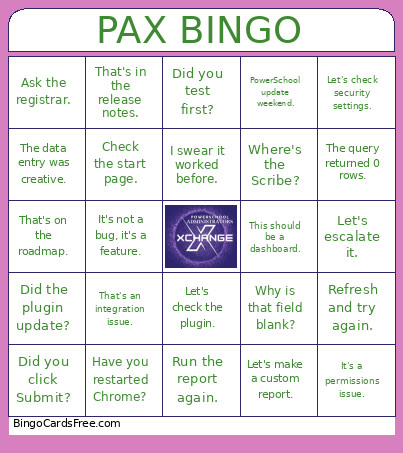 This PAX Bingo Cards Game contains following Words or Phrases: Did you clear your cache?, Have you tried Chrome?, It's a permissions issue., That worked yesterday., Let's check the plugin., Submit a support case., What school are you logged into?, Try a Quick Export., That's in System Setup., Did you click Submit?, The data is there somewhere., PowerSchool is being PowerSchool., That's a state reporting problem., Can you reproduce it?, Check the student's transfer info., That's a customization., It works in test., Let's run DDE., Who changed that?, I swear it worked before., Refresh and try again., PowerScheduler season is here., Did you store grades?, Check the attendance conversion., That's a historical grade., Let's look at the logs., It's probably cached., Can you send a screenshot?, That's expected behavior., It's not a bug, it's a feature., Let's compare two students., What does SQL say?, Run the report again., Check the field name., Did the plugin update?, The state changed the rules., Another duplicate student., Let's escalate it., Have you checked PowerSource?, That's in the release notes., Who owns this process?, I need more coffee for this., Try it as an admin., The parent called again., That attendance code looks wrong., Let's check enrollment history., I hate summer rollover., Summer rollover survived., Why are there 14 contacts?, It's a custom page., The teacher says it's missing., The student says they submitted it., That's an SIS issue., That's a Schoology issue., That's an integration issue., Nobody knows who built that., Legacy customization detected., Works for me., Not working for me., Check the start page., Did you search by student number?, Let's look in U_Students., Let's look in Students., The query ran for 20 minutes., The query returned 0 rows., The query returned 50,000 rows., Can you export that?, The principal needs it today., The state needs it yesterday., Another attendance audit., Who has access to that?, Can we automate this?, This should be a report., This should be a dashboard., This should be a ticket., Please don't edit production., Did you test first?, Let's check security settings., PowerSchool update weekend., Unexpected error occurred., That student is special., The school secretary knows., Ask the registrar., Ask state reporting., Ask IT., Ask SQL., Have you restarted Chrome?, Can you share your screen?, Let's create a workaround., That's on the roadmap., The superintendent wants a report., The board meeting is tomorrow., Why is that field blank?, The data entry was creative., Who trained them?, We need documentation., Where's the Scribe?, It's buried in Group Functions., Let's make a custom report., That's definitely a PowerSchool thing..