PITS FRC CHAMPS Bingo Cards - Print Free or Customize
Print free PITS FRC CHAMPS bingo cards or adjust them,
unlimited prints! Pick from 41,500+ designs or use our bingo card generator.
Add numbers, words, pictures, or mix them all.
Play using printable PDF, virtual bingo cards,
and our virtual bingo caller, or combine all formats.
About: This bingo card is a perfect fit for robotics competitions, especially those in the FIRST Robotics world. It highlights everything from unique robot features and programming languages to team quirks and pit decorations. The tone is fun and nerdy, making it ideal for students, mentors, or volunteers looking to spot cool details at an event.
How To: To download a printable PDF, click the Print button.
You can alter the card quantity and other
print settings on the Print tab.
Grid items and free space text can be added on the Basic tab.
Appearance can be totally customized on the
corresponding tabs, or you can quickly find any preference
on the 🔍 tab.
How to play PITS FRC CHAMPS Bingo Cards?
Printed Caller: Print PDF calling list & calling slips and manually pick the slips.
Online Players: Click on the Play button above, and then click on the 🎫 button.
Online Caller: Click on the Play button above.
Printed Players: Print PDF bingo cards and manually write on the cards.
Hybrid Mode: Select any combination above.
For instance, caller can be either Offline or Online.
And players can be Offline or Online or a mix of both.
Step-By-Step:
Start by saving the PITS FRC CHAMPS PDF by clicking on the "Print" button above.
Open the PDF and print it.
For random drawing, you can print another copy of the call list, cut, fold and then pull them randomly at play time.
Cut the bingo cards at the cut marks if there are greater than 1 bingo cards per page.
Distribute one card per player. For marking, you can use crayons. Crayons are the cheapest.
Select one person to be the caller. If you are playing in a small group, the caller may as well play along with their own Bingo card.
The caller starts the game by randomly drawing an item from the call list and calling out it to everyone.
The players check their cards to see if they have the called word. If they do, they mark that word.
The first player to complete a horizontal, vertical, or a diagonal line of crossed items yells "Bingo!" and wins the game.
The caller verifies that the items crossed off form a proper line as per the Bingo card and call list.
You can play for different patterns or a full card blackout for an extended game.
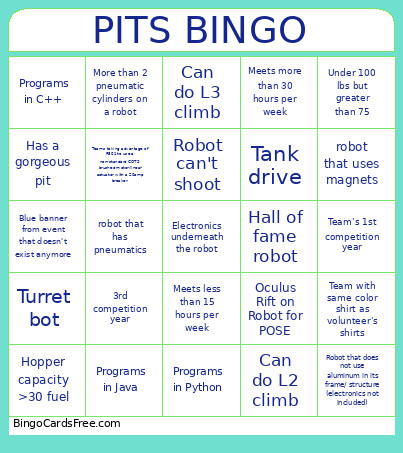
This PITS FRC CHAMPS Bingo Cards Game contains following Words or Phrases: Programs in Java, Team with same color shirt as volunteer's shirts, Under 100 lbs but greater than 75, Four-bar linkage on robot, More than 3 cameras on robot, Thrifty swerve modules, Old game piece in pit decoration, Programs in Python, From another country, 1st competition year, robot that uses magnets, Turret bot, robot that has pneumatics, Meets more than 30 hours per week, Hopper capacity >30 fuel, Spindexer indexer, SDS Swerve Modules, Under 75 lbs, Prime number team, Team's 1st competition year, Old blue banner (before 2010), Roller indexer, Can do L3 climb, Electronics underneath the robot, Belt indexer, Robot can't shoot, More than 2 pneumatic cylinders on a robot, Hall of fame robot, Can only do a L1 climb, Meets less than 15 hours per week, Programs in C++, Robot that does not use aluminum in its frame/ structure (electronics not included), Can do L2 climb, Blue banner from event that doesn't exist anymore, Tank drive, Oculus Rift on Robot for POSE, Krakens, non-swerve, Positional sensors other than IMU or Limelight, 3rd competition year, Has a gorgeous pit, Teams taking advantage of R501 to use a non-standard COTS brushed motor/linear actuator with a 20amp breaker.

 This PITS FRC CHAMPS Bingo Cards Game contains following Words or Phrases: Programs in Java, Team with same color shirt as volunteer's shirts, Under 100 lbs but greater than 75, Four-bar linkage on robot, More than 3 cameras on robot, Thrifty swerve modules, Old game piece in pit decoration, Programs in Python, From another country, 1st competition year, robot that uses magnets, Turret bot, robot that has pneumatics, Meets more than 30 hours per week, Hopper capacity >30 fuel, Spindexer indexer, SDS Swerve Modules, Under 75 lbs, Prime number team, Team's 1st competition year, Old blue banner (before 2010), Roller indexer, Can do L3 climb, Electronics underneath the robot, Belt indexer, Robot can't shoot, More than 2 pneumatic cylinders on a robot, Hall of fame robot, Can only do a L1 climb, Meets less than 15 hours per week, Programs in C++, Robot that does not use aluminum in its frame/ structure (electronics not included), Can do L2 climb, Blue banner from event that doesn't exist anymore, Tank drive, Oculus Rift on Robot for POSE, Krakens, non-swerve, Positional sensors other than IMU or Limelight, 3rd competition year, Has a gorgeous pit, Teams taking advantage of R501 to use a non-standard COTS brushed motor/linear actuator with a 20amp breaker.