
Pokemon Day @ Game Kastle Bingo Cards - Print Free or Customize
Print free Pokemon Day @ Game Kastle bingo cards or alter them, limitless prints! Select from 41,500+ templates or use the bingo card generator. Add numbers, phrases, pictures, or mix them all. Play using PDF printouts, online bingo cards, and the online bingo caller, or mix physical and digital.
About: This bingo card is perfect for a vibrant Pokémon Trading Card Game event, encouraging players to explore new strategies and connect with each other. The tone is friendly and interactive, with plenty of opportunities for creative plays and social engagement. It’s a fun way to keep tournaments or club meetups lively, inclusive, and packed with cool challenges.
How To: To save a PDF to print, click the Print button. You can alter the number of cards and other print options on the Print tab. Grid items and free space content can be changed on the Basic tab. Appearance can be entirely personalized on the relevant tabs, or you can easily locate any preference on the 🔍 tab.
How to play Pokemon Day @ Game Kastle Bingo Cards?
- Paper Caller: Print PDF calling list & calling slips and manually select the slips.
- Virtual Caller: Click on the Play button above.
- Paper Players: Print PDF bingo cards and manually cross off the cards.
- Virtual Players: Click on the Play button above, and then click on the 🎫 button.
- Hybrid Mode: Select any combination above. For example, caller can be either Printed or Virtual. And players can be Printed or Virtual or a combination of both.
Step-By-Step:
- Start by downloading the Pokemon Day @ Game Kastle PDF by clicking on the "Print" button above.
- Open the PDF and print it.
- For random calling, you can print another copy of the call list, cut, fold and then pull them randomly at play time.
- Cut the bingo cards at the cut lines if there are greater than 1 bingo cards per page.
- Distribute one card per player. For marking, you can use crayons. Crayons cost the least.
- Select one person to be the caller. If you are playing in a small group, the caller may as well play along with their own Bingo card.
- The caller initiates the play by randomly picking an item from the call list and saying it to all players.
- The players look at their cards to see if they have the called word. If they do, they mark that word.
- The first player to complete a horizontal, vertical, or a diagonal line of marked items shouts "Bingo!" and wins the game.
- The caller checks that the items crossed off form a correct line according to the Bingo card and call list.
- You can play for different patterns or a full card blackout for a longer game.
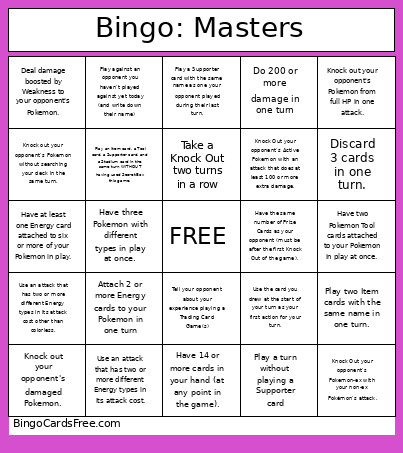 This Pokemon Day @ Game Kastle Bingo Cards Game contains following Words or Phrases: Play against an opponent you haven't played against yet today (and write down their name), Play against an opponent you haven't played against yet today (and write down their name), Play against an opponent you haven't played against yet today (and write down their name), Play against an opponent you haven't played against yet today (and write down their name), Give your opponent two or more handshakes/fist bumps/high-fives (at the beginning of the game and at the end!), Deal damage boosted by Weakness to your opponent's Pokemon., Use an attack that does no damage (after Weakness & Resistance)., Knock Out your opponent's Pokemon with exact damage from an attack, Retreat a damaged Pokemon., Evolve a Pokemon from your hand without using a Trainer card to search for it or put it into play., Use an attack that has two or more different Energy types in its attack cost., Attack with a Pokemon that has an Energy card that provides a different Energy type from that Pokemon's type., Play a turn without playing a Supporter card, Take 3 Prize Cards in one turn., Win a game without using the attacks Itchy Pollen or Oceanic Gloom., Use 3 Abilities in one turn, Have a basic, stage 1, and stage 2 Pokemon in play, Attach 2 or more Energy cards to your Pokemon in one turn, Draw cards 4 times in one turn (your draw for the turn counts as the first), Have 7 or more Pokemon in play, Knock out one of your opponent's Pokemon without using attack damage, Switch your opponent's Active Pokemon twice in one turn., Do 200 or more damage in one turn, Win a game without using the Adrena-Brain ability, Tell your opponent about your experience playing a Trading Card Game(s), Ask your opponent about their experience playing a Trading Card Game(s), Use an Ability of a Pokemon in your Active Spot twice in one turn, Put four Pokemon with the same name in play (Pikachu and Pikachu-ex do NOT have the same name)., Knock Out your opponent's Pokemon-ex with your non-ex Pokémon's attack., Knock Out your opponent's Pokemon on the bench., Retreat your Active Pokemon by discarding fewer Energy than its printed Retreat Cost., Have two Pokemon Tool cards attached to your Pokemon in play at once., Evolve 3 of your Pokemon in one turn., Have at least one Energy card attached to six or more of your Pokemon in play., Search for a Pokemon, Trainer, and Energy card in one game., Play a game without playing a supporter card, Have 14 or more cards in your hand (at any point in the game)., Have the same ACE SPEC in your discard pile as your opponent., Win the game by taking excess prize cards (i.e. take a 3 prize turn when you only have 2 prizes left), Discard 5 or more cards in one turn, Play Lillie's Determination or Professor's Research as your last card in hand (your opponent should give you a high-five!)., Play Nest Ball and Ultra Ball in the same turn, Play an Item card, a Tool card, a Supporter card, and a Stadium card in the same turn WITHOUT having used Secret Box this game., Knock out your opponent's Pokemon without drawing extra cards in the same turn (your draw at the start of your turn does not count)., Knock out your opponent's Pokemon without searching your deck in the same turn., Play 4 Item cards in one turn., Play two Item cards with the same name in one turn., Play a Supporter card with the same name as one your opponent played during their last turn., Have three Pokemon with different types in play at once., Have two different Energy cards attached to your Pokemon at once., Knock out your opponent's Pokemon from full HP in one attack., Knock out your opponent's damaged Pokemon., Move one card out of your discard pile (to anywhere), Discard 3 cards in one turn., Take a card out of your discard pile during the same turn you put it into the discard pile., Use an attack that has two or more different Energy types in its attack cost other than colorless., Knock Out your opponent's Active Pokemon with an attack that does at least 100 or more extra damage., Use the card you drew at the start of your turn as your first action for your turn., Search for a card that searches for another card or a card that draws more cards., Have 3 Pokemon with different names as your Active Pokemon in one turn (evolving counts)., Take the first Knock Out in a game, Take a Knock Out two turns in a row, Have the same number of Prize Cards as your opponent (must be after the first Knock Out of the game)., Attack with a Pokemon that got put into play this turn..