Print free PP&J bingo cards or alter them,
unlimited prints! Pick from 39,000+ designs or use the bingo card generator.
Add numbers, words, images, or any combination.
Play using PDF printouts, online bingo cards,
and the online bingo caller, or go hybrid.
About: This bingo card perfectly captures the chaos and drama of a typical public city council or committee meeting, especially those held over Zoom. It's ideal for anyone who regularly tunes in to local government sessions—activists, community members, or just fans of democracy in action—who want a little extra fun as they spot familiar quirks, classic arguments, and memorable personalities.
How To: To get a PDF to print, click the Print button.
You can modify the number of cards and other
printing settings on the Print tab.
Grid items and free space content can be edited on the Basic tab.
Appearance can be entirely personalized on the
relevant tabs, or you can easily locate any option
using the 🔍 tab.
How to play PP&J Bingo Cards?
Virtual Caller: Click on the Play button above.
Paper Players: Print PDF bingo cards and manually cross off the cards.
Virtual Players: Click on the Play button above, and then click on the 🎫 button.
Paper Caller: Print PDF calling list & calling slips and manually pick the slips.
Hybrid Mode: Pick any combination above.
For instance, caller can be either Offline or Virtual.
And players can be Offline or Virtual or a mix of both.
Step-By-Step:
Start by getting the PP&J Bingo PDF by clicking on the "Print" button above.
Open the PDF and print a hard copy.
For random calling, you can print another copy of the call list, cut, fold and then pull them randomly at play time.
Cut the bingo cards at the cut marks if there are greater than 1 bingo cards per page.
Give one card to each player. For marking, you can use markers. Crayons cost the least.
Pick one person to be the caller. If you are playing in a small group, the caller can also play along with their own Bingo card.
The caller opens the game by randomly pulling an item from the call list and announcing it to everyone.
The players check their cards to see if they have the announced word. If they do, they cross off that word.
The first player to complete a horizontal, vertical, or a diagonal line of marked items shouts "Bingo!" and wins the play.
The caller checks that the items crossed off form a correct line according to the Bingo card and call list.
You can play for varied patterns or a full card blackout for an extended play.
This PP&J Bingo Cards Game contains following Words or Phrases: someone on zoom doesn't realize their mic is on, zoom problems, meeting goes into closed session, procedural argument!!!, someone gets kicked out of the room, testifier runs out of time, someone cuts off a woman who is talking, an impacted person gets to speak, someone supports contract WITHOUT obvious ties to cops or county, C.M. falls asleep, C.M. puts head in hands, loud sigh for effect from C.M., C.M. makes strong argument against, but still votes for, threats that this will cost taxpayers more money, claims that this is about safety, x-rays or chemical detection systems, question asked abt contract that no one can answer, bad pun, fragile cop ego surfaces fentanyl panic, "this is more of a comment than a question", "saves lives", "lives are at stake", "vulnerable population", "inaction", "we have to do something", "timeline", "unrealistic", Bonnie Roe speaks in favor, Weigand says something racist, Weigand makes inappropriate or nonsensical metaphor, Weigand says something smug, C.M. insults/needles Weigand, Andrae dithers about something, DCSO says something that sounds factual, but isn't, DCSO makes argument not supported by facts, attempt by DCSO to use statistics, DCSO can't cite specific data on mailed drugs; still claims it's a legitimate issue.

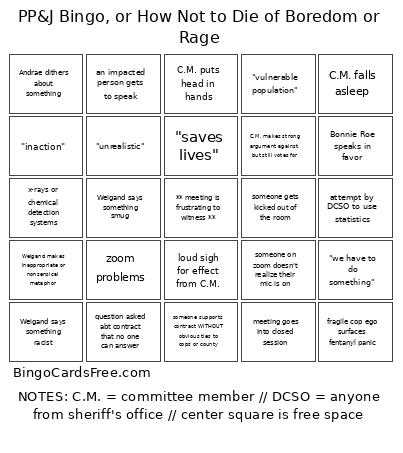 This PP&J Bingo Cards Game contains following Words or Phrases: someone on zoom doesn't realize their mic is on, zoom problems, meeting goes into closed session, procedural argument!!!, someone gets kicked out of the room, testifier runs out of time, someone cuts off a woman who is talking, an impacted person gets to speak, someone supports contract WITHOUT obvious ties to cops or county, C.M. falls asleep, C.M. puts head in hands, loud sigh for effect from C.M., C.M. makes strong argument against, but still votes for, threats that this will cost taxpayers more money, claims that this is about safety, x-rays or chemical detection systems, question asked abt contract that no one can answer, bad pun, fragile cop ego surfaces
fentanyl panic, "this is more of a comment than a question", "saves lives", "lives are at stake", "vulnerable population", "inaction", "we have to do something", "timeline", "unrealistic", Bonnie Roe speaks in favor, Weigand says something racist, Weigand makes inappropriate or nonsensical metaphor, Weigand says something smug, C.M. insults/needles Weigand, Andrae dithers about something, DCSO says something that sounds factual, but isn't, DCSO makes argument not supported by facts, attempt by DCSO to use statistics, DCSO can't cite specific data on mailed drugs; still claims it's a legitimate issue.
This PP&J Bingo Cards Game contains following Words or Phrases: someone on zoom doesn't realize their mic is on, zoom problems, meeting goes into closed session, procedural argument!!!, someone gets kicked out of the room, testifier runs out of time, someone cuts off a woman who is talking, an impacted person gets to speak, someone supports contract WITHOUT obvious ties to cops or county, C.M. falls asleep, C.M. puts head in hands, loud sigh for effect from C.M., C.M. makes strong argument against, but still votes for, threats that this will cost taxpayers more money, claims that this is about safety, x-rays or chemical detection systems, question asked abt contract that no one can answer, bad pun, fragile cop ego surfaces
fentanyl panic, "this is more of a comment than a question", "saves lives", "lives are at stake", "vulnerable population", "inaction", "we have to do something", "timeline", "unrealistic", Bonnie Roe speaks in favor, Weigand says something racist, Weigand makes inappropriate or nonsensical metaphor, Weigand says something smug, C.M. insults/needles Weigand, Andrae dithers about something, DCSO says something that sounds factual, but isn't, DCSO makes argument not supported by facts, attempt by DCSO to use statistics, DCSO can't cite specific data on mailed drugs; still claims it's a legitimate issue.