
rivals Bingo Cards - Print Free or Customize
Print free rivals bingo cards or customize, unlimited prints! Choose from 42,200+ templates or use the bingo card generator. Add numbers, words, images, or any combination. Play using printable PDF, online bingo cards, and the online bingo caller, or combine all formats.
About: This bingo card is perfect for a chaotic, inside-joke-filled online gaming night with friends who love competitive team shooters. It captures all the classic moments and frequent mishaps that happen during intense matches, plus hilarious personal quirks from regular players. Whether you're watching or playing, this card will have everyone laughing and calling out each wild event as it unfolds.
How To: To download a PDF to print, click the Print button. You can alter the card count and other printing options on the Print tab. Grid items and free space text can be added on the Basic tab. Appearance can be highly personalized on the corresponding tabs, or you can easily search any setting using the 🔍 tab.
How to play rivals Bingo Cards?
- Paper Caller: Print PDF calling list & calling slips and physically draw the slips.
- Paper Players: Print PDF bingo cards and physically scratch the cards.
- Online Players: Click on the Play button above, and then click on the 🎫 button.
- Online Caller: Click on the Play button above.
- Mixed Play: Choose any combination above. For instance, caller can be either Offline or Online. And players can be Offline or Online or a combo of both.
Step-By-Step:
- Start by downloading the rivals PDF by clicking on the "Print" button above.
- Open the PDF and print a hard copy.
- For random calling, you can print another copy of the call list, cut, fold and then pull them randomly at play time.
- Cut the bingo cards at the cut lines if there are greater than 1 bingo cards per page.
- Distribute one card per player. For marking, you can use pencils. Crayons are the cheapest.
- Choose one person to be the caller. If you are playing in a small group, the caller can also play along with their own Bingo card.
- The caller starts the play by randomly picking an item from the call list and calling out it to everyone.
- The players check their cards to see if they have the announced word. If they do, they cross off that word.
- The first player to finish a horizontal, vertical, or a diagonal line of marked items shouts "Bingo!" and wins the game.
- The caller validates that the items marked form a proper line as per the Bingo card and call list.
- You can play for different patterns or a full card blackout for an extended game.
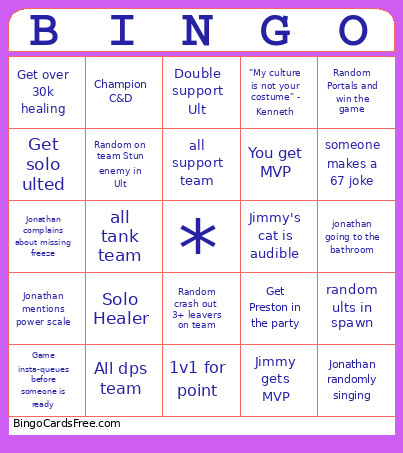 This rivals Bingo Cards Game contains following Words or Phrases: Triple support slop, Get Preston in the party, Jonathan swaps for team up, Champion C&D, Dps on our team goes negative, Solo Healer, Team wipe, You get MVP, Triple DPS slop, Team ignores ankh's, Team ignores mines, Team ignores squids, 5+ losing streak, Someone complains about healing, Lord Spiderman on team, Get 20+ final hits, Get over 30k healing, Get 40k dmg blocked, Survive team wipe, Random gets an MVP, All lord team comp, Get a champion on our team, Enemy has triple dive, Random Portals and win the game, Have a rocket with less than 500 damage, Random Jeff, ult your own team off the map, Random on team Stun enemy in Ult, Jonathan goes on a side tangent, Kenneth dc, Jimmy gets MVP, Receive stun from same character 3 times without dying, Jonathan complains about missing freeze, Aiden complains about a invis shove, Jimmy old joke, Jonathan randomly singing, E- daters in game, Random with VC, Toxic teammate, Double support Ult, Slow walk to point with random(can't say to teammate-must be voluntary), Run fliers into poke comp, 1v1 for point, "My culture is not your costume" - Kenneth, Someone else makes "bed or chair/better chair" joke, Enemy team responds to messages mid game, Jimmy's cat is audible, All dps team, Bot lobby, Someone says please I need this, Kill enemy while they are in Ult or right before, Someone makes racist joke, Convince someone to do an accent, LTF meme, Jonathan mentions power scale, Someone is caught eating, Someone ults when round ends with another round after, Teammate dc, Random crash out 3+ leavers on team, Aiden complains about heals, Game insta-queues before someone is ready, Aiden needs to go shower, all support team, all tank team, jonathan going to the bathroom, someone goes to get water, someone makes a 67 joke, enemy team portals at the start of the game, Everyone on your team but you goes negative, Someone complains about cc, Get solo ulted, Someone says "diff", Someone says "Omg", Someone's portal gets stopped, Victim of "AGAIN!", random gets less than 10% accuracy, random ults in spawn, Aiden brings up anything related to manga.