
Safety Bingo Cards - Print Free or Customize
Print free Safety bingo cards or adjust them, unlimited cards! Select from 37,300+ designs or use the bingo card generator. Add numbers, words, photos, or all of them. Play using PDF printouts, digital bingo cards, and the digital bingo caller, or combine all formats.
About: This bingo card is all about workplace safety, focusing on real-world hazards, essential equipment, and protective procedures found in construction, maintenance, or industrial settings. It’s a perfect interactive tool for training sessions or safety meetings, helping workers or trainees brush up on practical knowledge while emphasizing the importance of keeping everyone protected on the job.
How To: To download a PDF to print, click the Print button. You can modify the card count and other print preferences on the Print tab. Grid items and free space content can be changed on the Basic tab. Appearance can be totally customized on the corresponding tabs, or you can easily locate any preference using the 🔍 tab.
How to play Safety Bingo Cards?
- Paper Caller: Print PDF calling list & calling slips and physically choose the slips.
- Digital Caller: Click on the Play button above.
- Digital Players: Click on the Play button above, and then click on the 🎫 button.
- Paper Players: Print PDF bingo cards and physically scratch the cards.
- Mixed Mode: Select any combination above. For example, caller can be either Paper or Digital. And players can be Paper or Digital or a combo of both.
Step-By-Step:
- Start by downloading the Safety Bingo PDF by clicking on the "Print" button above.
- Open the PDF and print a hard copy.
- For random calling, you can print another copy of the call list, cut, fold and then pull them randomly at play time.
- Cut the bingo cards at the cut lines if there are greater than 1 bingo cards per page.
- Distribute one card per player. For marking, you can use pens. Crayons are the cheapest.
- Select one person to be the caller. If you are playing in a small group, the caller may also play along with their own Bingo card.
- The caller opens the play by randomly drawing an item from the call list and saying it to everyone.
- The players check their cards to see if they have the called word. If they do, they cross off that word.
- The first player to finish a horizontal, vertical, or a diagonal line of marked items shouts "Bingo!" and wins the play.
- The caller confirms that the items marked form a proper line according to the Bingo card and call list.
- You can play for varied patterns or a full card blackout for a longer play.
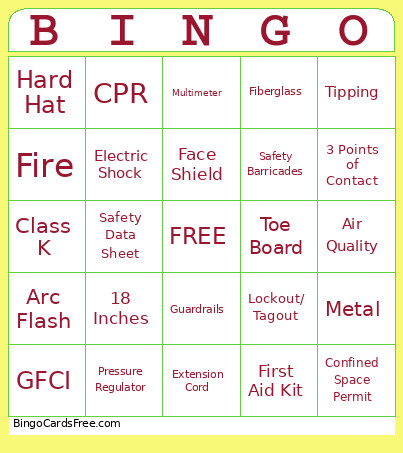 This Safety Bingo Cards Game contains following Words or Phrases: GFCI--#1: What Device protects workers from electrical shock in wet locations, Lockout/ Tagout-- #2: What Procedure that controls hazardous energy during repairs, Hard Hat--#3: Head protection that reduces injury from falling objects, Class A--#4: Extinguisher used for ordinary combustible fires, Air Purifying Respirator--#5: What respirator filters airborne particles and vapors, Cut Resistant--#6: Type of gloves that protect against sharp sheet metal edges, Pressure Regulator--#7: This should always be installed before opening a compressed gas cylinder, Frostbite--#8: A hazard that can occur if liquid refrigerant contacts skin, Face Shield--#9: PPE that protects against flying metal during grinding, Confined Space Permit--#10: What permit may be required before entering certain mechanical spaces, Air Quality--#11: What should be tested before entering a confined space, Fiberglass--#12: Type of ladder that should be used when working around electricity, Metal--#13: Type of ladder that should not be used near energized equipment, 3 Points of Contact--#14: What should always be maintained when climbing a ladder, 4 to 1 Ratio--#15: Which angle rule is commonly used for extension ladder setup, Class C--#16: Type of extinguisher that should be used on an electrical fire, Fire--#17: Main hazard when brazing near insulation, Rubber Mat--#18: What should be used when working near energized panels on concrete floors, eDocs--#19: Where can a Safety Hazard Report be submitted, Safety Data Sheet--#20: What should be reviewed prior to handling any chemical, Attendant--#21: What should always remain available outside a confined space entry, Multimeter--#22: Tool that is used to verify a circuit is de-energized, Electric Shock--#23: What hazard increases when extension cords are damaged, Hearing Loss--#24: Hazard that occurs from prolonged exposure to loud equioment, Tipping--#25: Main hazard of raising forklift loads to high while moving, 18 Inches--#26: The minimum vertical clearance between sprinkler heads and stored material, CPR--#27: A confined space attendant should have what training, Reduce Severity--#28: What does the word Mitigation mean, Arc Flash--#29: What electrical hazard releases explosive heat energy, First Aid Kit--#30: An emergency kit that contains injury treatment supplies, Extension Cord--#31: Temporary electrical supply that must be inspected before use, Guardrails--#32: A scaffold feature that prevents workers from falling, Safety Barricades--#33: What blocks unauthorized access to hazardous zones, Reflective Safety Vest--#34: What garment should be worn when entering a construction site, Rigging Assembly--#35: A lifting component that must be inspected before crane use, Housekeeping--#36: A practice that keeps workspaces clean and organized, Fit Test--#37: What test confirms respirator sealing effectiveness, Class K--#38: An extinguisher designed for grease fires, Toe Board--#39: What scaffold feature prevents tools from falling.