
Stranger Things S5 Bingo Cards - Print Free or Customize
Print free Stranger Things S5 bingo cards or alter them, limitless prints! Pick from 41,500+ designs or use the bingo card generator. Add numbers, phrases, images, or mix them all. Play using PDF printouts, online bingo cards, and the online bingo caller, or go hybrid.
About: Get ready for a wild ride through Hawkins with this Stranger Things-themed bingo card, packed full of twists, theories, and dramatic moments. Perfect for binge-watching parties or season premiere gatherings, this card captures the show's signature blend of supernatural chaos, character drama, and fan-favorite callbacks that will thrill both devoted fans and newcomers alike.
How To: To get a PDF to print, click the Print button. You can adjust the card count and other print options on the Print tab. Grid items and free space content can be edited on the Basic tab. Appearance can be completely personalized on the relevant tabs, or you can easily locate any setting on the 🔍 tab.
How to play Stranger Things S5 Bingo Cards?
- Printed Caller: Print PDF calling list & calling slips and physically draw the slips.
- Virtual Caller: Click on the Play button above.
- Printed Players: Print PDF bingo cards and physically mark the cards.
- Virtual Players: Click on the Play button above, and then click on the 🎫 button.
- Mixed Play: Choose any combination above. For example, caller can be either Printed or Virtual. And players can be Printed or Virtual or a combo of both.
Step-By-Step:
- Start by downloading the Stranger Things S5 PDF by clicking on the "Print" button above.
- Open the PDF and print a hard copy.
- For random calling, you can print another copy of the call list, cut, fold and then draw them randomly at play time.
- Cut the bingo cards at the cut lines if there are more than 1 bingo cards per page.
- Give one card to each player. For marking, you can use pens. Crayons cost the least.
- Choose one person to be the caller. If you are playing in a small group, the caller may as well play along with their own Bingo card.
- The caller starts the play by randomly pulling an item from the call list and saying it to all players.
- The players check their cards to see if they have the called word. If they do, they dab that word.
- The first player to finish a horizontal, vertical, or a diagonal line of crossed items announces "Bingo!" and wins the play.
- The caller verifies that the items crossed off form a correct line according to the Bingo card and call list.
- You can play for different patterns or a full card blackout for a longer play.
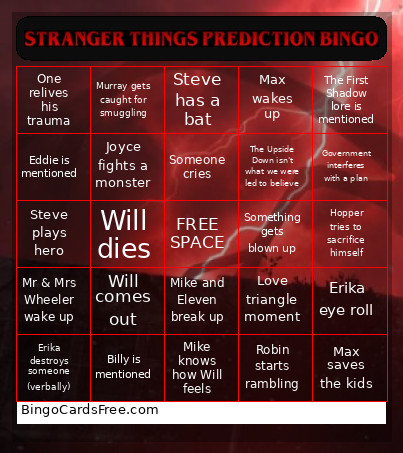 This Stranger Things S5 Bingo Cards Game contains following Words or Phrases: Something gay happens, Steve plays hero, mindflayer appears, Nancy has a gun, Max wakes up, Eight, Eleven. and Will team up, Hopper tries to sacrifice himself, Joyce cant find her son, Mr & Mrs Wheeler wake up, Demogorgon fight scene, No one cares about what's wrong with Dustin, Erika destroys someone (verbally), Phinneas Gage (eye) theory is true, Vecna kills Max, time travel theory is true, Shock Jock Robin theory is true, Shock Jock Steve theory is true, Lucas protects Max, Jonathan proposes, Murray gets caught for smuggling, Character from the past appears, Suzie is called in to help, Someone starts singing (?), Eleven dies, Will is evil again, Mike and Eleven break up, Holly escapes, One relives his trauma, Derek does something badass, Max saves the kids, New monster introduced, Vecna dies, Steve becomes an Uber for everyone, Hopper loses his temper, Someone makes a sarcastic comment, more than 1 death (within the main cast) in a single episode, Erika eye roll, Nancy gets annoyed, Will comes out, Someone rides a bike, D&D mentioned, Eddie is mentioned, Billy is mentioned, Another main character falls victim to Vecna, One knows Holly left the house, Max has to confront One, Eleven discovers something new about her powers, Someone cries, Someone ALMOST dies (but doesn't/fake out), Government interferes with a plan, Russia is still involved, Something gets blown up, Will dies, The First Shadow lore is mentioned, Jonathan sideways runs, Steve has a bat, Dustin knows what to do, Mike knows how Will feels, Joyce freaks out, Joyce fights a monster, Labryinthgate is true, Love triangle moment, Jonathan dies, Joyce dies, Dustin and Steve make up, Dustin and Steve hug, "A Wrinkle in Time" book was a clue, Finale was a theory no one online has predicted, Robin starts rambling, Hopper and Joyce have an emotional moment, The Upside Down isn't what we were led to believe.