Sunday Service Bingo Cards - Print Free or Customize
Print free Sunday Service bingo cards or adjust them,
unlimited prints! Choose from 41,500+ designs or use our bingo card generator.
Add numbers, words, pictures, or all of them.
Play using printed PDF, online bingo cards,
and our online bingo caller, or mix physical and digital.
About: This bingo card is perfect for anyone who’s part of a church worship team or attends regular Sunday services led by a colorful pastor. With its focus on light-hearted complaints, quirky habits, and memorable sermon moments, it’s sure to get laughs at ministry team gatherings or worship leader retreats. Expect plenty of knowing nods and inside jokes with every round!
How To: To download a printable PDF, click the Print button.
You can alter the card quantity and other
printing settings on the Print tab.
Grid items and free space text can be edited on the Basic tab.
Appearance can be entirely customized on the
corresponding tabs, or you can quickly search any setting
on the 🔍 tab.
How to play Sunday Service Bingo Cards?
Digital Players: Click on the Play button above, and then click on the 🎫 button.
Paper Players: Print PDF bingo cards and physically cross off the cards.
Paper Caller: Print PDF calling list & calling slips and physically draw the slips.
Digital Caller: Click on the Play button above.
Combo Mode: Pick any combination above.
For instance, caller can be either Paper or Digital.
And players can be Paper or Digital or a combo of both.
Step-By-Step:
Start by downloading the Sunday Service PDF by clicking on the "Print" button above.
Open the PDF and print it.
For random calling, you can print another copy of the call list, cut, fold and then draw them randomly at play time.
Cut the bingo cards at the cut marks if there are more than 1 bingo cards per page.
Distribute one card per player. For marking, you can use pens. Crayons are the cheapest.
Pick one person to be the caller. If you are playing in a small group, the caller can as well play along with their own Bingo card.
The caller begins the play by randomly drawing an item from the call list and announcing it to all players.
The players check their cards to see if they have the called word. If they do, they dab that word.
The first player to complete a horizontal, vertical, or a diagonal line of marked items announces "Bingo!" and wins the game.
The caller checks that the items crossed off form a correct line according to the Bingo card and call list.
You can play for multiple patterns or a full card blackout for a longer game.
This Sunday Service Bingo Cards Game contains following Words or Phrases: Calls out a member of the congregation by name, Complains about instruments, Complains about metronome, Complains about sound/mix during service, Does aggressive hand motions to get the band to pump up the song, Goes on a tangent that is barely related to the sermon, Interrupts the song with complaint, Mentions his family, Mentions his reading glasses, Mimics an instrument melody with high pitched voice, Mimics instrument melody with low pitched voice, Mix is too loud, Mix is too quiet, Pastor Larry leaves before the service is over, Personal story/analogy lasting longer than 5 minutes, Practice runs until 10, Practice starts after 8:30, Scraps a song because there wasn't time to practice it/couldn't get it right, Sermon has a video/pictures, Sermon notes page count is over 15, Service goes past 12:20, Service starts five minutes late, Song at the end of service gets changed, Talks about food (bonus point if it's smoking meat), Talks about having babies from the pulpit, Talks about sex from the pulpit, Tears up (or as he would say: weeps), Tells a weak joke but the congregation laughs anyway, Tells the singer(s) they're off key, Tells you to tell your neighbor something, Uses a dramatic adjective about quality of the mix is, Yells.

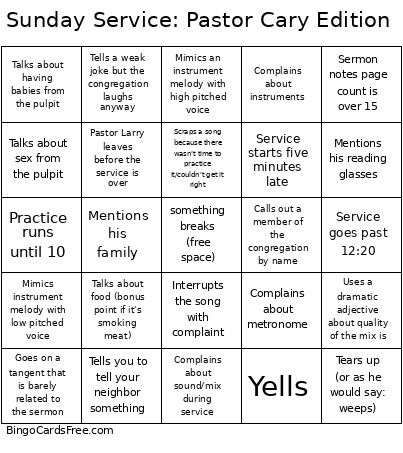 This Sunday Service Bingo Cards Game contains following Words or Phrases: Calls out a member of the congregation by name, Complains about instruments, Complains about metronome, Complains about sound/mix during service, Does aggressive hand motions to get the band to pump up the song, Goes on a tangent that is barely related to the sermon, Interrupts the song with complaint, Mentions his family, Mentions his reading glasses, Mimics an instrument melody with high pitched voice, Mimics instrument melody with low pitched voice, Mix is too loud, Mix is too quiet, Pastor Larry leaves before the service is over, Personal story/analogy lasting longer than 5 minutes, Practice runs until 10, Practice starts after 8:30, Scraps a song because there wasn't time to practice it/couldn't get it right, Sermon has a video/pictures, Sermon notes page count is over 15, Service goes past 12:20, Service starts five minutes late, Song at the end of service gets changed, Talks about food (bonus point if it's smoking meat), Talks about having babies from the pulpit, Talks about sex from the pulpit, Tears up (or as he would say: weeps), Tells a weak joke but the congregation laughs anyway, Tells the singer(s) they're off key, Tells you to tell your neighbor something, Uses a dramatic adjective about quality of the mix is, Yells.