
Superbowl 2026 Bingo Cards - Print Free or Customize
Print free Superbowl 2026 bingo cards or customize, limitless cards! Select from 40,100+ designs or use our bingo card generator. Add numbers, phrases, pictures, or any combination. Play using PDF printouts, virtual bingo cards, and our virtual bingo caller, or mix physical and digital.
About: This bingo card perfectly captures the over-the-top fun and recognizable tropes of Super Bowl commercials. Packed with nostalgia, celebrity overloads, food gags, and hilarious ad clichés, it’s a great fit for a Super Bowl party or watch-along event. Expect your group to laugh, bond, and groan together as you spot these classic commercial moments live.
How To: To get a PDF to print, click the Print button. You can adjust the number of cards and other print options on the Print tab. Grid items and free space content can be edited on the Basic tab. Appearance can be entirely personalized on the corresponding tabs, or you can quickly find any preference on the 🔍 tab.
How to play Superbowl 2026 Bingo Cards?
- Digital Players: Click on the Play button above, and then click on the 🎫 button.
- Digital Caller: Click on the Play button above.
- Printed Caller: Print PDF calling list & calling slips and manually choose the slips.
- Printed Players: Print PDF bingo cards and manually cross off the cards.
- Mixed Mode: Select any combination above. For instance, caller can be either Paper or Digital. And players can be Paper or Digital or a combination of both.
Step-By-Step:
- Start by getting the Superbowl 2026 PDF by clicking on the "Print" button above.
- Open the PDF and print a hard copy.
- For random drawing, you can print another copy of the call list, cut, fold and then pull them randomly at play time.
- Cut the bingo cards at the cut lines if there are more than 1 bingo cards per page.
- Give one card to each player. For marking, you can use pens. Crayons cost the least.
- Select one person to be the caller. If you are playing in a small group, the caller may as well play along with their own Bingo card.
- The caller initiates the play by randomly pulling an item from the call list and saying it to everyone.
- The players check their cards to see if they have the called word. If they do, they cross off that word.
- The first player to complete a horizontal, vertical, or a diagonal line of marked items shouts "Bingo!" and wins the game.
- The caller confirms that the items marked form a proper line according to the Bingo card and call list.
- You can play for multiple patterns or a full card blackout for an extended game.
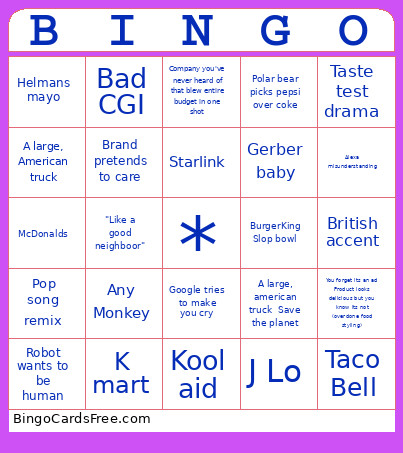 This Superbowl 2026 Bingo Cards Game contains following Words or Phrases: Pure Michigan, Horse, Michael Jordan in Bill Cosby sweater and wearing shorts, A large, American truck, "What the fuck did I just watch", Company you've never heard of that blew entire budget in one shot, Parenting, J Lo, Office scenario, Grillos pickles, Chips, Wonderball, Star athlete's atrocious acting, Company you've never heard of that blew entire budget in one shot IDK what they're advertising, Slo-Mo, Inanimate objects dancing, Very fast car, Fruit by the foot, Starlink, Nostalgia from better times that never existed, Save the plant, Song from at least 20 years ago, Travis Kelsey and Taylor Swift, Helmans mayo, Dancing fruit, Superhero, Black and white commercial, Commercial repeat, Feminism, Senior citizen, Chia pet Celebrity Duo, K mart, Radio shack, Pontiac car, Gerber baby, Polaroid, Blockbuster video, Kool aid, Borders books, Talking Animal, Any Monkey, Talking Food, Laugh track when inappropriate, Ex-Athlete Spokesperson Chips, Beer! Beer! Beer!, "What the fuck did I just watch?", Ressurection of C list celebrity, Tone deaf misstep that should get everyone fired Chips, Tone deaf misstep that should get everyone fired Star athlete's atrocious acting, Commerical repeat, Yogurt commercial, British accent, A large, american truck Save the planet, Idk what they're advertising, Already have/ used it, Persuaded you to buy/ try, Super hero, Pizza rolls, Disney character, Hellman's mayo, Godaddy, Got Milk, Taco Bell, McDonalds, BurgerKing Slop bowl, Patriotic Song, Robot wants to be human, Flying food delivery, Brand pretends to care, Bad CGI, Celebrity overload (at least 4), Awkward hug, Confetti, Pop song remix, Taste test drama, "Like a good neighboor", Alexa misunderstanding, You forget its an ad Product looks delicious but you know its not (overdone food styling), Expectation vs reality theme, Polar bear picks pepsi over coke, Google tries to make you cry, You miss the brand name, Slogan makes no sense, Random animal for laughs.