Print free TABINGO cards or modify,
limitless prints! Pick from 42,200+ designs or use our bingo card generator.
Add numbers, words, images, or any combination.
Play using printable PDF, digital bingo cards,
and our digital bingo caller, or mix physical and digital.
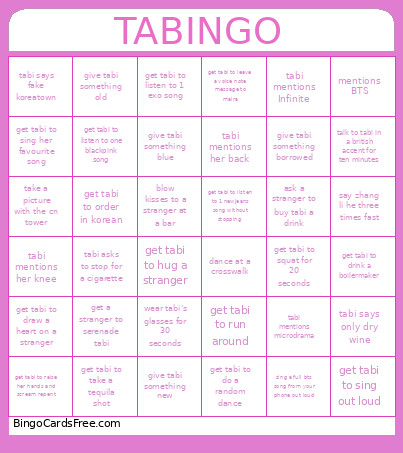
About: This bingo card is perfect for a lively night out with friends celebrating Tabi, perhaps for a birthday or bachelorette party. The dares and challenges are playful, slightly mischievous, and tailored for a group ready to make memories and laugh together. Expect lots of music, dancing, social interactions, and some inside jokes along the way.
How To: To save a PDF to print, click the Print button.
You can modify the card count and other
printing options on the Print tab.
Grid items and free space content can be added on the Basic tab.
Appearance can be highly customized on the
relevant tabs, or you can easily search any preference
using the 🔍 tab.
How to play TABINGO Cards?
Virtual Players: Click on the Play button above, and then click on the 🎫 button.
Paper Caller: Print PDF calling list & calling slips and physically select the slips.
Paper Players: Print PDF bingo cards and physically write on the cards.
Virtual Caller: Click on the Play button above.
Combo Mode: Select any combination above.
For example, caller can be either Paper or Virtual.
And players can be Paper or Virtual or a combo of both.
Step-By-Step:
Start by saving the TABINGO PDF by clicking on the "Print" button above.
Open the PDF and print a hard copy.
For random calling, you can print another copy of the call list, cut, fold and then pull them randomly at play time.
Cut the bingo cards at the cut marks if there are greater than 1 bingo cards per page.
Give one card to each player. For marking, you can use crayons. Crayons cost the least.
Select one person to be the caller. If you are playing in a small group, the caller can as well play along with their own Bingo card.
The caller begins the play by randomly drawing an item from the call list and saying it to all players.
The players scan their cards to see if they have the called word. If they do, they cross off that word.
The first player to complete a horizontal, vertical, or a diagonal line of crossed items announces "Bingo!" and wins the play.
The caller verifies that the items marked form a correct line as per the Bingo card and call list.
You can play for different patterns or a full card blackout for an extended play.
This TABINGO Cards Game contains following Words or Phrases: ask a stranger to buy tabi a drink, blow kisses to a stranger at a bar, dance at a crosswalk, get a stranger to serenade tabi, get tabi to do a random dance, get tabi to draw a heart on a stranger, get tabi to drink a boilermaker, get tabi to hug a stranger, get tabi to leave a voice note message to maira, get tabi to listen to 1 exo song, get tabi to listen to 1 newjeans song without stopping, get tabi to listen to one blackpink song, get tabi to order in korean, get tabi to raise her hands and scream repent, get tabi to run around, get tabi to sing her favourite song, get tabi to sing out loud, get tabi to squat for 20 seconds, get tabi to take a tequila shot, give tabi something blue, give tabi something borrowed, give tabi something new, give tabi something old, mentions BTS, say zhang li he three times fast, sing a full bts song from your phone out loud, tabi asks to stop for a cigarette, tabi mentions her back, tabi mentions her knee, tabi mentions Infinite, tabi mentions microdrama, tabi says fake koreatown, tabi says only dry wine, take a picture with the cn tower, talk to tabi in a british accent for ten minutes, wear tabi's glasses for 30 seconds.

 This TABINGO Cards Game contains following Words or Phrases: ask a stranger to buy tabi a drink, blow kisses to a stranger at a bar, dance at a crosswalk, get a stranger to serenade tabi, get tabi to do a random dance, get tabi to draw a heart on a stranger, get tabi to drink a boilermaker, get tabi to hug a stranger, get tabi to leave a voice note message to maira, get tabi to listen to 1 exo song, get tabi to listen to 1 newjeans song without stopping, get tabi to listen to one blackpink song, get tabi to order in korean, get tabi to raise her hands and scream repent, get tabi to run around, get tabi to sing her favourite song, get tabi to sing out loud, get tabi to squat for 20 seconds, get tabi to take a tequila shot, give tabi something blue, give tabi something borrowed, give tabi something new, give tabi something old, mentions BTS, say zhang li he three times fast, sing a full bts song from your phone out loud, tabi asks to stop for a cigarette, tabi mentions her back, tabi mentions her knee, tabi mentions Infinite, tabi mentions microdrama, tabi says fake koreatown, tabi says only dry wine, take a picture with the cn tower, talk to tabi in a british accent for ten minutes, wear tabi's glasses for 30 seconds.