Print free Testing 123 bingo cards or adjust them,
limitless prints! Select from 39,000+ templates or use our bingo card generator.
Add numbers, phrases, photos, or all of them.
Play using printable PDF, virtual bingo cards,
and our virtual bingo caller, or go hybrid.
About: This bingo card is all about iconic kids’ movies from the 1990s, capturing adventurous plots, lovable characters, and the kind of imaginative fun that defined a generation. It’s perfect for retro movie nights, family gatherings, or school events where everyone can reminisce about favorite childhood films and share some laughs along the way.
How To: To get a PDF to print, click the Print button.
You can change the number of cards and other
print settings on the Print tab.
Grid items and free space content can be edited on the Basic tab.
Appearance can be totally customized on the
relevant tabs, or you can easily search any option
using the 🔍 tab.
How to play Testing 123 Bingo Cards?
Printed Caller: Print PDF calling list & calling slips and physically select the slips.
Digital Players: Click on the Play button above, and then click on the 🎫 button.
Digital Caller: Click on the Play button above.
Printed Players: Print PDF bingo cards and physically mark the cards.
Combo Mode: Choose any combination above.
For example, caller can be either Printed or Digital.
And players can be Printed or Digital or a combination of both.
Step-By-Step:
Start by downloading the Testing 123 PDF by clicking on the "Print" button above.
Open the PDF and print a hard copy.
For random calling, you can print another copy of the call list, cut, fold and then draw them randomly at play time.
Cut the bingo cards at the cut marks if there are more than 1 bingo cards per page.
Give one card to each player. For marking, you can use crayons. Crayons are the cheapest.
Choose one person to be the caller. If you are playing in a small group, the caller can as well play along with their own Bingo card.
The caller starts the game by randomly pulling an item from the call list and saying it to everyone.
The players check their cards to see if they have the called word. If they do, they dab that word.
The first player to finish a horizontal, vertical, or a diagonal line of crossed items announces "Bingo!" and wins the play.
The caller verifies that the items crossed off form a correct line as per the Bingo card and call list.
You can play for multiple patterns or a full card blackout for a longer play.
This Testing 123 Bingo Cards Game contains following Words or Phrases: A Little Princess believes her father will return someday, Aladdin rides a magic carpet with Jasmine, All Dogs Go To Heaven features talking animal friends, Angels help a baseball team win their games, Antz tells how Z dreams bigger than his colony, Babe the pig wants to be a sheepdog, Balto leads sled dogs through snowy Alaska, Blank Check boy gets rich and buys cool stuff, Buzz says, "To infinity and beyond", Casper is a friendly ghost in an old mansion, Dennis the Menace causes mischief for Mr. Wilson, Free Willy jumps over the rocks to freedom, George of the Jungle swings into funny trouble, Hercules learns he's a hero in ancient Greece, Honey, I Shrunk the Kids makes kids tiny in backyard, Jack grows older faster than other children, James travels inside a giant peach with bug friends, Jumanji board game causes jungle chaos at home, Jurassic Park dinosaurs escape the island, Matilda uses her powers to move objects, Mighty Morphin Power Rangers battle evil monsters together, Mrs. Doubtfire wears a silly disguise, Mufasa teaches Simba about the circle of life, Simba becomes king of the Pride Lands, Stuart Little is adopted by a loving family, The Genie grants three wishes in Agrabah, The Mighty Ducks form a hockey team together, The Parent Trap twins switch places to unite parents, The Sandlot kids play baseball all summer long, Woody feels jealous of Buzz Lightyear.

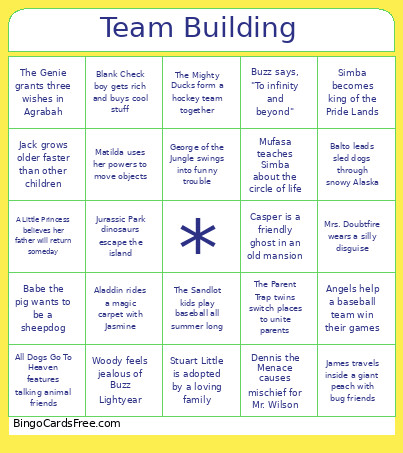 This Testing 123 Bingo Cards Game contains following Words or Phrases: A Little Princess believes her father will return someday, Aladdin rides a magic carpet with Jasmine, All Dogs Go To Heaven features talking animal friends, Angels help a baseball team win their games, Antz tells how Z dreams bigger than his colony, Babe the pig wants to be a sheepdog, Balto leads sled dogs through snowy Alaska, Blank Check boy gets rich and buys cool stuff, Buzz says, "To infinity and beyond", Casper is a friendly ghost in an old mansion, Dennis the Menace causes mischief for Mr. Wilson, Free Willy jumps over the rocks to freedom, George of the Jungle swings into funny trouble, Hercules learns he's a hero in ancient Greece, Honey, I Shrunk the Kids makes kids tiny in backyard, Jack grows older faster than other children, James travels inside a giant peach with bug friends, Jumanji board game causes jungle chaos at home, Jurassic Park dinosaurs escape the island, Matilda uses her powers to move objects, Mighty Morphin Power Rangers battle evil monsters together, Mrs. Doubtfire wears a silly disguise, Mufasa teaches Simba about the circle of life, Simba becomes king of the Pride Lands, Stuart Little is adopted by a loving family, The Genie grants three wishes in Agrabah, The Mighty Ducks form a hockey team together, The Parent Trap twins switch places to unite parents, The Sandlot kids play baseball all summer long, Woody feels jealous of Buzz Lightyear.