Test Desert Trip Bingo Cards - Print Free or Customize
Print free Test Desert Trip bingo cards or customize,
limitless prints! Pick from 42,200+ templates or use the bingo card generator.
Add numbers, words, images, or mix them all.
Play using PDF prints, online bingo cards,
and the online bingo caller, or mix physical and digital.
About: This bingo card is bursting with the vibrant life and unique features of the desert. Perfect for nature hikes, educational field trips, or desert-themed parties, it invites players to look closely at the fascinating plants, reptiles, insects, and landscapes that define arid environments. It’s an engaging way for outdoor enthusiasts and curious minds to celebrate desert biodiversity together.
How To: To save a printable PDF, click the Print button.
You can alter the number of cards and other
printing settings on the Print tab.
Grid items and free space content can be edited on the Basic tab.
Appearance can be entirely personalized on the
corresponding tabs, or you can easily locate any option
on the 🔍 tab.
How to play Test Desert Trip Bingo Cards?
Printed Caller: Print PDF calling list & calling slips and physically select the slips.
Printed Players: Print PDF bingo cards and physically cross off the cards.
Digital Players: Click on the Play button above, and then click on the 🎫 button.
Digital Caller: Click on the Play button above.
Combo Play: Pick any combination above.
For instance, caller can be either Offline or Digital.
And players can be Offline or Digital or a mix of both.
Step-By-Step:
Start by saving the Test Desert Trip PDF by clicking on the "Print" button above.
Open the PDF and print a hard copy.
For random calling, you can print another copy of the call list, cut, fold and then pick them randomly at play time.
Cut the bingo cards at the cut lines if there are more than 1 bingo cards per page.
Distribute one card per player. For marking, you can use markers. Crayons are the cheapest.
Pick one person to be the caller. If you are playing in a small group, the caller can as well play along with their own Bingo card.
The caller opens the game by randomly picking an item from the call list and announcing it to everyone.
The players scan their cards to see if they have the called word. If they do, they cross off that word.
The first player to finish a horizontal, vertical, or a diagonal line of marked items announces "Bingo!" and wins the game.
The caller confirms that the items crossed off form a proper line according to the Bingo card and call list.
You can play for different patterns or a full card blackout for a longer game.
This Test Desert Trip Bingo Cards Game contains following Words or Phrases: Desert Varnish, Cholla, Joshua Tree, Desert Night Lizard, Desert Iguana, Desert Horned Lizard, Leopard Lizard, Chuckwalla, Long-tailed Brush Lizard, Desert Night Snake, Desert Gopher Snake, Desert Spiny Lizard, Desert Kangaroo Rat, Merriam's Kangaroo Rat, Desert Pocket Mouse, Loggerhead Shrike, Phainopepla, Fringed Toed Lizard, Side Blotched Lizard (Uta), Desert Tortoise, Desert Banded Gecko, Whiptail, Longnose Leopard Lizard, Western Fence Lizard, Zebra-Tailed Lizard, GILA MONSTER!!!!, Beavertail cactus, California barrel cactus, Creosote, Mormon Tea, Apricot Mallow, Desert Five Spot, Western Juniper, Mojave Green Rattlesnake, Sidewinder, Mojave Yucca, Desert Monkey Flower, Desert Fan Palm, Washingtonia, Collared Lizard, Desert Coachwhip, Desert Blister Beetle, Spider Blister Beetle, Ironclad Beetle, Giant Hairy Scorpion, Solpugid, Wind Scorpion, Desert Holly, Datura, Jimson Weed, Lizard-tail, Desert Dandelion, Mojave Aster.

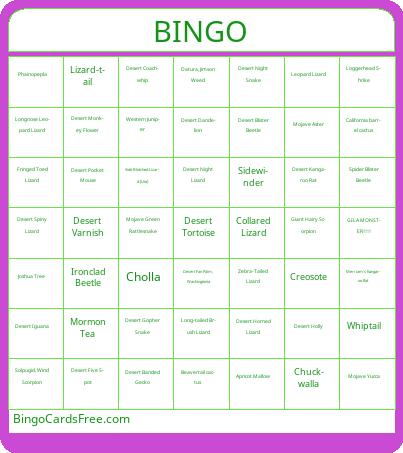 This Test Desert Trip Bingo Cards Game contains following Words or Phrases: Desert Varnish, Cholla, Joshua Tree, Desert Night Lizard, Desert Iguana, Desert Horned Lizard, Leopard Lizard, Chuckwalla, Long-tailed Brush Lizard, Desert Night Snake, Desert Gopher Snake, Desert Spiny Lizard, Desert Kangaroo Rat, Merriam's Kangaroo Rat, Desert Pocket Mouse, Loggerhead Shrike, Phainopepla, Fringed Toed Lizard, Side Blotched Lizard (Uta), Desert Tortoise, Desert Banded Gecko, Whiptail, Longnose Leopard Lizard, Western Fence Lizard, Zebra-Tailed Lizard, GILA MONSTER!!!!, Beavertail cactus, California barrel cactus, Creosote, Mormon Tea, Apricot Mallow, Desert Five Spot, Western Juniper, Mojave Green Rattlesnake, Sidewinder, Mojave Yucca, Desert Monkey Flower, Desert Fan Palm, Washingtonia, Collared Lizard, Desert Coachwhip, Desert Blister Beetle, Spider Blister Beetle, Ironclad Beetle, Giant Hairy Scorpion, Solpugid, Wind Scorpion, Desert Holly, Datura, Jimson Weed, Lizard-tail, Desert Dandelion, Mojave Aster.