The Roller Rink Bingo Cards - Print Free or Customize
Print free The Roller Rink bingo cards or alter them,
unlimited cards! Select from 41,500+ templates or use the bingo card generator.
Add numbers, words, pictures, or all of them.
Play using printable PDF, digital bingo cards,
and the digital bingo caller, or mix physical and digital.
About: This bingo card is a dance party time machine packed with iconic throwbacks and infectious beats from the 70s, 80s, and 90s. Perfect for themed parties, reunions, or music trivia nights, it brings together disco grooves, funk hits, and club classics guaranteed to keep everyone smiling, moving, and singing along as they fill their cards.
How To: To download a printable PDF, click the Print button.
You can alter the card count and other
print options on the Print tab.
Grid items and free space text can be edited on the Basic tab.
Appearance can be highly customized on the
corresponding tabs, or you can quickly find any option
using the 🔍 tab.
How to play The Roller Rink Bingo Cards?
Online Players: Click on the Play button above, and then click on the 🎫 button.
Printed Caller: Print PDF calling list & calling slips and manually choose the slips.
Online Caller: Click on the Play button above.
Printed Players: Print PDF bingo cards and manually mark the cards.
Combo Play: Choose any combination above.
For example, caller can be either Paper or Online.
And players can be Paper or Online or a combo of both.
Step-By-Step:
Start by getting the The Roller Rink PDF by clicking on the "Print" button above.
Open the PDF and print it.
For random calling, you can print another copy of the call list, cut, fold and then draw them randomly at play time.
Cut the bingo cards at the cut lines if there are greater than 1 bingo cards per page.
Give one card to each player. For marking, you can use markers. Crayons are the cheapest.
Choose one person to be the caller. If you are playing in a small group, the caller can as well play along with their own Bingo card.
The caller opens the play by randomly drawing an item from the call list and announcing it to everyone.
The players look at their cards to see if they have the called word. If they do, they cross off that word.
The first player to finish a horizontal, vertical, or a diagonal line of marked items announces "Bingo!" and wins the game.
The caller checks that the items marked form a proper line as per the Bingo card and call list.
You can play for different patterns or a full card blackout for a longer game.
This The Roller Rink Bingo Cards Game contains following Words or Phrases: Pump Up The Jam -Technotronic, Conga Miami Sound Machine, C'mon N' Ride It (The Train) Quad City DJ's, The Rhythm of the Night Corona, Good Vibrations Marky Mark And The Funky Bunch;Loleatta Holloway, Move Your Feet Junior Senior, The Rockafeller Skank Fatboy Slim, Mambo No. 5 (a Little Bit of...) Lou Bega, Ymca Village People, Sweet Dreams (Are Made of This) - Eurythmics, It's Tricky Run–D.M.C., Cruel Summer Bananarama, Let's Go Crazy Prince, Billie Jean Michael Jackson, Don't Stop 'Til You Get Enough Michael Jackson, Le Freak CHIC, Poison Bell Biv DeVoe, Wild Thing Tone-Loc, Somebody's Watching Me - Rockwell, Party All the Time Eddie Murphy, Raspberry Beret Prince, I Think We're Alone Now Tiffany, Bounce, Rock, Skate, Roll Vaughan Mason and Crew, P.Y.T. (Pretty Young Thing) Michael Jackson, Got To Give It Up - Pt. 1 Marvin Gaye, Let's Groove Earth, Wind & Fire, Funkytown - Single Version Lipps Inc., Music Sounds Better With You Stardust, Boogie Wonderland (with The Emotions) Earth, Wind & Fire, I'm Coming Out Diana Ross, Finally CeCe Peniston, The Groove Line Heatwave, Dazz - Single Version Brick, He's the Greatest Dancer - Sister Sledge, Boogie Oogie Oogie - A Taste Of Honey, Genius of Love Tom Tom Club, Let It Whip Dazz Band, The Message Grandmaster Flash & The Furious Five, I'm Too Sexy Right Said Fred, Another Night Real McCoy, Every Little Step Bobby Brown, Buffalo Stance Neneh Cherry, Spring Love Stevie B, Dreamin' Of Love Stevie B, In A Dream - Original Mix Rockell, I Wonder If I Take You Home Lisa Lisa & Cult Jam;Full Force, Take Me in Your Arms Lil Suzy, Diamond Girl Nice & Wild, Planet Rock Afrika Bambaataa, When I Hear Music Debbie Deb, Head to Toe Lisa Lisa & Cult Jam.

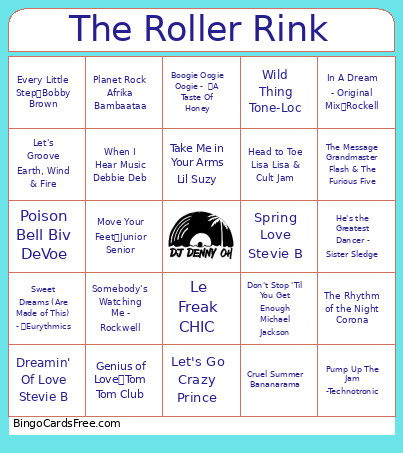 This The Roller Rink Bingo Cards Game contains following Words or Phrases: Pump Up The Jam -Technotronic, Conga Miami Sound Machine, C'mon N' Ride It (The Train) Quad City DJ's, The Rhythm of the Night Corona, Good Vibrations Marky Mark And The Funky Bunch;Loleatta Holloway, Move Your Feet Junior Senior, The Rockafeller Skank Fatboy Slim, Mambo No. 5 (a Little Bit of...) Lou Bega, Ymca Village People, Sweet Dreams (Are Made of This) - Eurythmics, It's Tricky Run–D.M.C., Cruel Summer Bananarama, Let's Go Crazy Prince, Billie Jean Michael Jackson, Don't Stop 'Til You Get Enough Michael Jackson, Le Freak CHIC, Poison Bell Biv DeVoe, Wild Thing Tone-Loc, Somebody's Watching Me - Rockwell, Party All the Time Eddie Murphy, Raspberry Beret Prince, I Think We're Alone Now Tiffany, Bounce, Rock, Skate, Roll Vaughan Mason and Crew, P.Y.T. (Pretty Young Thing) Michael Jackson, Got To Give It Up - Pt. 1 Marvin Gaye, Let's Groove Earth, Wind & Fire, Funkytown - Single Version Lipps Inc., Music Sounds Better With You Stardust, Boogie Wonderland (with The Emotions) Earth, Wind & Fire, I'm Coming Out Diana Ross, Finally CeCe Peniston, The Groove Line Heatwave, Dazz - Single Version Brick, He's the Greatest Dancer - Sister Sledge, Boogie Oogie Oogie - A Taste Of Honey, Genius of Love Tom Tom Club, Let It Whip Dazz Band, The Message Grandmaster Flash & The Furious Five, I'm Too Sexy Right Said Fred, Another Night Real McCoy, Every Little Step Bobby Brown, Buffalo Stance Neneh Cherry, Spring Love Stevie B, Dreamin' Of Love Stevie B, In A Dream - Original Mix Rockell, I Wonder If I Take You Home Lisa Lisa & Cult Jam;Full Force, Take Me in Your Arms Lil Suzy, Diamond Girl Nice & Wild, Planet Rock Afrika Bambaataa, When I Hear Music Debbie Deb, Head to Toe Lisa Lisa & Cult Jam.