
Titan Hollow - Angie's List Bingo Cards - Print Free or Customize
Print free Titan Hollow - Angie's List bingo cards or modify, limitless cards! Pick from 41,500+ designs or use the bingo card generator. Add numbers, phrases, pictures, or any combination. Play using PDF prints, virtual bingo cards, and the virtual bingo caller, or combine all formats.
About: This bingo card bursts with classic tunes and feel-good anthems, making it perfect for a music-themed party or a lively pub trivia night. With hits ranging from old-school rock and pop to soulful ballads, it sets a playful, nostalgic vibe that gets everyone humming along and sharing stories behind their favorite songs.
How To: To get a PDF to print, click the Print button. You can alter the card count and other printing options on the Print tab. Grid items and free space text can be changed on the Basic tab. Appearance can be fully customized on the relevant tabs, or you can easily find any option using the 🔍 tab.
How to play Titan Hollow - Angie's List Bingo Cards?
- Printed Caller: Print PDF calling list & calling slips and manually pick the slips.
- Printed Players: Print PDF bingo cards and manually scratch the cards.
- Digital Caller: Click on the Play button above.
- Digital Players: Click on the Play button above, and then click on the 🎫 button.
- Mixed Mode: Choose any combination above. For instance, caller can be either Offline or Digital. And players can be Offline or Digital or a combination of both.
Step-By-Step:
- Start by getting the Titan Hollow - Angie's List PDF by clicking on the "Print" button above.
- Open the PDF and print a hard copy.
- For random calling, you can print another copy of the call list, cut, fold and then pull them randomly at play time.
- Cut the bingo cards at the cut marks if there are more than 1 bingo cards per page.
- Give one card to each player. For marking, you can use pencils. Crayons are the cheapest.
- Choose one person to be the caller. If you are playing in a small group, the caller may also play along with their own Bingo card.
- The caller opens the game by randomly pulling an item from the call list and saying it to all players.
- The players check their cards to see if they have the called word. If they do, they dab that word.
- The first player to finish a horizontal, vertical, or a diagonal line of marked items shouts "Bingo!" and wins the play.
- The caller confirms that the items marked form a correct line as per the Bingo card and call list.
- You can play for varied patterns or a full card blackout for an extended play.
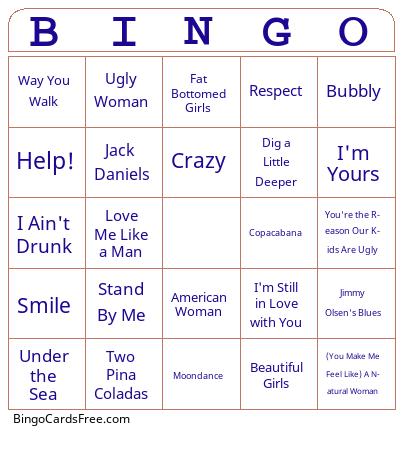 This Titan Hollow - Angie's List Bingo Cards Game contains following Words or Phrases: All About That Bass, All Summer Long, American Woman, Baby What You Want Me To Do, Be My Yoko Ono, Beautiful Girls, Blister In The Sun, The Boy From Ipanema, Breakfast In Bed, Brown Eyed Girl, Bubbly, But Anyway, C'mon Everybody, California Girls, Coconut, Cool For Cats, Copacabana, Crazy, Crazy Ex-Girlfriend, Crazy Love, Dear Future Husband, Dig a Little Deeper, Don't You Want Me?, Fat Bottomed Girls, Fever, Follow Me, Get Back, Gimme Three Steps, The Girl Can't Help It, Girls Just Want To Have Fun, Good to Be Me, Got Messed Up, Got To Be Real, Guava Jelly, Happy, Hello Goodbye, Help!, Hooked On a Feeling, I Ain't Drunk, I Can See Clearly Now, I Just Want to Celebrate, I Knew the Bride, I'm Still in Love with You, I'm Yours, In A Dis A Time, It Wasn't Me, It's Not Unusual, Jack & Diane, Jack Daniels, Jessie's Girl, Jimmy Olsen's Blues, Kiss the Girl, Kokomo, L.O.V.E., Life is Beautiful, Love Me Like a Man, Mack the Knife, Maggie May, Mambo No. 5, Mammas Don't Let Your Babies Grow Up to be Cowboys, Margaritaville, Me & Bobby McGee, Me and The Devil Blues, Mercedes Benz, Moondance, Mr. Sweetness, Must Be Catchin', Mustang Sally, Oh, What a Night, One Bourbon, One Scotch, One Beer, Pussy Whipped Again, Red Red Wine, Rehab, Respect, Ripple, Rude, Say Hey (I Love You), Scenes From an Italian Restaurant, Since You Been Gone, Smile, Solsbury Hill, Son of a Preacher Man, Son of a Scoundrel, Spill the Wine, Stand By Me, Sugar Is Sweet, Sugar Magnolia, Sugaree, Summer of '69, Summertime, Sweet Caroline, Tell Him, Two Pina Coladas, Ugly Woman, Under the Sea, Wasn't That a Party?, Watermelon Man, Way You Walk, We Are Family, What I Like About You, You Can Leave Your Hat On, (You Make Me Feel Like) A Natural Woman, You Sexy Thing, You Talk Too Much, You're the Reason Our Kids Are Ugly, 32-20 Blues.