Print free To Do bingo cards or personalize,
limitless cards! Choose from 42,200+ designs or use the bingo card generator.
Add numbers, words, pictures, or any combination.
Play using printed PDF, virtual bingo cards,
and the virtual bingo caller, or mix physical and digital.
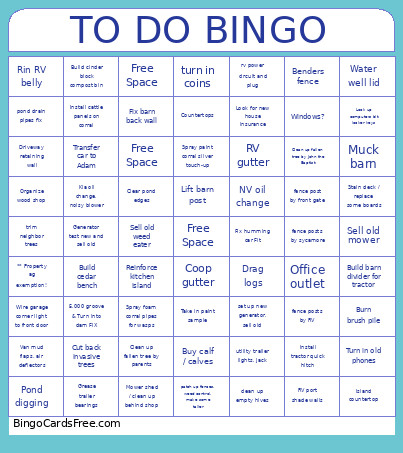
About: This bingo card is perfect for anyone tackling a long farm or homestead to-do list. With tasks ranging from tractor repairs to fence building and yard cleanup, it's ideal for families or small farm crews looking for a fun way to organize chores. The tone is practical yet lighthearted, making even tough jobs feel more manageable and engaging.
How To: To download a printable PDF, click the Print button.
You can change the number of cards and other
print settings on the Print tab.
Grid items and free space content can be changed on the Basic tab.
Appearance can be totally personalized on the
relevant tabs, or you can easily search any preference
on the 🔍 tab.
How to play To Do Bingo Cards?
Printed Caller: Print PDF calling list & calling slips and physically choose the slips.
Printed Players: Print PDF bingo cards and physically cross off the cards.
Virtual Players: Click on the Play button above, and then click on the 🎫 button.
Virtual Caller: Click on the Play button above.
Mixed Mode: Pick any combination above.
For instance, caller can be either Offline or Virtual.
And players can be Offline or Virtual or a combo of both.
Step-By-Step:
Start by saving the To Do PDF by clicking on the "Print" button above.
Open the PDF and print it.
For random calling, you can print another copy of the call list, cut, fold and then draw them randomly at play time.
Cut the bingo cards at the cut lines if there are greater than 1 bingo cards per page.
Distribute one card per player. For marking, you can use crayons. Crayons are the cheapest.
Pick one person to be the caller. If you are playing in a small group, the caller may as well play along with their own Bingo card.
The caller starts the game by randomly drawing an item from the call list and saying it to everyone.
The players check their cards to see if they have the announced word. If they do, they dab that word.
The first player to complete a horizontal, vertical, or a diagonal line of crossed items yells "Bingo!" and wins the play.
The caller validates that the items marked form a proper line according to the Bingo card and call list.
You can play for different patterns or a full card blackout for a longer play.
This To Do Bingo Cards Game contains following Words or Phrases: ** Property ag exemption!, 5,000 groove & Turn into dam FIX, Benders fence, Build barn divider for tractor, Build cedar bench, Build cinder block compost bin, Burn brush pile, Buy calf / calves, clean up empty hives, Clean up fallen tree by John the Baptist, Clean up fallen tree by parents, Clear pond edges, Coop gutter, Countertops, Cut back invasive trees, Drag logs, Driveway retaining wall, fence post by front gate, fence posts by RV, fence posts by sycamore, Fix barn back wall, Fix humming car Fit, Free Space, Free Space, Free Space, Generator test new and sell old, Grease trailer bearings, Install cattle panels on corral, Install tractor quick hitch, Island countertop, Kia oil change, noisy blower, Lift barn post, Look for new house insurance, Look up computers bit locker keys, Mower shed / clean up behind shop, Muck barn, NV oil change, Office outlet, Organize wood shop, patch up fences, weed control, make some taller, Pond digging, pond drain pipes fix, Reinforce kitchen island, Rin RV belly, RV gutter, RV port shade walls, rv power circuit and plug, Sell old mower, Sell old weed eater, set up new generator, sell old, Spray foam corral pipes for wasps, Spray paint corral silver touch-up, Stain deck / replace some boards, Take in paint sample, Transfer car to Adam, trim neighbor trees, turn in coins, Turn in old phones, utility trailer lights, jack, Van mud flaps, air deflectors, Water well lid, Windows?, Wire garage corner light to front door.

 This To Do Bingo Cards Game contains following Words or Phrases: ** Property ag exemption!, 5,000 groove & Turn into dam FIX, Benders fence, Build barn divider for tractor, Build cedar bench, Build cinder block compost bin, Burn brush pile, Buy calf / calves, clean up empty hives, Clean up fallen tree by John the Baptist, Clean up fallen tree by parents, Clear pond edges, Coop gutter, Countertops, Cut back invasive trees, Drag logs, Driveway retaining wall, fence post by front gate, fence posts by RV, fence posts by sycamore, Fix barn back wall, Fix humming car Fit, Free Space, Free Space, Free Space, Generator test new and sell old, Grease trailer bearings, Install cattle panels on corral, Install tractor quick hitch, Island countertop, Kia oil change, noisy blower, Lift barn post, Look for new house insurance, Look up computers bit locker keys, Mower shed / clean up behind shop, Muck barn, NV oil change, Office outlet, Organize wood shop, patch up fences, weed control, make some taller, Pond digging, pond drain pipes fix, Reinforce kitchen island, Rin RV belly, RV gutter, RV port shade walls, rv power circuit and plug, Sell old mower, Sell old weed eater, set up new generator, sell old, Spray foam corral pipes for wasps, Spray paint corral silver touch-up, Stain deck / replace some boards, Take in paint sample, Transfer car to Adam, trim neighbor trees, turn in coins, Turn in old phones, utility trailer lights, jack, Van mud flaps, air deflectors, Water well lid, Windows?, Wire garage corner light to front door.