
Trivia Joe Bingo Cards - Print Free or Customize
Print free Trivia Joe bingo cards or adjust them, unlimited cards! Choose from 41,500+ designs or use the bingo card generator. Add numbers, phrases, images, or all of them. Play using printable PDF, online bingo cards, and the online bingo caller, or go hybrid.
About: This bingo card perfectly captures the lively chaos and inside jokes of a typical pub trivia night with friends. Expect references to wild answers, quirky teammates, memorable music moments, and iconic host antics. It’s ideal for regulars or newcomers at your local quiz night and guarantees laughs as you spot these classic trivia night occurrences.
How To: To save a PDF to print, click the Print button. You can change the card quantity and other printing preferences on the Print tab. Grid items and free space text can be changed on the Basic tab. Appearance can be highly customized on the relevant tabs, or you can quickly search any preference using the 🔍 tab.
How to play Trivia Joe Bingo Cards?
- Paper Caller: Print PDF calling list & calling slips and manually pick the slips.
- Virtual Players: Click on the Play button above, and then click on the 🎫 button.
- Virtual Caller: Click on the Play button above.
- Paper Players: Print PDF bingo cards and manually write on the cards.
- Mixed Mode: Choose any combination above. For example, caller can be either Offline or Virtual. And players can be Offline or Virtual or a mix of both.
Step-By-Step:
- Start by getting the Trivia Joe Bingo PDF by clicking on the "Print" button above.
- Open the PDF and print a hard copy.
- For random drawing, you can print another copy of the call list, cut, fold and then draw them randomly at play time.
- Cut the bingo cards at the cut marks if there are greater than 1 bingo cards per page.
- Distribute one card per player. For marking, you can use pens. Crayons cost the least.
- Choose one person to be the caller. If you are playing in a small group, the caller can also play along with their own Bingo card.
- The caller initiates the game by randomly picking an item from the call list and announcing it to everyone.
- The players look at their cards to see if they have the called word. If they do, they dab that word.
- The first player to complete a horizontal, vertical, or a diagonal line of crossed items shouts "Bingo!" and wins the play.
- The caller checks that the items marked form a correct line as per the Bingo card and call list.
- You can play for multiple patterns or a full card blackout for a longer play.
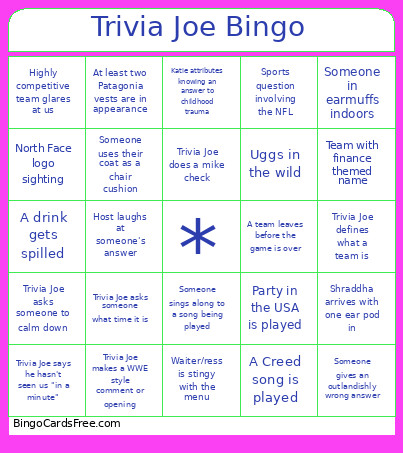 This Trivia Joe Bingo Cards Game contains following Words or Phrases: A song by the O'Jays is the answer for a question, Host repeats the question 3+ times, Team writes something ridiculous "just in case", Katie attributes knowing an answer to childhood trauma, Trivia Joe makes a WWE style comment or opening, We have to ask for a menu back, A team leaves before the game is over, A Miley Cyrus song gets played, There's a table where only espresso martinis get ordered, Someone references a random documentary, Someone's coat takes up an entire chair, Scarf so big it doubles as a blanket, Trivia Joe plays 90s music, Trivia Joe refers to himself as Trivia Joe, Someone says "I only know this because of TikTok", The music round includes a song everyone knows but no one can name, Uggs in the wild, Someone asks "what decade is this from?", Someone claps when Trivia Joe announces the winner, A question everyone gets wrong and Trivia Joe reads out the batshit answers, Someone arrives with fogged-up glasses, Movie Quote question or round makes an appearance, Someone celebrates way too hard over a single point, North Face logo sighting, Someone peels off three layers at the table, Laura shows up late or has to leave early, Trivia Joe asks someone what time it is, Tie with another team for a round, At least two Patagonia vests are in appearance, Music round features esoteric music from Shraddha or Katie's playlists, Someone is still working on their laptop, Host laughs at someone's answer, Someone sings along to a song being played, Canada Goose jacket makes an appearance, One person panics and fills in something random, Someone gives an outlandishly wrong answer, Faux fur–trim hood sighting, A pun based question, Shraddha arrives with one ear pod in, People (Tourists?) who are baffled by a pub quiz appear, One person writes the answer without consulting anyone, Katy Perry song makes an appearance, Sports question involving the NFL, Gen Z team gets an answer right that we're clueless on, Our team answers a classic literature question which no one else gets, Someone says "I literally just read this", Party in the USA is played, Laura bails last minute, Trivia Joe uses self-deprecating humour, Trivia Joe says he hasn't seen us "in a minute", Someone tries to logic their way into a wrong answer, Highly competitive team glares at us, Someone says "I can picture it but I can't name it", Aly and Aj music makes an appearance, Someone with a matching hat-and-glove set, Waiter/ress is stingy with the menu, Someone's gloves fall on the floor mid-round, Trivia Joe defines what a team is, We change our answer at the last second to the correct one, Someone orders another round mid-question, Shloka knows a medical/science based question, Someone doodles instead of thinking, The corrected 1099s makes an appearance, Shloka finishes her meal before anyone arrives, Katie orders a beer and the team wins beers, Someone in earmuffs indoors, We miss a sports based question, Trivia Joe asks someone to calm down, Nomura Deez Nuts makes an appearance, Someone says "lock it in" like it's life or death, "Wait wait wait—change it back!!", Someone refuses to take off their coat indoors, Someone says "that should count" after getting it wrong, Logo recognition question or round, Team with finance themed name, Trivia Joe does a mike check, Someone orders the kitchen sink, Someone obviously cheating, Someone with a statement winter coat, A question about U.S. Presidents, An old many is trying to flirt with/get way too personal with the waitstaff, a tie-breaker question happens, Trivia Joe leans into our conversation at some point in the evening, Someone says "I'm pretty sure" right before disaster, Newbie doesn't know how to answer "what time is it?", A drink gets spilled, A Creed song is played, We get a question that "Cory would know the answer to", Branded gear from one of the Big4, Someone uses their coat as a chair cushion, Obvious group of consultants, A non-trivia patron in the trivia section asks to be moved after trivia begins.