Untitled Art Exhibition Bingo Cards - Print Free or Customize
Print free Untitled Art Exhibition bingo cards or adjust them,
limitless cards! Pick from 42,200+ templates or use the bingo card generator.
Add numbers, words, images, or mix them all.
Play using printable PDF, online bingo cards,
and the online bingo caller, or go hybrid.
About: This bingo card is all about having fun while exploring an art exhibition at GMBB and engaging with both artwork and the gallery community. Perfect for exhibition visitors, art lovers, or even team-building groups, it encourages participants to interact creatively online and offline, making the visit lively, memorable, and social media-friendly.
How To: To save a printable PDF, click the Print button.
You can adjust the card quantity and other
printing options on the Print tab.
Grid items and free space text can be edited on the Basic tab.
Appearance can be entirely personalized on the
relevant tabs, or you can easily find any setting
using the 🔍 tab.
How to play Untitled Art Exhibition Bingo Cards?
Paper Players: Print PDF bingo cards and manually write on the cards.
Paper Caller: Print PDF calling list & calling slips and manually select the slips.
Digital Players: Click on the Play button above, and then click on the 🎫 button.
Digital Caller: Click on the Play button above.
Mixed Mode: Pick any combination above.
For instance, caller can be either Paper or Digital.
And players can be Paper or Digital or a combo of both.
Step-By-Step:
Start by getting the Untitled Art Exhibition PDF by clicking on the "Print" button above.
Open the PDF and print a hard copy.
For random calling, you can print another copy of the call list, cut, fold and then pick them randomly at play time.
Cut the bingo cards at the cut lines if there are greater than 1 bingo cards per page.
Distribute one card per player. For marking, you can use crayons. Crayons are the cheapest.
Pick one person to be the caller. If you are playing in a small group, the caller may also play along with their own Bingo card.
The caller begins the play by randomly picking an item from the call list and announcing it to everyone.
The players check their cards to see if they have the called word. If they do, they dab that word.
The first player to complete a horizontal, vertical, or a diagonal line of crossed items yells "Bingo!" and wins the play.
The caller confirms that the items crossed off form a correct line according to the Bingo card and call list.
You can play for varied patterns or a full card blackout for an extended play.
This Untitled Art Exhibition Bingo Cards Game contains following Words or Phrases: Follow primaryexhibitions and gmbb.kl on Instagram, Share a photo of your favourite artwork and tag primaryexhibitions & gmbb.kl on Instagram, Write a message to an artist (-RM2), Follow 3 artists on Instagram (tip: look for their socials in the e-catalogue!), Tell a joke to a gallery attendant, Take 3 photos of artwork that feature fish and show it to a gallery attendant, Take a photo of an artwork that features grapes and show it to a gallery attendant, Leave GMBB a 5-star review on Google Maps, Go to Artrabbit and label Untitled as "seen", Leave a positive comment under any of primaryexhibitions' posts (related to Untitled), Like 5 posts from any of the artists in Untitled, Share the Untitled poster on your social media, Leave your phone with a gallery attendant and walk around the exhibition for 20 minutes without your phone, Take a photo with an artwork that matches your outfit, Find a shop in GMBB that doesn't sell what their name says (hint: the name is related to food!), Count how many lightbulbs there are on Level 5, Guess a gallery attendant's age (you get 3 guesses per attendant!), Find a painting in the exhibition that reminds you of punk rock, Take a picture next to the smallest artwork you can find, Win 'rock paper scissors' against a gallery attendant 3 times in a row, Count the number of artwork in GM5-25 to GM5-30, Name 3 other events that took place (or are taking place) in GMBB in May, Count how many escalators are in GMBB, Come up with an backronym for GMBB (eg, Great Minds Big Brains), Memorize the exhibition paragraph on the wall.

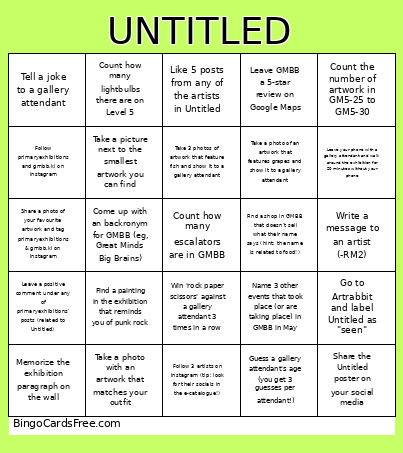 This Untitled Art Exhibition Bingo Cards Game contains following Words or Phrases: Follow primaryexhibitions and gmbb.kl on Instagram, Share a photo of your favourite artwork and tag primaryexhibitions & gmbb.kl on Instagram, Write a message to an artist (-RM2), Follow 3 artists on Instagram (tip: look for their socials in the e-catalogue!), Tell a joke to a gallery attendant, Take 3 photos of artwork that feature fish and show it to a gallery attendant, Take a photo of an artwork that features grapes and show it to a gallery attendant, Leave GMBB a 5-star review on Google Maps, Go to Artrabbit and label Untitled as "seen", Leave a positive comment under any of primaryexhibitions' posts (related to Untitled), Like 5 posts from any of the artists in Untitled, Share the Untitled poster on your social media, Leave your phone with a gallery attendant and walk around the exhibition for 20 minutes without your phone, Take a photo with an artwork that matches your outfit, Find a shop in GMBB that doesn't sell what their name says (hint: the name is related to food!), Count how many lightbulbs there are on Level 5, Guess a gallery attendant's age (you get 3 guesses per attendant!), Find a painting in the exhibition that reminds you of punk rock, Take a picture next to the smallest artwork you can find, Win 'rock paper scissors' against a gallery attendant 3 times in a row, Count the number of artwork in GM5-25 to GM5-30, Name 3 other events that took place (or are taking place) in GMBB in May, Count how many escalators are in GMBB, Come up with an backronym for GMBB (eg, Great Minds Big Brains), Memorize the exhibition paragraph on the wall.