UoM Science Icebreaker Bingo Cards - Print Free or Customize
Print free UoM Science Icebreaker bingo cards or alter them,
limitless cards! Choose from 40,600+ designs or use the bingo card generator.
Add numbers, phrases, pictures, or all of them.
Play using printable PDF, digital bingo cards,
and the digital bingo caller, or combine all formats.
About: This bingo card is perfect for an icebreaker session at a university or workplace gathering, especially with a science or academic crowd. It encourages conversations about hobbies, quirky talents, and diverse backgrounds, making it a fun way to connect people who may not know each other well. There's something here sure to spark a good laugh or a surprising story.
How To: To get a PDF to print, click the Print button.
You can alter the card quantity and other
print settings on the Print tab.
Grid items and free space text can be added on the Basic tab.
Appearance can be highly customized on the
corresponding tabs, or you can quickly search any preference
using the 🔍 tab.
How to play UoM Science Icebreaker Bingo Cards?
Virtual Caller: Click on the Play button above.
Virtual Players: Click on the Play button above, and then click on the 🎫 button.
Paper Players: Print PDF bingo cards and manually write on the cards.
Paper Caller: Print PDF calling list & calling slips and manually choose the slips.
Hybrid Play: Select any combination above.
For example, caller can be either Printed or Virtual.
And players can be Printed or Virtual or a mix of both.
Step-By-Step:
Start by downloading the UoM Science Icebreaker PDF by clicking on the "Print" button above.
Open the PDF and print it.
For random drawing, you can print another copy of the call list, cut, fold and then pull them randomly at play time.
Cut the bingo cards at the cut marks if there are greater than 1 bingo cards per page.
Distribute one card per player. For marking, you can use markers. Crayons are the cheapest.
Select one person to be the caller. If you are playing in a small group, the caller may as well play along with their own Bingo card.
The caller opens the play by randomly picking an item from the call list and calling out it to all players.
The players look at their cards to see if they have the announced word. If they do, they cross off that word.
The first player to finish a horizontal, vertical, or a diagonal line of crossed items yells "Bingo!" and wins the game.
The caller checks that the items crossed off form a correct line according to the Bingo card and call list.
You can play for varied patterns or a full card blackout for an extended game.
This UoM Science Icebreaker Bingo Cards Game contains following Words or Phrases: Has ≥ 3 pets __________, Has ≥ 2 siblings __________, Plays a musical instrument __________, Plays a team sport __________, Can make an origami crane __________, Owns Lego lab equipment __________, Grows their own fruit/veg __________, Has a name with same first letter as yours __________, Has visited Uluru __________, Has eaten haggis __________, Has seen a Star Wars original trilogy movie at a cinema __________, Has worked at UoM for 10+ years __________, Has worked at UoM for less than 1 year __________, Is wearing the same colour top as you __________, Was born outside Australia __________, Has appeared on TV __________, Went to the Australian Open this year __________, Knows the NATO phonetic alphabet __________, Has an iNaturalist account __________, Moved house in the last 12 months __________, Has done a building evacuation this year __________, Can do the Macarena (demonstration required) __________, Has had a full-time job unrelated to science __________, Can do a magic trick __________, Likes Workday __________.

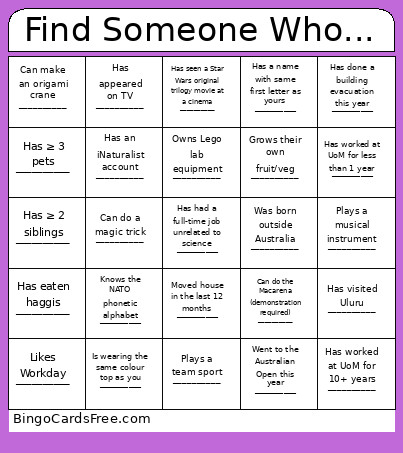 This UoM Science Icebreaker Bingo Cards Game contains following Words or Phrases: Has ≥ 3 pets __________, Has ≥ 2 siblings __________, Plays a musical instrument __________, Plays a team sport __________, Can make an origami crane __________, Owns Lego lab equipment __________, Grows their own fruit/veg __________, Has a name with same first letter as yours __________, Has visited Uluru __________, Has eaten haggis __________, Has seen a Star Wars original trilogy movie at a cinema __________, Has worked at UoM for 10+ years __________, Has worked at UoM for less than 1 year __________, Is wearing the same colour top as you __________, Was born outside Australia __________, Has appeared on TV __________, Went to the Australian Open this year __________, Knows the NATO phonetic alphabet __________, Has an iNaturalist account __________, Moved house in the last 12 months __________, Has done a building evacuation this year __________, Can do the Macarena (demonstration required) __________, Has had a full-time job unrelated to science __________, Can do a magic trick __________, Likes Workday __________.