Print free wedding bingo cards or alter them,
limitless cards! Select from 41,500+ designs or use the bingo card generator.
Add numbers, words, images, or mix them all.
Play using printed PDF, virtual bingo cards,
and the virtual bingo caller, or mix physical and digital.
About: This bingo card is perfect for a lively wedding celebration, encouraging guests to mingle, make memories, and capture sweet moments throughout the event. With prompts focused on photos, conversations, and connections, it's designed to break the ice and deepen bonds among friends and family of all ages—ideal for a joyful, interactive wedding crowd.
How To: To save a PDF to print, click the Print button.
You can change the number of cards and other
print settings on the Print tab.
Grid items and free space content can be changed on the Basic tab.
Appearance can be entirely customized on the
relevant tabs, or you can easily locate any setting
on the 🔍 tab.
How to play wedding Bingo Cards?
Digital Players: Click on the Play button above, and then click on the 🎫 button.
Digital Caller: Click on the Play button above.
Printed Players: Print PDF bingo cards and manually write on the cards.
Printed Caller: Print PDF calling list & calling slips and manually pick the slips.
Combo Mode: Pick any combination above.
For example, caller can be either Printed or Digital.
And players can be Printed or Digital or a combination of both.
Step-By-Step:
Start by downloading the wedding PDF by clicking on the "Print" button above.
Open the PDF and print a hard copy.
For random drawing, you can print another copy of the call list, cut, fold and then pull them randomly at play time.
Cut the bingo cards at the cut marks if there are more than 1 bingo cards per page.
Distribute one card per player. For marking, you can use pencils. Crayons cost the least.
Pick one person to be the caller. If you are playing in a small group, the caller may also play along with their own Bingo card.
The caller starts the play by randomly drawing an item from the call list and announcing it to all players.
The players check their cards to see if they have the called word. If they do, they dab that word.
The first player to complete a horizontal, vertical, or a diagonal line of crossed items yells "Bingo!" and wins the play.
The caller verifies that the items marked form a proper line according to the Bingo card and call list.
You can play for multiple patterns or a full card blackout for an extended play.
This wedding Bingo Cards Game contains following Words or Phrases: Took a photo with Priyanka's dad, Took a photo with Leo's dad, Took a photo with a new friend, Took a photo with some old friends, Group photo of your table, Cheered to the bride and groom, Took a photo of someone laughing, Took a photo of someone with happy tears, Experienced a sweet moment, Joined the dance floor!, Took a selfie, Took a photo of your favorite guest outfit of the night, Gave Priyanka or Leo's brother a high five, Found something in common with someone you met today, Met someone who traveled internationally for the wedding, Met someone who went to high school with the bride or groom, Learned the names of P&L's cats, Met someone with a hidden talent, Showed a picture of your pet/Saw a picture of someone's pet, Met a relative of the bride, Met a relative of the groom, Met a couple who has been married 20+ years, Complimented someone else's outfit, Met someone who doesn't drink coffee (aside from the bride), Met someone without social media (aside from the groom), Gave a high five to a kiddo, Met someone who grew up in the same state as you, Gave the bride or groom a hug, Gave an old friend a hug, Had a conversation with someone in a language other than English, Asked about someone's skin or hair routine, Congratulated Priyanka's mom on getting her PhD this year!, Congratulated a 4th year med student on becoming a doctor!, Talked about a book you recently read, Talked about a cool place you recently traveled to, Found something your entire table has in common, Got a photobooth picture with friends, Complimented Shreyah on her dance choreography.

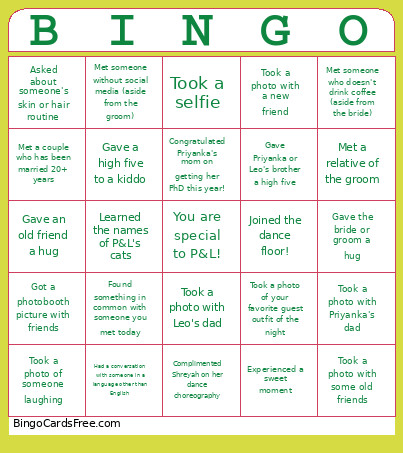 This wedding Bingo Cards Game contains following Words or Phrases: Took a photo with Priyanka's dad, Took a photo with Leo's dad, Took a photo with a new friend, Took a photo with some old friends, Group photo of your table, Cheered to the bride and groom, Took a photo of someone laughing, Took a photo of someone with happy tears, Experienced a sweet moment, Joined the dance floor!, Took a selfie, Took a photo of your favorite guest outfit of the night, Gave Priyanka or Leo's brother a high five, Found something in common with someone you met today, Met someone who traveled internationally for the wedding, Met someone who went to high school with the bride or groom, Learned the names of P&L's cats, Met someone with a hidden talent, Showed a picture of your pet/Saw a picture of someone's pet, Met a relative of the bride, Met a relative of the groom, Met a couple who has been married 20+ years, Complimented someone else's outfit, Met someone who doesn't drink coffee (aside from the bride), Met someone without social media (aside from the groom), Gave a high five to a kiddo, Met someone who grew up in the same state as you, Gave the bride or groom a hug, Gave an old friend a hug, Had a conversation with someone in a language other than English, Asked about someone's skin or hair routine, Congratulated Priyanka's mom on getting her PhD this year!, Congratulated a 4th year med student on becoming a doctor!, Talked about a book you recently read, Talked about a cool place you recently traveled to, Found something your entire table has in common, Got a photobooth picture with friends, Complimented Shreyah on her dance choreography.