
Wrestling BINGO Cards - Print Free or Customize
Print free Wrestling BINGO cards or alter them, limitless cards! Select from 37,300+ designs or use our bingo card generator. Add numbers, phrases, pictures, or all of them. Play using PDF prints, online bingo cards, and our online bingo caller, or mix physical and digital.
About: This bingo card is all about capturing the excitement and chaos of a major professional wrestling event. Loaded with classic moments, fan interactions, and legendary appearances, it's perfect for wrestling watch parties or fans tuning in to big pay-per-views. Get ready to check off those wild spots, surprise returns, and unforgettable crowd reactions as the action unfolds live!
How To: To get a PDF to print, click the Print button. You can alter the card count and other printing options on the Print tab. Grid items and free space text can be changed on the Basic tab. Appearance can be exactly personalized on the relevant tabs, or you can easily find any setting on the 🔍 tab.
How to play Wrestling BINGO Cards?
- Digital Caller: Click on the Play button above.
- Paper Caller: Print PDF calling list & calling slips and manually draw the slips.
- Paper Players: Print PDF bingo cards and manually scratch the cards.
- Digital Players: Click on the Play button above, and then click on the 🎫 button.
- Mixed Mode: Select any combination above. For example, caller can be either Paper or Digital. And players can be Paper or Digital or a combination of both.
Step-By-Step:
- Start by downloading the Wrestling BINGO PDF by clicking on the "Print" button above.
- Open the PDF and print it.
- For random calling, you can print another copy of the call list, cut, fold and then pull them randomly at play time.
- Cut the bingo cards at the cut marks if there are more than 1 bingo cards per page.
- Distribute one card per player. For marking, you can use pencils. Crayons cost the least.
- Select one person to be the caller. If you are playing in a small group, the caller can also play along with their own Bingo card.
- The caller starts the play by randomly drawing an item from the call list and saying it to all players.
- The players look at their cards to see if they have the called word. If they do, they cross off that word.
- The first player to finish a horizontal, vertical, or a diagonal line of marked items announces "Bingo!" and wins the game.
- The caller validates that the items marked form a proper line according to the Bingo card and call list.
- You can play for multiple patterns or a full card blackout for an extended game.
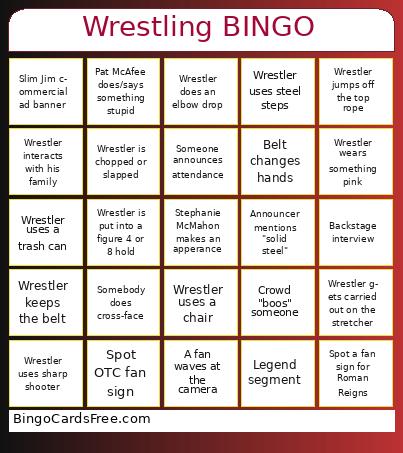 This Wrestling BINGO Cards Game contains following Words or Phrases: Someone uses a kendo stick, Announcer mentions "solid steel", Wrestler starts bleeding, Wrestler gets pyro entrance, Slim Jim commercial ad banner, Ref bump, Prime mascot appears, Spot a fan sign for The Rock, Spot a fan sign for CM Punk, Spot "YEET" fan sign, Spot a fan sign for John Cena, Spot a fan sign for Roman Reigns, Spot OTC fan sign, Spot a giant fan face cut-out, Spot a fan sign for Rhea Ripley, Spot a fan sign for Charlotte Flair, Spot a fan sign for Cody Rhodes, Spot a fan sign for Seth Rollins, Spot a fan sign for Drew McIntyre, Wrestler performs "suicide dive", Wrestler interacts with his family, Wrestler gets thrown onto the announcer's table, Wrestler goes through a table, Wrestler wears a cape/robe/long coat, Wrestler's gear has flames on it, Wrestler interacts with a fan, Wrestler uses steel steps, Wrestler fight moves into the crowd, Wrestler is chopped or slapped, Wrestler is put into a figure 4 or 8 hold, A fan holds up a championship belt, Wrestler does a spear, Wrestler bounces off the ropes, Wrestler run in / interference, Wrestler gets kicked out of the ring, Wrestler wears something pink, Wrestler wears a brace or a sleeve, Referee gets distracted, A fan waves at the camera, Wrestler hits the turnbuckle, Wrestler wears sunglasses, Fans sing along to the intro song, Wrestler uses a trash can, Wrestler jumps off the top rope, Crowd "boos" someone, Crowd chants together, Wrestler does a moonsault, Wrestler uses a ladder, Legend segment, Pat McAfee does/says something stupid, Someone announces attendance, Backstage interview, General manager restarts the match, Stephanie McMahon makes an apperance, The Rock makes an appearance, Wrestler gets carried out on the stretcher, Wrestler does frog splash, Belt changes hands, Wrestler keeps the belt, Wrestler taps out, Triple H makes an appearance, Wrestler does an elbow drop, The Rock cuts a promo, Wrestler uses a chair, Somebody does cross-face, Wrestler uses sharp shooter, Big return, Face turn, Heel turn, Double turn, Charity commercial, Fan does a hand gesture, Wrestler does a super kick.