XO Kitty Season 2 Watch Party Bingo Cards - Print Free or Customize
Print free XO Kitty Season 2 Watch Party bingo cards or modify,
limitless cards! Choose from 41,500+ templates or use the bingo card generator.
Add numbers, phrases, images, or mix them all.
Play using printed PDF, digital bingo cards,
and the digital bingo caller, or combine all formats.
About: This bingo card is perfect for fans of teen dramas and K-dramas, especially those who love wild plot twists, romantic entanglements, and over-the-top school shenanigans. With its mix of heartfelt moments, surprise cameos, and cultural references, it would be a hit for a watch party or fan event centered around "XO, Kitty" or similar shows.
How To: To get a printable PDF, click the Print button.
You can adjust the card quantity and other
printing preferences on the Print tab.
Grid items and free space text can be changed on the Basic tab.
Appearance can be completely personalized on the
corresponding tabs, or you can quickly find any preference
on the 🔍 tab.
How to play XO Kitty Season 2 Watch Party Bingo Cards?
Virtual Caller: Click on the Play button above.
Paper Players: Print PDF bingo cards and physically cross off the cards.
Virtual Players: Click on the Play button above, and then click on the 🎫 button.
Paper Caller: Print PDF calling list & calling slips and physically pick the slips.
Mixed Mode: Pick any combination above.
For example, caller can be either Offline or Virtual.
And players can be Offline or Virtual or a combination of both.
Step-By-Step:
Start by getting the XO Kitty Season 2 Watch Party PDF by clicking on the "Print" button above.
Open the PDF and print it.
For random calling, you can print another copy of the call list, cut, fold and then pick them randomly at play time.
Cut the bingo cards at the cut marks if there are greater than 1 bingo cards per page.
Give one card to each player. For marking, you can use markers. Crayons are the cheapest.
Pick one person to be the caller. If you are playing in a small group, the caller can as well play along with their own Bingo card.
The caller begins the play by randomly pulling an item from the call list and announcing it to everyone.
The players look at their cards to see if they have the called word. If they do, they cross off that word.
The first player to finish a horizontal, vertical, or a diagonal line of crossed items announces "Bingo!" and wins the game.
The caller verifies that the items crossed off form a proper line according to the Bingo card and call list.
You can play for multiple patterns or a full card blackout for a longer game.
This XO Kitty Season 2 Watch Party Bingo Cards Game contains following Words or Phrases: A character has a health scare, A sporting event against a rival school, Black pink on the soundtrack again, Class trip to Singapore or Tokyo, Dae and Kitty gets back together, Dae's dad becomes a janitor at KISS, Daniel Dae Kim or Ken Jeong appearance, Episode about Korea's sexism culture, Jenny Han cameo again, KISS gets shut down, Kitty crushes on a new female student, Kitty discovers a new family member, Kitty gets a job, Kitty gets kicked out of school but refuses to leave, Kitty making kimchi, Kitty messes something up so badly it threatens to shut down the school, Kitty's dad has been keeping a giant secret about their mom, Kitty's mom was also LGBT, Kpop idol appearance, LGBT scene set to a Chappell Roan song, Minho dates a stuck-up rich girl and realized that's how others see him, Minho's family loses their fortune, Montage scene where they get really drunk, set to APT, New asexual character, New Brazilian student who is really loud, NewJeans is on the soundtrack, Peter consoles Kitty about her gay awakening by revealing he also had a gay phase, Physical fight between Minho and Dae over Kitty, Q basically repeats his storyline with a new french guy, Reference to Olympics 2024, Scene that takes place on a luxury yacht, Someone proposes to Kitty, Squid game mentioned, The mean teacher gets married, The mean teacher is written off and replaced with an even meaner character, Unnecessary singing, Yuri says "I'm gay" to a new character, Yuri takes control of her family's company, Yuri's dad flees the country due to legal troubles, Yuri's family gets her girlfriend deported, Yuri's gf gets immediately written off.

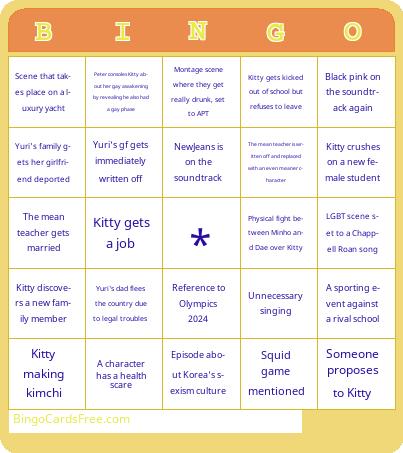 This XO Kitty Season 2 Watch Party Bingo Cards Game contains following Words or Phrases: A character has a health scare, A sporting event against a rival school, Black pink on the soundtrack again, Class trip to Singapore or Tokyo, Dae and Kitty gets back together, Dae's dad becomes a janitor at KISS, Daniel Dae Kim or Ken Jeong appearance, Episode about Korea's sexism culture, Jenny Han cameo again, KISS gets shut down, Kitty crushes on a new female student, Kitty discovers a new family member, Kitty gets a job, Kitty gets kicked out of school but refuses to leave, Kitty making kimchi, Kitty messes something up so badly it threatens to shut down the school, Kitty's dad has been keeping a giant secret about their mom, Kitty's mom was also LGBT, Kpop idol appearance, LGBT scene set to a Chappell Roan song, Minho dates a stuck-up rich girl and realized that's how others see him, Minho's family loses their fortune, Montage scene where they get really drunk, set to APT, New asexual character, New Brazilian student who is really loud, NewJeans is on the soundtrack, Peter consoles Kitty about her gay awakening by revealing he also had a gay phase, Physical fight between Minho and Dae over Kitty, Q basically repeats his storyline with a new french guy, Reference to Olympics 2024, Scene that takes place on a luxury yacht, Someone proposes to Kitty, Squid game mentioned, The mean teacher gets married, The mean teacher is written off and replaced with an even meaner character, Unnecessary singing, Yuri says "I'm gay" to a new character, Yuri takes control of her family's company, Yuri's dad flees the country due to legal troubles, Yuri's family gets her girlfriend deported, Yuri's gf gets immediately written off.