Print free Zoo Bird bingo cards or customize,
limitless cards! Choose from 41,500+ templates or use our bingo card generator.
Add numbers, words, photos, or any combination.
Play using PDF prints, digital bingo cards,
and our digital bingo caller, or mix physical and digital.
About: This bingo card is a vibrant celebration of colorful and unique bird species from around the world, perfect for birdwatchers, nature lovers, or anyone attending an ornithology-themed event. With its diverse mix of exotic names and striking feathered friends, it brings a sense of adventure and discovery to your next birding outing or educational gathering.
How To: To save a PDF to print, click the Print button.
You can adjust the card quantity and other
printing settings on the Print tab.
Grid items and free space content can be added on the Basic tab.
Appearance can be totally personalized on the
relevant tabs, or you can easily search any setting
on the 🔍 tab.
How to play Zoo Bird Bingo Cards?
Paper Caller: Print PDF calling list & calling slips and manually pick the slips.
Virtual Caller: Click on the Play button above.
Virtual Players: Click on the Play button above, and then click on the 🎫 button.
Paper Players: Print PDF bingo cards and manually cross off the cards.
Hybrid Mode: Select any combination above.
For example, caller can be either Paper or Virtual.
And players can be Paper or Virtual or a combination of both.
Step-By-Step:
Start by downloading the Zoo Bird Bingo PDF by clicking on the "Print" button above.
Open the PDF and print it.
For random drawing, you can print another copy of the call list, cut, fold and then pull them randomly at play time.
Cut the bingo cards at the cut marks if there are greater than 1 bingo cards per page.
Give one card to each player. For marking, you can use pencils. Crayons cost the least.
Select one person to be the caller. If you are playing in a small group, the caller can as well play along with their own Bingo card.
The caller starts the game by randomly picking an item from the call list and announcing it to everyone.
The players check their cards to see if they have the called word. If they do, they cross off that word.
The first player to finish a horizontal, vertical, or a diagonal line of crossed items yells "Bingo!" and wins the play.
The caller validates that the items marked form a proper line as per the Bingo card and call list.
You can play for different patterns or a full card blackout for a longer play.

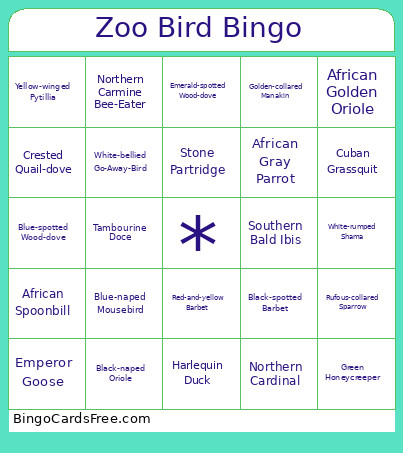 This Zoo Bird Bingo Cards Game contains following Words or Phrases: Bananaquit, Purple Honeycreeper, Blue-necked Tanager, Rufous-collared Sparrow, Cuban Grassquit, Screaming Piha, Crested Quail-dove, Spangled Cotinga, Golden-collared Manakin, Spotted Tanager, Green Honeycreeper, Swallow Tanager, Green-backed Trogon, Turquoise Tanager, Pompadour Cotinga, Violaceous Euphonia, Opal-rumped Tanager, Wattled Jacana, African Pygmy Goose, African Openbill Stork, African Olive-pigeon, Blue-bellied Roller, Taveta Golden Weaver, Bruce's Green-pigeon, Red-and-yellow Barbet, Black-headed Weaver, Malagasy Pond Heron, Adamawa turtle-dove, African Gray Parrot, Northern Red Bishop, African Spoonbill, Tambourine Doce, White-crowned Robin-chat, Southern Bald Ibis, Senegal Laughing Dove, Superb Starling, White-headed Lapwing, Blue-headed Wood-dove, Violet-backed Starling, Black Crake, Blue-spotted Wood-dove, White-vented Bulbul, Allen's Gallinule, Crested Coua, African Golden Oriole, Black-naped Oriole, Northern Cardinal, White-rumped Shama, Red-breasted Gooose, Emperor Goose, Bufflehead, Harlequin Duck, Falcated Duck, Black-spotted Barbet, Andean Cock-of-the-Rock, Blue-rumped Motmot, Yellow-rumped Cacique, Inca Tern, Crested Oropendola, Blue-headed Macaw, Toco Toucan, Keel-billed Toucan, Grey-winged Trumpeter, Blue-crowned Motmot, White-faced Whistling Duck, Sunbittern, Northern Carmine Bee-Eater, White Fronted Bee-Eater, Golden-breasted Bunting, Purple Grenadier, Golden-breasted Starling, Red-cheeked Cordon-bleu, Yellow-winged Pytillia, African Pygmy Goose, Yellow-manteled Widowbird, Snowy-crowned Robin-chat, Pin-tailed Whydah, Senegal Laughing Dove, Splendid Sunbird, Stone Partridge, Namaqua Dove, Common Waxbill, Yellow-crowned Bishop, African Silverbill, Blue-naped Mousebird, White-headed Buffalo-weaver, Red-billed Fire-finch, White-bellied Go-Away-Bird, Emerald-spotted Wood-dove, Magpie Mannikin.