
Музыкальное бинго Bingo Cards - Print Free or Customize
Print free Музыкальное бинго bingo cards or adjust them, unlimited prints! Pick from 42,200+ designs or use our bingo card generator. Add numbers, phrases, pictures, or any combination. Play using printed PDF, digital bingo cards, and our digital bingo caller, or go hybrid.
How To: To download a printable PDF, click the Print button. You can adjust the number of cards and other printing options on the Print tab. Grid items and free space text can be changed on the Basic tab. Appearance can be completely customized on the corresponding tabs, or you can easily locate any option using the 🔍 tab.
How to play Музыкальное бинго Bingo Cards?
- Online Caller: Click on the Play button above.
- Printed Caller: Print PDF calling list & calling slips and physically select the slips.
- Printed Players: Print PDF bingo cards and physically cross off the cards.
- Online Players: Click on the Play button above, and then click on the 🎫 button.
- Combo Mode: Select any combination above. For example, caller can be either Offline or Online. And players can be Offline or Online or a combination of both.
Step-By-Step:
- Start by saving the Музыкальное бинго PDF by clicking on the "Print" button above.
- Open the PDF and print it.
- For random calling, you can print another copy of the call list, cut, fold and then draw them randomly at play time.
- Cut the bingo cards at the cut lines if there are greater than 1 bingo cards per page.
- Distribute one card per player. For marking, you can use pencils. Crayons are the cheapest.
- Select one person to be the caller. If you are playing in a small group, the caller may also play along with their own Bingo card.
- The caller initiates the play by randomly pulling an item from the call list and saying it to everyone.
- The players scan their cards to see if they have the announced word. If they do, they dab that word.
- The first player to complete a horizontal, vertical, or a diagonal line of crossed items yells "Bingo!" and wins the play.
- The caller checks that the items crossed off form a correct line as per the Bingo card and call list.
- You can play for different patterns or a full card blackout for an extended play.
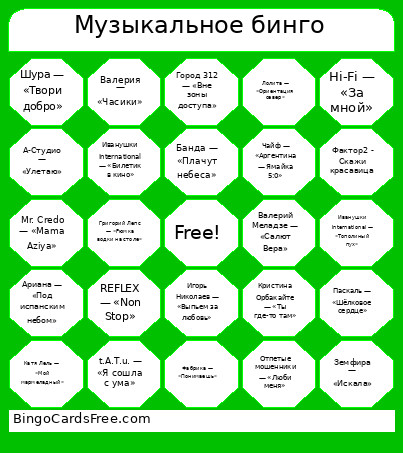 This Музыкальное бинго Bingo Cards Game contains following Words or Phrases: Bomfunk MC's — «Freestyler», Demo — «Солнышко», DJ Дождик — «Почему же», Hi-Fi — «За мной», Hi-Fi — «Седьмой лепесток», Limp Bizkit — «Behind Blue Eyes», Mr. Credo — «Mama Aziya», O-Zone — «Dragostea Din Tei», REFLEX — «Non Stop», REFLEX — «Люблю», Reflex — «Сойти с ума», Reflex — «Танцы», Revoльvers — «Ты у меня одна», SEREBRO — «Song #1», t.A.T.u. — «Нас не догонят», t.A.T.u. — «Я сошла с ума», t.A.T.u. — «Я твоя не первая», Uma2rman — «Проститься», Авраам Руссо — «Знаю», Акула — «Мало», Акула — «Такая любовь», Алсу — «Зимний сон», Андрей Губин — «Девушки как звёзды», Андрей Губин — «Танцы», Апина — «Лунные ночи», Ариана — «Под испанским небом», Ария — «Улица роз», А-Студио — «Улетаю», Банда — «Плачут небеса», Би-2 — «Полковнику никто не пишет», Блестящие — «А я всё летала», Блестящие — «Восточные сказки», Босиком по солнцу — «А по тёмным улицам гуляет дождь», Браво — «Московский бит», Бьянка — «Были танцы», Валерий Леонтьев — «Дельтаплан», Валерий Меладзе — «Салют Вера», Валерия — «Часики», ВИА Гра — «Попытка номер пять», Вирус — «Попрошу тебя», Вирус — «Ты меня не ищи», Витас — «Опера №2», Вячеслав Быков — «Любимая моя», Глюкоза — «Ой-ой», Глюкоза — «Швайне», Глюкоза — «Шмарофон», Город 312 — «Вне зоны доступа», Город 312 — «Фонари», Григорий Лепс — «Рюмка водки на столе», Демо — «Солнышко», Децл — «Мои слёзы, моя печаль», Децл — «Уличный боец», Дима Билан — «На берегу неба», Дима Маликов — «Звезда моя далёкая», Динамит — «Я не забуду», Дискотека Авария — «Disco Superstar», Дискотека Авария — «Если хочешь остаться», Дискотека Авария — «Опа!», Жасмин — «Долгие дни», Жуки — «Танкист», Звери — «Районы-кварталы», Земфира — «Искала», Земфира — «Ромашки», Иванушки International — «Билетик в кино», Иванушки International — «Об этом я буду кричать всю ночь», Иванушки International — «Тополиный пух», Иванушки International — «Кукла», Игорь Николаев — «Выпьем за любовь», Ирина Аллегрова — «Странник мой», Катя Лель — «Долетай», Катя Лель — «Мой мармеладный», Катя Лель — «Я по тебе скучаю», Корни — «25-й этаж», Краски — «Сегодня к маме я приехала домой», Краски — «Те, кто любит», Кристина Орбакайте — «Ты где-то там», Леонид Портной — «Кто тебя создал такую», Лера Массква — «7 этаж», Лолита — «Ориентация север», Любэ — «Главное, что есть ты у меня», Любэ — «Комбат», Маша и Медведи — «Любочка», Мурат Насыров — «Лунные ночи», Мурат Насыров — «Я это ты», Настя Задорожная — «Буду», Наташа Королёва — «Маленькая страна», Непара — «Они знакомы давно», Никита — «Однажды», Олег Газманов — «Эскадрон», Отпетые мошенники — «Девушки как звёзды», Отпетые мошенники — «Девушки, как звёзды», Отпетые мошенники — «Люби меня», Отпетые мошенники — «Невеста», Паскаль — «Шёлковое сердце», Пропаганда — «Белым мелом», Руки Вверх — «18 мне уже», Руки Вверх — «Маленькие девочки», Руки Вверх — «Не бойся, я с тобой», Руки Вверх — «Танцуй со мной», Света — «Твои глаза», Сергей Лазарев — «Даже если ты уйдёшь», Сливки — «Куда уходит детство», Согдиана — «Сердце-магнит», София Ротару — «Я назову планету именем твоим», Сплин — «Романс», Стрелки — «Солнце за горой», Танцы Минус — «Город», Технология — «Странные танцы», Фактор2 - Скажи красавица, Фабрика — «Зажигают огоньки», Фабрика — «Понимаешь», Фабрика — «Про любовь», Филипп Киркоров — «Полетели», Филипп Киркоров — «Я за тебя умру», Чайф — «Аргентина — Ямайка 5:0», Чи-Ли — «Лето», Чи-Ли — «Сердце», Шура — «Твори добро», Юлия Савичева — «Если в сердце живёт любовь», Юлия Савичева — «Прости за любовь».