
2025 Taxes Bingo Cards - Print Free or Customize
Print free 2025 Taxes bingo cards or adjust them, unlimited cards! Select from 41,500+ templates or use the bingo card generator. Add numbers, phrases, pictures, or mix them all. Play using printable PDF, virtual bingo cards, and the virtual bingo caller, or go hybrid.
About: This bingo card perfectly captures the highs, lows, and relatable quirks of life during tax season at an accounting firm. It’s a lighthearted, inside-joke-filled game that’s ideal for accountants, tax professionals, or anyone navigating client chaos and office routines during the busiest months of the year. Play it to add some fun and camaraderie to long workdays!
How To: To download a PDF to print, click the Print button. You can alter the card count and other print settings on the Print tab. Grid items and free space content can be changed on the Basic tab. Appearance can be fully personalized on the relevant tabs, or you can quickly locate any option using the 🔍 tab.
How to play 2025 Taxes Bingo Cards?
- Virtual Players: Click on the Play button above, and then click on the 🎫 button.
- Virtual Caller: Click on the Play button above.
- Printed Players: Print PDF bingo cards and manually write on the cards.
- Printed Caller: Print PDF calling list & calling slips and manually select the slips.
- Combo Mode: Choose any combination above. For instance, caller can be either Offline or Virtual. And players can be Offline or Virtual or a mix of both.
Step-By-Step:
- Start by downloading the 2025 Taxes PDF by clicking on the "Print" button above.
- Open the PDF and print a hard copy.
- For random calling, you can print another copy of the call list, cut, fold and then pick them randomly at play time.
- Cut the bingo cards at the cut marks if there are greater than 1 bingo cards per page.
- Give one card to each player. For marking, you can use pens. Crayons cost the least.
- Choose one person to be the caller. If you are playing in a small group, the caller may also play along with their own Bingo card.
- The caller starts the game by randomly picking an item from the call list and saying it to all players.
- The players look at their cards to see if they have the announced word. If they do, they mark that word.
- The first player to complete a horizontal, vertical, or a diagonal line of marked items announces "Bingo!" and wins the game.
- The caller validates that the items crossed off form a correct line as per the Bingo card and call list.
- You can play for different patterns or a full card blackout for a longer game.
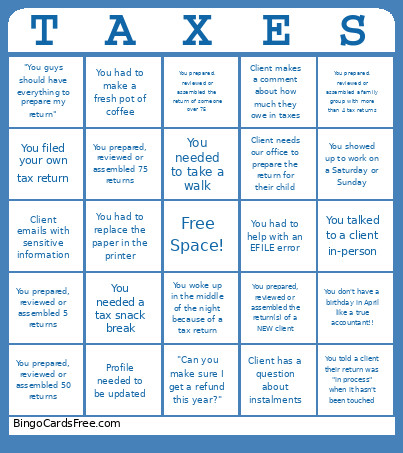 This 2025 Taxes Bingo Cards Game contains following Words or Phrases: Client sends a photo of a document that is illegible or way too large, Client believes their return is simple, Client lets you know they are having issues with the portal, "I need this return done quickly/by this date so I can ______", Client has a question about instalments, Client provides a receipt for or mentions a safety deposit box, You're put on hold with CRA for longer than 15 minutes, You had to contact CRA, You filed your own tax return, You handled receipts in a "shoebox", Client makes a comment about their invoice, You showed up to work on a Saturday or Sunday, You had a dream (or nightmare) about a tax return, Client emails with sensitive information, Client tells you about their politics, Client tells you about a conspiracy theory, You told a client their return was "in process" when it hasn't been touched, Client needs our office to prepare the return for their child, "Can you make sure I get a refund this year?", You had to replace the paper in the printer, You had to make a fresh pot of coffee, Profile needed to be updated, Client's address has changed, Client tells you they are going on vacation in April, "Why do I owe so much this year?", Portal client tells you they are not on the portal, You work late enough to see the cleaning staff, You had to help with an EFILE error, You prepared, reviewed or assembled a "Paper" return, Client asks you what is needed to prepare their return, "You guys should have everything to prepare my return", You don't have a birthday in April like a true accountant!!, Client tries to claim a weird or ineligible expense, Client has a refund of over $5,000, Client has to pay over $5,000, Client makes a comment about how much they owe in taxes, You were the first one in the office on Saturday morning, You prepared, reviewed or assembled the return(s) of a NEW client, You prepared, reviewed or assembled 5 returns, You prepared, reviewed or assembled 25 returns, You prepared, reviewed or assembled 50 returns, You prepared, reviewed or assembled 75 returns, You prepared, reviewed or assembled 100 returns, You prepared, reviewed or assembled the return of someone over 75, You prepared, reviewed or assembled a family group with more than 4 tax returns, You prepared, reviewed or assembled a terminal return, You woke up in the middle of the night because of a tax return, You were on the phone with a client for longer than 15 minutes, You talked to a client in-person, You talked to a client on the phone, You talked to a client over email, You had to use a calculator to do simple math, You needed a tax snack break, You needed more than 3 tax snack breaks in a single day, You needed to take a walk.