Print free 2026 Book bingo cards or personalize,
limitless prints! Pick from 41,500+ templates or use the bingo card generator.
Add numbers, words, photos, or any combination.
Play using printed PDF, virtual bingo cards,
and the virtual bingo caller, or combine all formats.
About: This bingo card is perfect for book lovers looking to shake up their reading habits. With fun prompts ranging from cover art to author backgrounds and genres, it encourages readers to explore new stories and perspectives. Ideal for reading challenges, book clubs, or library events, it’s a great way to add excitement and variety to any reading journey.
How To: To save a PDF to print, click the Print button.
You can adjust the number of cards and other
print options on the Print tab.
Grid items and free space text can be added on the Basic tab.
Appearance can be exactly personalized on the
corresponding tabs, or you can quickly locate any preference
on the 🔍 tab.
How to play 2026 Book Bingo Cards?
Virtual Players: Click on the Play button above, and then click on the 🎫 button.
Virtual Caller: Click on the Play button above.
Printed Caller: Print PDF calling list & calling slips and manually choose the slips.
Printed Players: Print PDF bingo cards and manually mark the cards.
Combo Play: Select any combination above.
For example, caller can be either Printed or Virtual.
And players can be Printed or Virtual or a combination of both.
Step-By-Step:
Start by saving the 2026 Book Bingo PDF by clicking on the "Print" button above.
Open the PDF and print it.
For random drawing, you can print another copy of the call list, cut, fold and then draw them randomly at play time.
Cut the bingo cards at the cut lines if there are more than 1 bingo cards per page.
Distribute one card per player. For marking, you can use pencils. Crayons cost the least.
Select one person to be the caller. If you are playing in a small group, the caller may also play along with their own Bingo card.
The caller begins the play by randomly pulling an item from the call list and announcing it to everyone.
The players look at their cards to see if they have the announced word. If they do, they mark that word.
The first player to finish a horizontal, vertical, or a diagonal line of marked items yells "Bingo!" and wins the play.
The caller validates that the items crossed off form a correct line according to the Bingo card and call list.
You can play for different patterns or a full card blackout for a longer play.
This 2026 Book Bingo Cards Game contains following Words or Phrases: A book that takes place at a school, A book about books, A book with food on the cover, A book with a diverse main character, A book with a dragon, A 5 star book, A standalone, A book with a long title, A book with a number in the title, A book with a flower on the cover, A prequel, A book you judged by the cover, A book with a one word title, A book with a color in the title, A banned book, A published fanfiction, A book with 2 POVs, A retelling, A celebrity book club pick, A book that takes place on a different continent, A novella, A book from a library display, A book written by a female author, A book with a nonhuman main character, A comedy, An audiobook, A reread, A Goodreads Award winner from a previous year, A book that was adapted, A nonfiction book, A biography or memoir, A graphic novel, A historical fiction, A book that has been on your TBR for ages, A classic, A book recommended on social media, A book with 500+ pages, A children's book, A romance, A fantasy, A mystery, A book with a purple cover, A holiday book, A YA book, A book by an author you haven't read, A book written by a diverse author, A debut novel, A cozy book, The first book in a series.

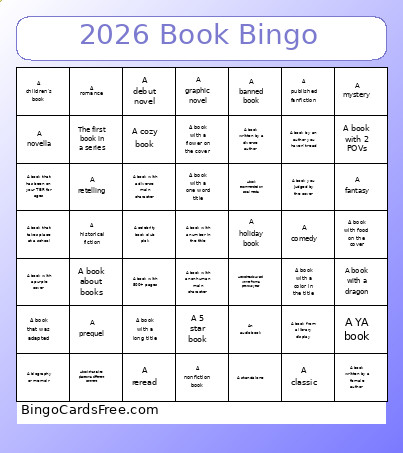 This 2026 Book Bingo Cards Game contains following Words or Phrases: A book that takes place at a school, A book about books, A book with food on the cover, A book with a diverse main character, A book with a dragon, A 5 star book, A standalone, A book with a long title, A book with a number in the title, A book with a flower on the cover, A prequel, A book you judged by the cover, A book with a one word title, A book with a color in the title, A banned book, A published fanfiction, A book with 2 POVs, A retelling, A celebrity book club pick, A book that takes place on a different continent, A novella, A book from a library display, A book written by a female author, A book with a nonhuman main character, A comedy, An audiobook, A reread, A Goodreads Award winner from a previous year, A book that was adapted, A nonfiction book, A biography or memoir, A graphic novel, A historical fiction, A book that has been on your TBR for ages, A classic, A book recommended on social media, A book with 500+ pages, A children's book, A romance, A fantasy, A mystery, A book with a purple cover, A holiday book, A YA book, A book by an author you haven't read, A book written by a diverse author, A debut novel, A cozy book, The first book in a series.