
2026 Winter Olympic Bingo Cards - Print Free or Customize
Print free 2026 Winter Olympic bingo cards or modify, limitless prints! Select from 41,500+ templates or use the bingo card generator. Add numbers, phrases, pictures, or mix them all. Play using printable PDF, digital bingo cards, and the digital bingo caller, or go hybrid.
About: Dive into the excitement of the Winter Olympics opening ceremony with this spirited bingo card, perfect for sports fans and party-watchers alike. From iconic Italian landmarks to memorable athlete moments and those classic broadcast quirks, it's designed to make every part of the spectacle even more fun for your group or viewing party. Let the games begin!
How To: To download a PDF to print, click the Print button. You can modify the number of cards and other printing settings on the Print tab. Grid items and free space content can be edited on the Basic tab. Appearance can be exactly personalized on the relevant tabs, or you can quickly search any preference using the 🔍 tab.
How to play 2026 Winter Olympic Bingo Cards?
- Digital Players: Click on the Play button above, and then click on the 🎫 button.
- Digital Caller: Click on the Play button above.
- Printed Caller: Print PDF calling list & calling slips and physically choose the slips.
- Printed Players: Print PDF bingo cards and physically write on the cards.
- Combo Play: Select any combination above. For example, caller can be either Offline or Digital. And players can be Offline or Digital or a mix of both.
Step-By-Step:
- Start by getting the 2026 Winter Olympic Bingo PDF by clicking on the "Print" button above.
- Open the PDF and print a hard copy.
- For random calling, you can print another copy of the call list, cut, fold and then pick them randomly at play time.
- Cut the bingo cards at the cut lines if there are greater than 1 bingo cards per page.
- Give one card to each player. For marking, you can use markers. Crayons cost the least.
- Select one person to be the caller. If you are playing in a small group, the caller may as well play along with their own Bingo card.
- The caller begins the game by randomly picking an item from the call list and announcing it to all players.
- The players look at their cards to see if they have the called word. If they do, they cross off that word.
- The first player to finish a horizontal, vertical, or a diagonal line of crossed items announces "Bingo!" and wins the play.
- The caller confirms that the items crossed off form a correct line as per the Bingo card and call list.
- You can play for different patterns or a full card blackout for a longer play.
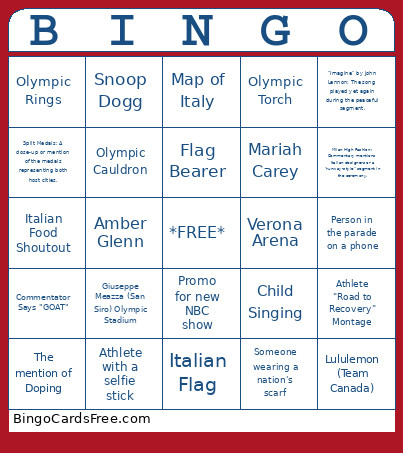 This 2026 Winter Olympic Bingo Cards Game contains following Words or Phrases: "26" Symbol: Seeing the emblem that looks like it was traced in snow., "Harmony" Theme: Mention of the official theme during the broadcast., "Imagine" by John Lennon: The song played yet again during the peaceful segment., "IT's Your Vibe": A reference to the official motto of the games., A shirtless athlete, Amber Glenn, Andrea Bocelli, Announcers mention how cold it is, Artificial Snow Talk, Athlete "Road to Recovery" Montage, Athlete carrying a mini flag, Athlete with a selfie stick, Celebrity in attendance, Child Singing, Chloe Kim, Coca-Cola sponsor or commercial, Commentator Says "GOAT", Cortina d'Ampezzo's Piazza Dibona, Dolomite Mountain Backdrop, Duomo di Milano - Milan Cathedral, Erin Jackson, Fireworks, Flag Bearer, Giuseppe Meazza (San Siro) Olympic Stadium, Ilia Malinin - The "Quad God", IOC President, Italian Flag, Italian Food Shoutout, Laura Pausini - Grammy-winning Italian singer., Lindsey Vonn, Lululemon (Team Canada), Map of Italy, Mariah Carey, Maxim Naumov, Medals Podium, Mikaela Shiffrin, Milan - Landmark, Milan High Fashion: Commentary mentions Italian designers or a "runway-style" segment in the ceremony., Milan's Arco della Pace, NHL Star - Return to Olympic play, Olympic Cauldron, Olympic Mascot - Tina and Milo, Olympic Rings, Olympic Torch, Opera Performance: A classic Italian tenor or soprano taking center stage., Person in the parade on a phone, Promo for new NBC show, Ralph Lauren (Team USA), Snoop Dogg, Someone crying in the crowd, Someone wearing a nation's scarf, Split Medals: A close-up or mention of the medals representing both host cities., Symbolic Release of Doves, Synchronized Dancing, The "Leonardo da Vinci" Reference, The "Oiled Up" Flag Bearer: A repeat of the Tongan flag bearer phenomenon., The Flo: The six small snowdrops that accompany the mascots, The mention of Doping, The mention of Ski Mountaineering (Skimo), Verona Arena, VISA Commercial, Visible Production Mistake / Technical Glitch.