
60s and 70s Hits Bingo Cards - Print Free or Customize
Print free 60s and 70s Hits bingo cards or adjust them, unlimited prints! Choose from 42,200+ templates or use the bingo card generator. Add numbers, phrases, images, or any combination. Play using printed PDF, virtual bingo cards, and the virtual bingo caller, or combine all formats.
About: This bingo card is a trip through the golden era of classic rock, pop, and soul, packed with legendary songs that defined generations. It’s perfect for music lovers at parties, trivia nights, or retro-themed events where nostalgia rules and everyone can sing along to their favorite hits. Expect big smiles and spontaneous singing!
How To: To download a PDF to print, click the Print button. You can adjust the card quantity and other print preferences on the Print tab. Grid items and free space text can be edited on the Basic tab. Appearance can be totally customized on the corresponding tabs, or you can easily find any setting using the 🔍 tab.
How to play 60s and 70s Hits Bingo Cards?
- Printed Caller: Print PDF calling list & calling slips and physically pick the slips.
- Online Caller: Click on the Play button above.
- Online Players: Click on the Play button above, and then click on the 🎫 button.
- Printed Players: Print PDF bingo cards and physically scratch the cards.
- Combo Play: Pick any combination above. For instance, caller can be either Printed or Online. And players can be Printed or Online or a mix of both.
Step-By-Step:
- Start by saving the 60s and 70s Hits PDF by clicking on the "Print" button above.
- Open the PDF and print it.
- For random drawing, you can print another copy of the call list, cut, fold and then pick them randomly at play time.
- Cut the bingo cards at the cut marks if there are greater than 1 bingo cards per page.
- Distribute one card per player. For marking, you can use pencils. Crayons are the cheapest.
- Pick one person to be the caller. If you are playing in a small group, the caller may also play along with their own Bingo card.
- The caller opens the game by randomly pulling an item from the call list and calling out it to everyone.
- The players scan their cards to see if they have the announced word. If they do, they mark that word.
- The first player to finish a horizontal, vertical, or a diagonal line of marked items yells "Bingo!" and wins the play.
- The caller verifies that the items marked form a correct line according to the Bingo card and call list.
- You can play for multiple patterns or a full card blackout for a longer play.
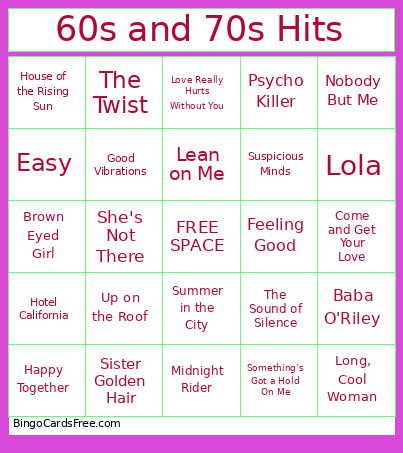 This 60s and 70s Hits Bingo Cards Game contains following Words or Phrases: Paint It, Black, Here Comes the Sun, Imagine, All Along the Watchtower, Stuck in the Middle With You, For What It's Worth, House of the Rising Sun, Bad Moon Rising, Oh Pretty Woman, Like a Rolling Stone, Carry On Wayward Son, Hotel California, Don't Fear the Reaper, Fortunate Son, Knockin' On Heaven's Door, Sweet Home Alabama, Somebody to Love, Take It Easy, Message in a Bottle, What A Wonderful World, Hey Joe, California Dreamin', Burning Love, Sultans of Swing, Stairway to Heaven, Ramble On, Mrs. Robinson, Stand By Me, The Wait, Hey Jude, Come Together, Mr. Tambourine Man, Paranoid, Easy, Love Me Do, Runaround Sue, Twist and Shout, Baba O'Riley, Love Hurts, I Saw Her Standing There, I Can't Get No Satisfaction, Son of a Preacher Man, My Generation, These Boots Are Made for Walking, Have You Ever Seen the Rain, More Than a Feeling, Layla, The Twist, Hit the Road, Jack, I'm a Believer, Heroes, Give a Little Bit, Time of the Season, Long, Cool Woman, Happy Together, Brown Eyed Girl, Little Wing, Free Bird, Sittin' on the Dock of the Bay, Ain't No Mountain High Enough, Something Stupid, Roxanne, If You Leave Me Now, Nobody But Me, Louie, Louie, Riders on the Storm, Spirit in the Sky, Blackbird, Brown Sugar, American Pie, Walk on the Wild Side, Midnight Rider, Run Through the Jungle, My Girl, Sugar Pie, Honey Bunch, She's Not There, Cupid, Go Your Own Way, Light My Fire, The Joker, Just What I Needed, Good Vibrations, Sugar, Sugar, Dancing in the Moonlight, Who Are You, Take Me Home, Country Roads, Come and Get Your Love, Sunshine of Your Love, Hang On, Sloopy, Let's Stay Together, In the Midnight Hour, Piano Man, I Heard It Through the Grapevine, Summer in the City, Sister Golden Hair, The Sound of Silence, 54-46 Was My Number, December, 1963 (Oh, What A Night), Ain't No Sunshine, Dream On, Feeling Good, Something's Got a Hold On Me, A Horse with No Name, Stir It Up, Dreams, Sweet Soul Music, Sympathy for the Devil, I Can See Clearly Now, Landslide, My Best Friend's Girl, Up on the Roof, Killing Me Softly with His Song, Suspicious Minds, Leaving on a Jet Plane, Devil in Disguise, Lola, That's Life, The Lion Sleeps Tonight, Werewolves of London, Some Kind of Wonderful, The Chain, I Want You Back, Grandma's Hands, Psycho Killer, I Say a Little Prayer, Bring It On Home to Me, Across the Universe, Love Really Hurts Without You, My Sharona, Ain't Gonna Hurt Nobody, YMCA, Celebration, Lean on Me.